

Build an MCP Server in Python with MCPServer (SDK 2.x Guide)
Build an MCP server in Python with the official SDK 2.x: MCPServer, typed tools, ToolError, resources, prompts, progress, stdio and Streamable HTTP, plus tests.
Imagine a training institute in Indore adding a new help desk for batch enquiries. Before it opens, someone writes the desk's name on the board, lists exactly what the desk can do, notes what each service needs from a visitor ("batch code, please"), and decides which answers it may give without asking a supervisor.
None of that is the desk's actual work. It is the description that lets strangers use the desk correctly on day one.
An MCP server is that desk for AI apps. The Python SDK writes most of the description for you from code you already know how to write.
What is an MCP server in Python?
Map the desk to code. The name board is the server name. The list of services is your set of tools. What each service needs is the tool's input schema.
The answers it may give without a supervisor are tool annotations such as readOnlyHint. The leaflets on the counter are resources, and the standard letters the desk drafts on request are prompts.
An MCP server in Python is a program, usually built with the official mcp SDK, that registers Python functions as MCP tools, resources and prompts and serves them to MCP clients over stdio or Streamable HTTP.
This tutorial targets mcp 2.3.0 (released October 2026), which speaks MCP specification 2026-07-28 and still answers older clients that use the initialize handshake.
It needs Python 3.10 or newer, but the SDK's next release drops 3.10, so install Python 3.11 or later to stay current. If you are coming from SDK 1.x, the class was called FastMCP; the migration notes are near the end.
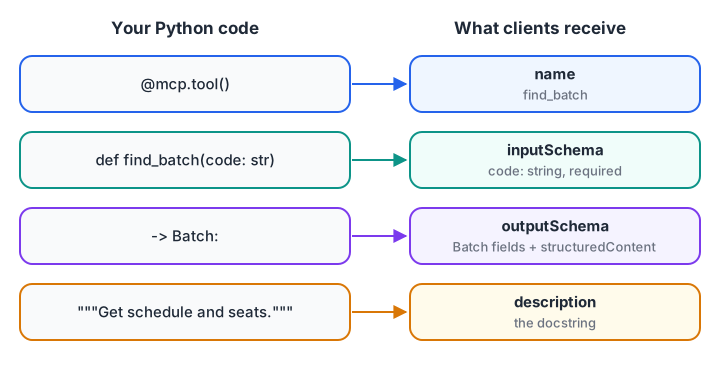
You write a normal function. The SDK derives the name, description and both schemas.
How to build an MCP server in Python step by step
Work through these six steps in order. Each one adds a piece to the same batch_server.py file.
Step 1: install the MCP Python SDK
Create a project folder and a virtual environment, then install the SDK with its command-line extra:
mkdir batch-desk && cd batch-desk
python -m venv .venv && source .venv/bin/activate      # Windows: .venv\Scripts\activate
pip install "mcp[cli]"                                   # or: uv add "mcp[cli]"
mcp version
The cli extra adds the mcp command with mcp dev (run your server inside the MCP Inspector), mcp run and mcp install. Python basics such as functions and dictionaries are all you need; the Python getting started guide covers setup if this is your first project.
Step 2: understand what the SDK does with your function
Before using the SDK, it helps to see the trick it performs. The simulation below builds a tool definition from a function's signature and docstring, which is roughly what @mcp.tool() does with Pydantic under the hood.
import inspect, json

PY_TO_JSON = {str: "string", int: "integer", float: "number", bool: "boolean"}
TOOLS = {}

def tool(fn):
    sig = inspect.signature(fn)
    props = {name: {"type": PY_TO_JSON[p.annotation]} for name, p in sig.parameters.items()}
    required = [name for name, p in sig.parameters.items() if p.default is inspect.Parameter.empty]
    TOOLS[fn.__name__] = {"fn": fn, "definition": {
        "name": fn.__name__,
        "description": inspect.getdoc(fn),
        "inputSchema": {"type": "object", "properties": props, "required": required}}}
    return fn

@tool
def fee_after_discount(fee: int, scholarship_pct: float = 0.0) -> int:
    """Course fee in rupees after a scholarship percentage is applied."""
    return round(fee * (1 - scholarship_pct / 100))

print(json.dumps(TOOLS["fee_after_discount"]["definition"], indent=2))
print("Call result:", TOOLS["fee_after_discount"]["fn"](45000, scholarship_pct=10))
Two lessons follow. Parameters without defaults become required, so defaults are part of your API. And the docstring is the description the model reads, so write it for the model.
Step 3: write your first MCP server with tools
Create batch_server.py. It exposes two tools for a training institute's batch desk.
# batch_server.py - tested with mcp 2.3.0 (MCP spec 2026-07-28)
from pydantic import BaseModel, Field
from mcp.server import MCPServer
from mcp.server.mcpserver import Context
from mcp.server.mcpserver.exceptions import ToolError
from mcp.types import ToolAnnotations

mcp = MCPServer("batch-desk", instructions="Look up training batches and manage the waitlist.")

BATCHES = {
    "GENAI-EVE": {"name": "Generative AI (evening)", "days": "Mon/Wed/Fri", "time": "18:00", "seats": 3},
    "DS-MOR": {"name": "Data Science (morning)", "days": "Tue/Thu/Sat", "time": "09:00", "seats": 0},
}
WAITLIST: dict[str, list[str]] = {code: [] for code in BATCHES}

class Batch(BaseModel):
    code: str
    name: str
    days: str
    time: str = Field(description="24-hour start time, IST")
    seats: int

@mcp.tool(annotations=ToolAnnotations(readOnlyHint=True, openWorldHint=False))
def find_batch(code: str) -> Batch:
    """Get schedule and free seats for one batch. Codes look like GENAI-EVE or DS-MOR."""
    if code.upper() not in BATCHES:
        raise ToolError(f"Unknown batch {code!r}. Valid codes: {', '.join(BATCHES)}")
    return Batch(code=code.upper(), **BATCHES[code.upper()])

@mcp.tool(annotations=ToolAnnotations(destructiveHint=False, idempotentHint=True, openWorldHint=False))
async def join_waitlist(code: str, student_email: str, ctx: Context) -> str:
    """Add a student to a full batch's waitlist. Returns their position."""
    batch = find_batch(code)
    if batch.seats > 0:
        raise ToolError(f"{batch.name} still has {batch.seats} seats; enrol directly instead.")
    await ctx.report_progress(0.5, 1.0, "Checking existing waitlist")
    queue = WAITLIST[batch.code]
    if student_email not in queue:
        queue.append(student_email)
    return f"{student_email} is number {queue.index(student_email) + 1} on the {batch.name} waitlist."
What each piece does:
MCPServer("batch-desk", instructions=...)names the server. The instructions appear inserver/discoverresults as guidance for the model.@mcp.tool()registers a function. Both plain andasyncfunctions work.- Returning
Batchmakes the SDK publish anoutputSchemaand returnstructuredContent, plus the same JSON as text for older clients. Astrreturn is wrapped as{"result": ...}. ToolAnnotationssets the hints hosts use for approval. Annotations you leave out fall back to the cautious defaults.ctx: Contextis injected by the SDK and hidden from the schema.report_progresssends progress notifications to clients that asked for them.
Step 3b: handle errors with ToolError
The SDK treats two kinds of failure differently, and getting this right matters for both usability and security.
class ToolError(Exception):
    """A failure you anticipated: the model should read the message."""

def run_tool(name, fn, **args):
    try:
        return {"isError": False, "content": [{"type": "text", "text": str(fn(**args))}]}
    except ToolError as exc:
        return {"isError": True, "content": [{"type": "text", "text": f"Error executing tool {name}: {exc}"}]}
    except Exception as exc:
        print(f"   [server log only] {type(exc).__name__}: {exc}")   # traceback stays on the server
        return {"isError": True, "content": [{"type": "text", "text": f"Error executing tool {name}"}]}

DB = {"GENAI-EVE": 3}
def seats(code):
    if code not in DB:
        raise ToolError(f"Unknown batch {code!r}. Valid codes: {', '.join(DB)}")
    return DB[code]

def report(code):
    conn_string = "postgres://admin:s3cret@10.0.0.4/fees"    # a bug leaks this into the message
    raise RuntimeError(f"could not connect to {conn_string}")

for name, fn, args in [("seats", seats, {"code": "GENAI-EVE"}), ("seats", seats, {"code": "ROBO"}),
                       ("report", report, {"code": "GENAI-EVE"})]:
    print(name, args, "->", run_tool(name, fn, **args)["content"][0]["text"])
The real SDK behaves like this simulation. A ToolError reaches the model with your message. An unexpected exception becomes a bare "Error executing tool report", so a connection string or stack trace never leaks into a model's context. Arguments that fail the input schema are reported as errors the model can read, too.
Step 4: add resources and prompts
Append a templated resource and a prompt to the same file:
@mcp.resource("batches://{code}/syllabus", mime_type="text/markdown")
def syllabus(code: str) -> str:
    """Week-by-week syllabus for a batch."""
    return f"# {BATCHES[code]['name']}\n- Week 1: Python refresher\n- Week 2: Core topics"

@mcp.prompt()
def welcome_message(student_name: str, code: str) -> str:
    """Draft a welcome message for a newly enrolled student."""
    b = BATCHES[code]
    return f"Write a short, friendly welcome note for {student_name} joining {b['name']} ({b['days']} at {b['time']})."

if __name__ == "__main__":
    mcp.run()                      # stdio; mcp.run("streamable-http") serves http://127.0.0.1:8000/mcp
The {code} placeholder makes this a resource template, listed by resources/templates/list. A URI with no placeholder, such as batches://rules, becomes a direct resource. A prompt returning a string is sent as a single user message. MCP tools, resources and prompts explains when to use each.
Step 5: run and inspect the server
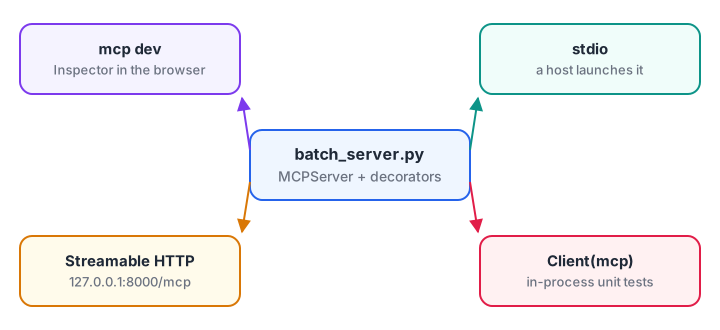
One server file, four ways to run it. Pick by who launches it.
Follow these steps in order:
- Inspect it.
mcp dev batch_server.pystarts the server inside the MCP Inspector, a browser UI where you can list tools and call them by hand. - Run it on stdio.
python batch_server.pywaits for messages on standard input. Hosts launch it this way, so you rarely run it by hand. - Run it over HTTP.
mcp run batch_server.py --transport streamable-httpserves it athttp://127.0.0.1:8000/mcp. It binds to localhost by default, which is the safe choice. - Connect a host. Many desktop hosts read a JSON config like the one below. Check your host's documentation for the exact file location.
{
  "mcpServers": {
    "batch-desk": {
      "command": "/full/path/to/batch-desk/.venv/bin/python",
      "args": ["/full/path/to/batch-desk/batch_server.py"]
    }
  }
}
Use absolute paths. A host does not start in your project folder or activate your virtual environment.
Step 6: test the server in-process
Client can connect directly to an MCPServer object, with no subprocess or network. That makes fast unit tests easy.
# test_batch_server.py - run with: python test_batch_server.py
import anyio
from mcp import Client
from batch_server import mcp

async def main():
    async with Client(mcp) as client:
        ok = await client.call_tool("find_batch", {"code": "genai-eve"})
        assert not ok.is_error and ok.structured_content["seats"] == 3

        bad = await client.call_tool("find_batch", {"code": "ROBO"})
        assert bad.is_error and "Valid codes" in bad.content[0].text

        wait = await client.call_tool("join_waitlist", {"code": "DS-MOR", "student_email": "asha@example.com"})
        print(wait.content[0].text)            # asha@example.com is number 1 on the ... waitlist.

        page = await client.read_resource("batches://DS-MOR/syllabus")
        print(page.contents[0].text.splitlines()[0])

anyio.run(main)
Result objects in SDK 2.x use snake_case attributes, such as is_error, structured_content and output_schema, even though the JSON on the wire uses camelCase. The MCP client tutorial builds on this Client to connect over stdio and HTTP and to drive a model.
Quick check
A tool raises ValueError with a database password in the message. What does the model see?
Only ToolError messages reach the model. Unexpected exceptions are logged on the server and hidden from clients.
Quick check
Why must a stdio server avoid print() to stdout?
Log to stderr instead; stdout is reserved for newline-delimited JSON-RPC.
Migrating from FastMCP (SDK 1.x) to MCPServer
If you follow an older guide, these are the changes you will hit first:
| SDK 1.x | SDK 2.x |
|---|---|
from mcp.server.fastmcp import FastMCP |
from mcp.server import MCPServer |
mcp = FastMCP("name") |
mcp = MCPServer("name") |
result.isError, result.structuredContent |
result.is_error, result.structured_content |
| Session-based protocol versions only | Speaks 2026-07-28 and falls back to initialize for older clients |
Importing mcp.server.fastmcp in 2.x raises an error that points to the migration guide. To keep old code running unchanged, pin mcp<2. The decorators themselves did not change much, so most servers migrate in minutes. See the Python SDK documentation for the full list.
Quick check
In mcp 2.x, how do you create a high-level server?
FastMCP was renamed to MCPServer in SDK 2.0. The old import raises an error with a migration link.
Common mistakes when building an MCP server in Python
- Missing docstrings. The model sees an empty description and guesses.
- Leaking secrets in exceptions. Raise
ToolErrorwith a safe message; let other errors stay generic. - Relative paths in host config. Hosts start processes from their own folder.
- Binding HTTP servers to 0.0.0.0 on a laptop. Keep the localhost default unless you add authorization.
- Copying
FastMCPcode into a 2.x project. Change the import, or pin the version you meant.
Key takeaways
MCPServerplus three decorators turns ordinary Python functions into tools, resources and prompts.- Type hints define the input schema; a Pydantic return type adds structured output.
- Use
ToolErrorfor messages the model should read; other exceptions stay private. - Develop with
mcp dev, deploy on stdio or Streamable HTTP, and unit test withClient(mcp). - SDK 2.x renamed
FastMCPtoMCPServerand uses snake_case attributes on results.
FAQ
Which Python version do I need for the MCP SDK?
The mcp package 2.3 accepts Python 3.10 or newer, and the SDK's main branch now requires 3.11, so choose Python 3.11 or later for a new server. Use a virtual environment per server so each server's dependencies stay separate. The host must launch the server with that environment's Python, which is why host configs should use absolute paths.
Is FastMCP still available?
In the official SDK 2.x, FastMCP was renamed to MCPServer, and importing the old module raises an error pointing to the migration guide. Code written for 1.x keeps working if you pin mcp<2. Most servers migrate by changing the import and the class name.
How do I test an MCP server without a host app?
Use mcp dev server.py to open the MCP Inspector and call tools by hand. For automated tests, pass the server object to Client(mcp) and call list_tools, call_tool and read_resource in-process, with no subprocess or network needed.
Can a Python MCP server run remotely?
Yes. Run it with the Streamable HTTP transport and put it behind HTTPS. A remote server should require OAuth-based authorization, validate token audience and keep its own credentials for downstream APIs. Locally, keep it bound to 127.0.0.1.
Can I learn to build MCP servers at a classroom in Indore?
Debugshala runs Generative AI classes at its Old Palasia campus in English and Hindi, and a free demo class lets you try one before paying. To brush up on Python functions first, attempt Python function quizzes on Debugshala Test.
From the team behind this site
Go further with the Generative AI Course at Debugshala
These tutorials are written by Debugshala, a training and placement institute at Old Palasia, Indore. The classroom course adds live mentoring, real projects and interview preparation.
- Offline classes at Old Palasia, Indore
- Free demo class before you pay
- Non-IT, fresher and year-gap friendly
- Placement assistance
700+ students placed · 200+ hiring partners · 4.9★ Google rating
