

MCP vs REST API: Differences, Examples and When to Use Each
MCP vs REST API compared on discovery, endpoints, errors, auth and caching, with a runnable Python wrapper that turns a REST API into MCP tools.
Think of the transport office in Indore. Behind the hall are a dozen counters: one for learner licences, one for address changes, one for fees. Each counter wants a particular form, filled in a particular order.
If you already know the system, you go straight to counter 7 with form 2. That is fast and precise, but only for people who studied the notice board first.
Now add a help desk at the entrance. You say "I moved house and need my licence updated". The helper hands you a short printed list of services with the fields each one needs, fills the right forms and walks them to the right counters.
The counters did not go away. The help desk sits in front of them and makes them usable by someone who never read the notice board.
What is the difference between MCP and a REST API?
Map the office to software. The counters are REST endpoints such as POST /licences/{id}/address. The notice board is the API documentation. The people who studied it are developers writing fixed integration code. The help desk is an MCP server. The visitor is the AI application, and the printed service list is the server's tools/list response.
A REST API exposes resources at many URLs that developers learn from documentation and call from fixed code, while MCP exposes a self-describing set of tools, resources and prompts through one JSON-RPC interface that AI applications discover and call at runtime; MCP servers usually wrap REST APIs rather than replace them.
This comparison uses MCP specification 2026-07-28. The MCP architecture article explains the transport details mentioned below.
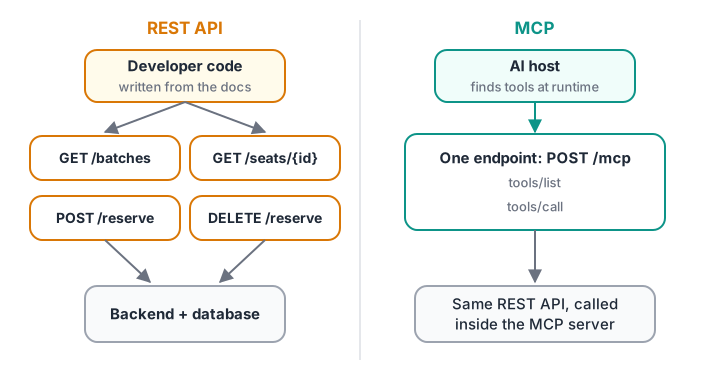
Same backend, two front doors. REST is designed for code someone wrote ahead of time; MCP is designed for apps that find tools at runtime.
MCP vs REST API: side-by-side comparison
| Aspect | REST API | MCP |
|---|---|---|
| Main consumer | Developer-written code | AI hosts and agents, through a model |
| Shape | Many URLs, HTTP verbs (GET, POST, DELETE) |
One endpoint, JSON-RPC methods (tools/call, resources/read) |
| Discovery | Docs or an OpenAPI file, read at build time | tools/list at runtime, with descriptions written for models |
| Descriptions | For human readers | For the model to choose tools and fill arguments |
| Transport | HTTP | stdio for local servers, Streamable HTTP for remote ones |
| State | Usually stateless | Stateless since 2026-07-28; handles passed as arguments |
| Errors | HTTP status codes | JSON-RPC errors, plus isError: true results the model can read |
| Auth | Anything: API keys, OAuth, cookies | OAuth 2.1 over HTTP with audience-bound tokens; environment credentials for stdio |
| Caching | Cache-Control, ETags |
ttlMs and cacheScope on list and read results |
| Versioning | /v1, /v2 in URLs or headers |
Dated protocol versions; tool contracts owned by the server |
Two rows deserve emphasis. Descriptions matter far more in MCP, because a model chooses tools by reading them. And errors split in two: a JSON-RPC error means the request was malformed, while isError: true means the tool ran and failed in a way the model should read and handle.
The same operation in REST and in MCP
Suppose a training institute has an internal API for batch seats. A developer calling it from a script writes:
curl -s https://api.example.edu/v1/batches/GENAI-EVE/seats \
  -H "Authorization: Bearer $INTERNAL_API_TOKEN"
An AI host calling the MCP server in front of that API sends one POST to the single MCP endpoint, with the method and tool name mirrored in headers for gateways:
POST /mcp HTTP/1.1
Content-Type: application/json
Accept: application/json, text/event-stream
MCP-Protocol-Version: 2026-07-28
Mcp-Method: tools/call
Mcp-Name: check_seats
Authorization: Bearer <token issued for this MCP server>

{"jsonrpc": "2.0", "id": 12, "method": "tools/call",
 "params": {"name": "check_seats", "arguments": {"batch": "GenAI evening"},
            "_meta": {"io.modelcontextprotocol/protocolVersion": "2026-07-28",
                      "io.modelcontextprotocol/clientCapabilities": {}}}}
Notice the arguments. The REST call needs the exact ID GENAI-EVE. The MCP tool accepts "GenAI evening", because the server can resolve friendly names. Models are good at language and bad at guessing internal IDs, so a good wrapper absorbs that gap.
How to wrap a REST API as an MCP server
Most real MCP servers are adapters. Each tool call becomes one or more REST calls, and HTTP failures become readable tool errors.
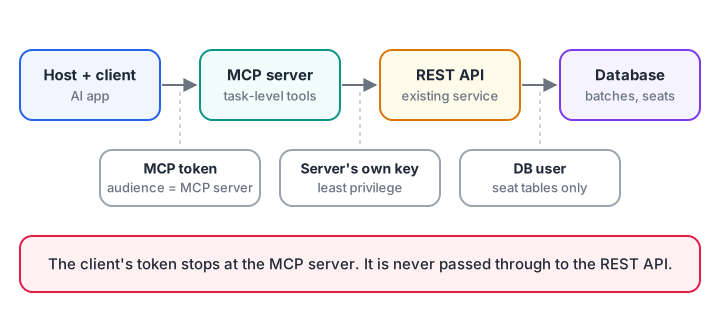
The MCP server keeps its own API credentials. The user's MCP token is never passed through to the REST API.
The simulation below fakes a REST API with a dictionary of routes, then wraps it with two MCP tools. Watch how a 404 and a 409 turn into messages the model can act on.
import json

BATCHES = {"GENAI-EVE": {"name": "GenAI evening", "seats": 3}, "DS-MOR": {"name": "Data Science morning", "seats": 0}}

def rest_api(method, path):                      # e.g. GET /v1/batches/GENAI-EVE/seats
    batch = BATCHES.get(path.split("/")[3])
    if batch is None:
        return 404, {"detail": "batch not found"}
    if method == "GET":
        return 200, {"seats": batch["seats"]}
    if batch["seats"] == 0:
        return 409, {"detail": "batch full"}
    batch["seats"] -= 1
    return 201, {"seats": batch["seats"]}

def resolve(friendly):                           # the wrapper maps language to internal IDs
    return next((k for k, v in BATCHES.items() if v["name"].lower() == friendly.lower()), "UNKNOWN")

def tools_call(name, args):
    method, action = ("GET", "seats") if name == "check_seats" else ("POST", "reserve")
    status, body = rest_api(method, f"/v1/batches/{resolve(args['batch'])}/{action}")
    if status >= 400:
        hint = {404: "Use one of: " + ", ".join(b["name"] for b in BATCHES.values()), 409: "Suggest another batch."}
        return {"isError": True, "content": [{"type": "text", "text": f"{body['detail']}. {hint[status]}"}]}
    return {"isError": False, "content": [{"type": "text", "text": json.dumps(body)}], "structuredContent": body}

for call in [("check_seats", {"batch": "GenAI evening"}), ("reserve_seat", {"batch": "Data Science morning"}),
             ("check_seats", {"batch": "Robotics weekend"}), ("reserve_seat", {"batch": "genai EVENING"})]:
    r = tools_call(*call)
    print(f"{call[0]:12} {call[1]['batch']!r:24} isError={r['isError']}  {r['content'][0]['text']}")
The model never sees status codes. It sees "batch full. Suggest another batch.", which it can turn into a helpful reply.
Task-level tools beat endpoint mirrors
A tempting shortcut is to auto-generate one MCP tool per REST endpoint from an OpenAPI file. For a large API that gives the model dozens of near-identical tools, and simple questions need several chained calls.
# Question: "How many seats are left in the GenAI evening batch?"
MODEL_TURN_MS, API_MS = 900, 80                 # rough, illustrative timings

plans = {
    "Endpoint-mirror tools": ["list_batches()  -> find the ID",
                              "get_batch(id='GENAI-EVE')  -> confirm it is active",
                              "get_batch_seats(id='GENAI-EVE')"],
    "Task-level tool": ["check_seats(batch='GenAI evening')  -> server makes all 3 REST calls"],
}
for label, steps in plans.items():
    model_turns = len(steps) + 1                # one turn per tool call, plus the final answer
    total = model_turns * MODEL_TURN_MS + 3 * API_MS
    print(f"{label}: {len(steps)} tool call(s), {model_turns} model turns, about {total} ms")
    for step in steps:
        print("   ", step)
The REST work is identical in both plans. The difference is model turns, and each one adds latency, tokens and another chance to pick the wrong tool. Design tools around what users ask for, and keep the REST chain inside the server. Avoiding tool overload goes deeper on this.
Quick check
Which statement about MCP and REST APIs is correct?
MCP is a layer for AI hosts. The REST API stays in place underneath.
Quick check
A REST call inside an MCP tool returns 409 (batch full). What should the tool return?
Execution failures go in isError results so the model can recover, for example by suggesting another batch.
When to use MCP and when to use a REST API
| Situation | Better choice |
|---|---|
| A mobile app or website calling your backend | REST (or GraphQL, gRPC) |
| A nightly job syncing two systems | REST |
| Letting AI assistants, IDEs or agents use your system | MCP server wrapping your API |
| One AI agent in your own codebase with three fixed functions | Plain function calling may be enough |
| Many AI hosts, or tools shared across teams | MCP |
The fourth row is worth understanding before you reach for MCP everywhere. MCP vs function calling covers that boundary.
Security differences that matter
A REST API often trusts any request with a valid key. An MCP server sits between a model, which can be manipulated, and your API, so it needs stricter habits.
- No token passthrough. The spec forbids an MCP server from accepting tokens not issued for it, and from forwarding the client's token to the REST API. Use the server's own credentials for downstream calls.
- Audience-bound tokens. MCP clients must request tokens with the
resourceparameter naming the MCP server, and servers must check the audience. - Least privilege. If the MCP tools only read seats and make reservations, give the server an API key that can do only that.
- Confirmation for writes. Mark write tools so the host asks the user before running them.
MCP security best practices works through each of these with code.
Common mistakes when comparing MCP and APIs
- "MCP replaces our API." It does not. Your apps keep using REST, and AI hosts reach the same backend through MCP.
- Mirroring every endpoint as a tool. Group endpoints into task-level tools.
- Leaking HTTP details to the model. Translate status codes into short, actionable messages.
- Forwarding the user's token downstream. Use separate credentials for the API.
- Writing descriptions for humans only. Say what the tool does, what inputs look like and what it returns.
Key takeaways
- REST serves code written in advance; MCP serves AI apps that discover tools at runtime.
- MCP uses one endpoint and JSON-RPC methods; REST uses many URLs and verbs.
- Most MCP servers wrap REST APIs, translating friendly inputs and HTTP errors for the model.
- Prefer a few task-level tools over one tool per endpoint.
- Keep MCP tokens and downstream API credentials separate.
FAQ
Is MCP just a REST API for AI?
Not quite. MCP is a JSON-RPC protocol with its own discovery methods, message shapes and error rules, running over stdio or HTTP. It is designed so models can read tool descriptions and schemas at runtime. Most MCP servers do call REST APIs underneath.
Can I convert my OpenAPI spec into an MCP server?
Yes, and tools exist that generate one, but treat the output as a first draft. Endpoint-per-tool servers overwhelm models with similar tools. Merge related endpoints into task-level tools, rewrite descriptions for a model, and check that write operations are clearly marked.
Does MCP work without HTTP?
Yes. The stdio transport runs the server as a local subprocess and exchanges newline-delimited JSON over standard input and output, with no network involved. It suits local tools such as file access. Remote servers use the Streamable HTTP transport.
Is MCP slower than calling a REST API directly?
The protocol overhead is small: one extra JSON-RPC hop through the MCP server. What makes AI workflows slow is the number of model turns, so well-designed task-level tools often make an MCP-based agent faster than one calling raw endpoints step by step.
Where can I learn API and MCP integration in Indore?
Debugshala's classroom Generative AI training in Indore runs at the Old Palasia campus in English and Hindi, with a free demo class before you pay. If you want to check your logic skills first, take a few reasoning and coding quizzes on Debugshala Test.
From the team behind this site
Go further with the Generative AI Course at Debugshala
These tutorials are written by Debugshala, a training and placement institute at Old Palasia, Indore. The classroom course adds live mentoring, real projects and interview preparation.
- Offline classes at Old Palasia, Indore
- Free demo class before you pay
- Non-IT, fresher and year-gap friendly
- Placement assistance
700+ students placed · 200+ hiring partners · 4.9★ Google rating
