

MCP Tool Overload: How to Keep AI Agents Accurate with Many Tools
Too many MCP tools hurt agent accuracy and cost. Measure the token load, then fix it with task-level tools, tool profiles and dynamic tool retrieval in Python.
Picture a new hire at a wholesale shop near Rajwada on his first day. The owner hands him the full supplier catalogue: four hundred pages, eleven kinds of "cotton dupatta", and three suppliers who all call their product "premium".
A customer asks for a red dupatta for a wedding, and the new hire flips pages for ten minutes and picks the wrong one.
The next week, the owner tries something different. He glances at the customer's request and hands over just the five pages that matter. The same new hire now answers in a minute and gets it right.
The new hire did not get smarter. His options got smaller.
What is tool overload in MCP agents?
Map the shop to an agent. The new hire is the language model. The catalogue is the full list of tool definitions from every connected MCP server. Similar product names are overlapping tools such as three different search tools. The owner choosing five pages is a host that selects relevant tools before each model call.
MCP tool overload is the drop in tool-selection accuracy, speed and cost-efficiency that occurs when an AI agent receives too many tool definitions at once, typically because a host passes every tool from every connected MCP server to the model on each turn.
This is the final article in the series. It builds on the multi-server host from build an MCP client, so read that first if the routing code is unfamiliar.
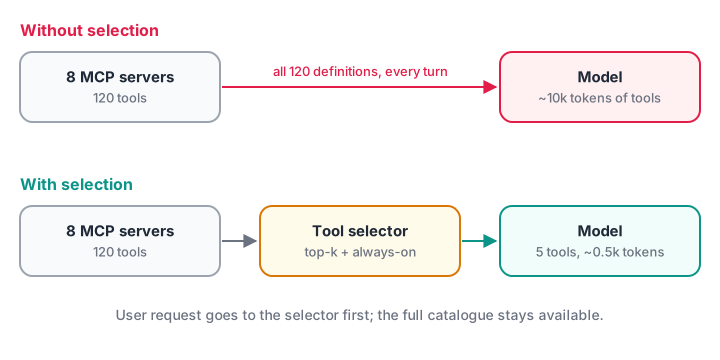
The model's job gets easier when the host does a cheap pre-selection step.
Why too many MCP tools hurt an agent
Three separate problems stack up as the tool count grows:
- Token cost and latency. Every tool's name, description and schema is sent with every request. Fifty detailed tools can add thousands of tokens per turn, before the user has said anything.
- Confusion between similar tools. A calendar server's
create_eventand a ticketing server'screate_ticketlook alike to a model in a hurry. The more near-duplicates, the more wrong calls. - Worse decisions overall. Long tool lists dilute the instructions and conversation that actually matter. Models may call tools that are not needed, or invent tool names that do not exist.
How many tools is too many depends on the model and on how distinct the tools are. Do not trust a fixed number. Measure with your own model and tasks.
Measure your tool budget first
Start by estimating how much context your tools consume. A rough rule for English text and JSON is about four characters per token. Use your model provider's tokenizer for exact numbers.
import json

def make_tool(i, server):
    return {"type": "function", "name": f"{server}__action_{i}",
            "description": f"Performs action {i} on the {server} system. Use when the user asks about {server} item {i}.",
            "parameters": {"type": "object",
                           "properties": {"id": {"type": "string", "description": "Record ID"},
                                          "limit": {"type": "integer", "description": "Max results, 1-50"}},
                           "required": ["id"]}}

servers = {"github": 26, "jira": 18, "calendar": 9, "drive": 14, "crm": 22, "billing": 11, "wiki": 8, "slackish": 12}
tools = [make_tool(i, s) for s, n in servers.items() for i in range(n)]

chars = len(json.dumps(tools))
tokens = chars // 4
print(f"{len(tools)} tools from {len(servers)} servers ~ {tokens:,} tokens per model call")
for turns in (5, 20):
    print(f"  a {turns}-turn agent run re-sends them: ~{tokens * turns:,} tokens")
print(f"Sending only 5 relevant tools: ~{tokens * 5 // len(tools):,} tokens per call")
Real tool definitions usually have longer descriptions and richer schemas than this toy, so real numbers are often higher. Prompt caching can cut the cost of a stable prefix, but it does not fix confusion between tools.
How to fix MCP tool overload
Apply these fixes roughly in order. The early ones cost nothing; the later ones add machinery.
Fix 1: design fewer, task-level tools
The cheapest tool is one you never send. When you control the server, design around user tasks, not API endpoints, as MCP vs REST API showed.
- Merge chains.
find_customerthenget_ordersthenget_invoicecan often be onecustomer_billing_summary(customer)tool. - Merge near-duplicates carefully.
search_open_ticketsandsearch_closed_ticketscan becomesearch_tickets(status=...)with anenum. Do not merge tools that differ in risk, such as reads and deletes. - Write distinct descriptions. Say when to use the tool and when not to: "Use for invoices. For refunds, use refund_status."
- Trim schemas. Remove rarely used optional parameters, or give them sensible defaults on the server.
Fix 2: give each agent a tool profile
Not every agent needs every server. A support agent needs tickets and the knowledge base, not the deployment server. Define profiles in the host and connect, or at least expose, only those servers.
| Agent profile | MCP servers exposed | Approx. tools |
|---|---|---|
| Support assistant | tickets, wiki, crm (read-only tools) | 18 |
| Developer helper | github, ci, docs | 24 |
| Finance reports | billing, crm, sheets | 15 |
Profiles also improve security, because an agent cannot misuse a tool it never sees. For very broad tasks, split the work across several specialised agents, each with its own profile, as described in multi-agent system patterns.
Fix 3: retrieve the relevant tools for each request
When an agent truly needs a large catalogue, select tools per request. Treat tool descriptions like documents in a search index, and send the model only the top few matches for the user's message. The example below uses TF-IDF from scikit-learn; production systems often use embeddings for better matching on paraphrases.
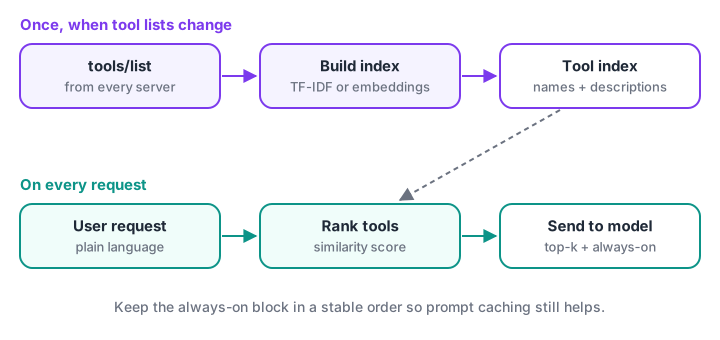
Index once when tool lists change; select on every request; always include a few core tools.
from sklearn.feature_extraction.text import TfidfVectorizer
from sklearn.metrics.pairwise import cosine_similarity

TOOLS = {
    "calendar__create_event": "Create a calendar meeting or event with date, time and attendees",
    "calendar__list_events": "List upcoming meetings and events on the calendar",
    "tickets__create_ticket": "Open a new support ticket for a customer problem",
    "tickets__search_tickets": "Search existing support tickets by keyword or status",
    "billing__invoice_summary": "Get invoice amounts and payment status for a customer",
    "billing__refund_status": "Check whether a refund was issued and when",
    "github__open_pull_requests": "List open pull requests in a code repository",
    "wiki__search_pages": "Search internal wiki and documentation pages",
}
names = list(TOOLS)
vectorizer = TfidfVectorizer(stop_words="english")
index = vectorizer.fit_transform(TOOLS.values())             # rebuild only when tool lists change

def select_tools(request, k=3, always=("wiki__search_pages",)):
    scores = cosine_similarity(vectorizer.transform([request]), index)[0]
    ranked = [names[i] for i in scores.argsort()[::-1] if scores[i] > 0][:k]
    return ranked + [t for t in always if t not in ranked]

for request in ["Has the refund for invoice 4471 been processed?",
                "Set up a meeting with the placement team on Friday",
                "Customer says the login page is broken, please log a ticket"]:
    print(f"{request[:48]:50} -> {select_tools(request)}")
Two design choices make this safer. Keep a small set of always-on tools (here a wiki search) so the model can still look things up if retrieval misses. And give the model a way out: if retrieval picks the wrong set, a find_more_tools(query) tool can load additional definitions on the next turn.
Fix 4: measure tool-selection accuracy
Every fix above is a guess until you measure it. Write a small set of realistic requests, label the correct tool for each, and check how often your selector includes it. That metric is recall at k: the fraction of requests where the right tool is in the top k.
from sklearn.feature_extraction.text import TfidfVectorizer
from sklearn.metrics.pairwise import cosine_similarity

TOOLS = {"billing__refund_status": "Check whether a refund was issued and when",
         "billing__invoice_summary": "Get invoice amounts and payment status for a customer",
         "tickets__create_ticket": "Open a new support ticket for a customer problem",
         "calendar__create_event": "Create a calendar meeting or event with date and attendees",
         "github__open_pull_requests": "List open pull requests in a code repository"}
SYNONYMS = {"billing__refund_status": " money back returned cancelled order",
            "billing__invoice_summary": " owe due outstanding balance client",
            "tickets__create_ticket": " report bug crash broken error",
            "calendar__create_event": " book call schedule appointment",
            "github__open_pull_requests": " PRs review code changes waiting"}
TESTS = [("Did my money come back for the cancelled order?", "billing__refund_status"),
         ("Book a call with Priya next Tuesday", "calendar__create_event"),
         ("Which PRs are waiting for review?", "github__open_pull_requests"),
         ("The app crashes on payment, report it", "tickets__create_ticket"),
         ("How much does client 22 owe us?", "billing__invoice_summary")]
def recall_at(k, descriptions):
    names, vec = list(descriptions), TfidfVectorizer(stop_words="english")
    index = vec.fit_transform(descriptions.values())
    hits = 0
    for request, correct in TESTS:
        scores = cosine_similarity(vec.transform([request]), index)[0]
        hits += correct in [names[i] for i in scores.argsort()[::-1][:k] if scores[i] > 0]
    return f"{hits}/{len(TESTS)}"

enriched = {name: desc + SYNONYMS[name] for name, desc in TOOLS.items()}
for k in (1, 3):
    print(f"recall@{k}: original {recall_at(k, TOOLS)}, with user-style words {recall_at(k, enriched)}")
The original descriptions use the server author's words, while users say "did my money come back" or "PRs". Adding the words users actually use lifts recall sharply. That is the point of measuring: it tells you whether to rewrite descriptions, switch to embeddings, or raise k.
Take those extra words from real user requests, and check them on a separate test set, or you will simply fit the five examples above. Evaluating AI agents covers building larger test sets.
Keep tool lists cache-friendly
The MCP spec says servers should return tools/list in a deterministic order. Hosts should keep that order too, and place tools before the conversation in the prompt. Model providers cache identical prompt prefixes, so a stable tool block is cheaper to send repeatedly.
Dynamic selection changes the tool block per request, which reduces cache hits. A common compromise is a stable block of always-on tools followed by the small per-request selection.
Quick check
Which change reduces tool overload without losing any capability?
Retrieval keeps the full catalogue available while showing the model only what fits the request.
Quick check
What does recall@3 measure for a tool selector?
It checks whether retrieval gives the model a chance to pick the right tool.
Common mistakes with large MCP toolsets
- Connecting every server to every agent. Start from profiles.
- Auto-generating one tool per API endpoint. Merge into task-level tools.
- Identical tool names across servers. Prefix with the server name.
- Retrieval with no fallback. Keep always-on tools and a way to load more.
- Never measuring. Track tool-selection accuracy whenever a server is added.
Key takeaways
- Every tool definition is re-sent each turn, so large toolsets cost tokens and accuracy.
- Measure the token budget and tool-selection accuracy before and after changes.
- Design fewer, task-level tools with distinct descriptions and lean schemas.
- Use per-agent profiles, and retrieve the top-k tools per request when catalogues are large.
- Keep the tool block in a stable order for prompt caching, with dynamic tools after it.
FAQ
How many tools can an LLM handle?
There is no fixed limit. It depends on the model and on how distinct the tools are. Many agents work well with ten to twenty clear tools, while dozens of similar tools cause wrong choices. Test your own model on realistic requests and measure selection accuracy as you add tools.
Does MCP have a limit on the number of tools?
No. The protocol supports pagination in tools/list, so a server can expose hundreds of tools. The limit is practical, not protocol-level: the model's context window and its ability to choose well. Hosts are responsible for deciding which tools to show the model.
What is dynamic tool loading?
Dynamic tool loading means the host picks which tool definitions to send for each request, instead of sending all of them. It usually ranks tools by similarity to the user's message and adds a few always-on tools. Some hosts also expose a tool-search tool so the model can request more.
Should I split one big MCP server into smaller ones?
Split when groups of tools serve different users, risks or credentials, such as read-only reporting versus admin actions. Smaller servers make profiles easy. Do not split purely to reduce tool counts, because the host still sees every tool unless it filters them.
Where can I build MCP agent projects in Indore?
Debugshala teaches a Generative AI programme with placement assistance at Old Palasia, in English and Hindi, and you can attend a free demo class first. To practise the Python and scikit-learn basics used in this article, test yourself with data and coding quizzes on Debugshala Test.
From the team behind this site
Go further with the Generative AI Course at Debugshala
These tutorials are written by Debugshala, a training and placement institute at Old Palasia, Indore. The classroom course adds live mentoring, real projects and interview preparation.
- Offline classes at Old Palasia, Indore
- Free demo class before you pay
- Non-IT, fresher and year-gap friendly
- Placement assistance
700+ students placed · 200+ hiring partners · 4.9★ Google rating
