

MCP Tools, Resources and Prompts: The Three Server Primitives
MCP tools, resources and prompts explained field by field: schemas, annotations, structured output, URI templates, prompt arguments, plus runnable Python demos.
Walk into a busy food street like Sarafa on a winter night. Each stall offers three different things. There is the counter, where you ask the cook to make something: one plate of garadu, extra spicy.
There is the board on the wall: today's prices, which items are vegetarian, what has sold out. And there are the combo deals that you, the customer, choose: "the student thali for two".
Who triggers each one is different. The waiter places orders at the counter. Anyone can read the board. Only you decide to order a combo.
The MCP introduction gave a one-line summary of each primitive. This article opens each one up, field by field, so you can design servers that models use well.
What are MCP tools, resources and prompts?
Map the stall to MCP. The counter orders are tools: actions with typed inputs, triggered by the model. The board is a set of resources: data identified by URI that the application reads and attaches as context. The combo deals are prompts: templates the user selects, which expand into messages for the model.
MCP tools, resources and prompts are the three server primitives of the Model Context Protocol: tools are model-controlled functions, resources are application-controlled data addressed by URI, and prompts are user-controlled message templates with arguments.
Everything here follows MCP specification 2026-07-28. Field names are the wire names you will see in JSON.
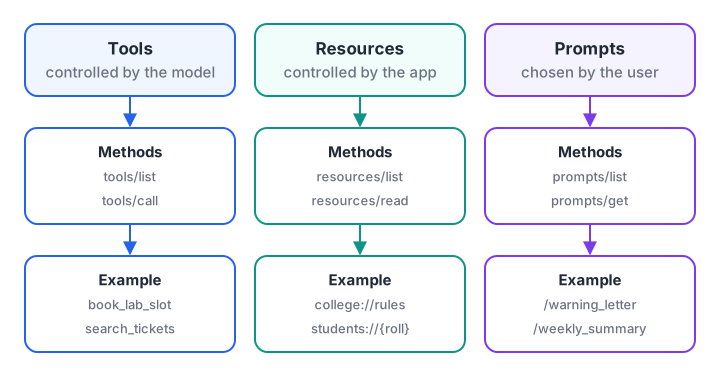
Each primitive has its own methods and its own controller. The controller is the party that decides when it is used.
Quick check
Who decides when an MCP prompt is used?
Prompts are user-controlled templates; tools are model-controlled and resources are application-controlled.
MCP tools: actions the model can call
A tool is a function that the server runs on request. The client finds tools with tools/list and runs one with tools/call.
The fields of a tool definition
| Field | Required | Purpose |
|---|---|---|
name |
Yes | Unique ID within the server, 1–128 characters from letters, digits, _, - and . |
title |
No | Human-friendly label for the UI |
description |
Yes, in practice | What the tool does, written for the model |
inputSchema |
Yes | JSON Schema (2020-12 by default) for the arguments |
outputSchema |
No | JSON Schema for structuredContent in the result |
annotations |
No | Behaviour hints for the host |
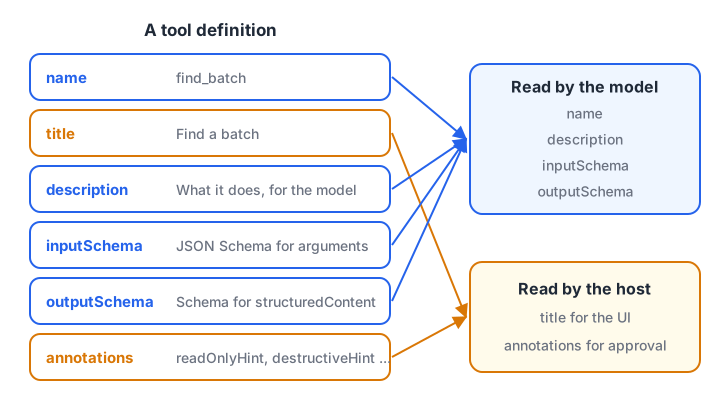
The description and schemas are read by the model. Annotations are read by the host's approval logic.
For a tool with no parameters, the spec recommends {"type": "object", "additionalProperties": false}, which accepts only an empty object.
Structured output and errors
A tool result carries content, a list of blocks such as text, images, audio or resource links. If the tool declares an outputSchema, the result must also carry structuredContent matching that schema, and clients should validate it. For older clients, the server should repeat the same JSON as a text block.
Errors come in two kinds. A protocol error (JSON-RPC error) means the request itself was wrong, such as an unknown tool. A tool execution error is a normal result with isError: true. Since 2025-11-25, bad arguments such as a date in the wrong format belong in the second kind, so the model can read the message and fix its call.
SCHEMA = {"type": "object", "required": ["batch", "seats_left", "full"],
          "properties": {"batch": {"type": "string"}, "seats_left": {"type": "integer"},
                         "full": {"type": "boolean"}}}
TYPES = {"string": str, "integer": int, "boolean": bool, "object": dict}

def validate(value, schema):
    if not isinstance(value, TYPES[schema["type"]]) or (schema["type"] == "integer" and isinstance(value, bool)):
        return [f"expected {schema['type']}, got {type(value).__name__}"]
    problems = [f"missing '{k}'" for k in schema.get("required", []) if k not in value]
    for key, sub in schema.get("properties", {}).items():
        if key in value:
            problems += [f"{key}: {p}" for p in validate(value[key], sub)]
    return problems

results = {
    "good": {"structuredContent": {"batch": "GenAI-Evening", "seats_left": 4, "full": False}},
    "wrong type": {"structuredContent": {"batch": "GenAI-Evening", "seats_left": "four", "full": False}},
    "missing field": {"structuredContent": {"batch": "DS-Morning", "seats_left": 0}},
}
for label, result in results.items():
    print(f"{label:13} ->", validate(result["structuredContent"], SCHEMA) or "valid")
Real clients use a full JSON Schema validator, but the idea is the same. Validating structured output catches a buggy server before bad numbers reach the model.
Tool annotations are hints, not guarantees
Annotations describe behaviour so the host can decide how much friction to add. There are four, and their defaults assume the worst case.
| Annotation | Meaning | Default if missing |
|---|---|---|
readOnlyHint |
Does not change anything | false |
destructiveHint |
May delete or overwrite (only meaningful when not read-only) | true |
idempotentHint |
Repeating the same call has no extra effect | false |
openWorldHint |
Talks to the outside world, such as the web or email | true |
DEFAULTS = {"readOnlyHint": False, "destructiveHint": True, "idempotentHint": False, "openWorldHint": True}

def approval(tool, server_trusted):
    hints = {**DEFAULTS, **tool.get("annotations", {})}
    if not server_trusted:
        return "ask user"                 # hints from an untrusted server are ignored
    if hints["readOnlyHint"]:
        return "auto-run"
    if hints["destructiveHint"]:
        return "ask user, show warning"
    return "ask user"

tools = [
    {"name": "get_timetable", "annotations": {"readOnlyHint": True}},
    {"name": "book_lab_slot", "annotations": {"destructiveHint": False}},
    {"name": "delete_batch"},
]
for trusted in (True, False):
    for t in tools:
        print(f"trusted={trusted!s:5} {t['name']:14} -> {approval(t, trusted)}")
Notice that an untrusted server's readOnlyHint changes nothing. The spec says clients must treat annotations as untrusted unless they come from a trusted server.
Quick check
A tool has no annotations. What should a careful host assume?
The defaults are readOnlyHint false, destructiveHint true, idempotentHint false and openWorldHint true.
MCP resources: data the application reads
A resource is a piece of data with a URI: a file, a table schema, a policy document or a record. Resources are application-driven. The host decides what to attach, often through a picker where the user chooses files, or by automatic rules.
Servers expose resources in two ways:
- Direct resources appear in
resources/listwith a fixed URI, name, optionalmimeTypeand optionalsize. - Resource templates appear in
resources/templates/listwith auriTemplatein RFC 6570 form, such asstudents://{roll}/attendance. The client fills in the variable and reads the result.
resources/read returns a contents list. Each item has the uri, a mimeType, and either text or a base64 blob. A missing resource must return error -32602, never an empty list.
Resources and content blocks can carry annotations too: audience ("user", "assistant" or both), priority from 0 to 1, and lastModified. A host can use priority to decide what fits in a small context window.
To hear about changes, a client opens a subscriptions/listen stream with the URIs it cares about in resourceSubscriptions. The server then sends notifications/resources/updated, and the client reads the resource again.
Quick check
What should a server return when resources/read gets an unknown URI?
The spec requires -32602 for a missing resource and forbids an empty contents array.
MCP prompts: templates the user chooses
A prompt is a reusable, server-authored template. prompts/list returns each prompt's name, description and arguments, each argument marked as required or not. prompts/get with filled-in arguments returns messages, a list of user and assistant turns ready to send to the model.
Prompts are user-controlled. Hosts usually show them as slash commands or menu items. The model never fires a prompt by itself, which makes prompts a safe way to package expert workflows such as "review this pull request" or "draft a fee reminder in Hindi".
The sketch below serves a fixed resource, a templated resource and a prompt in plain Python, including URI template matching and the -32602 errors.
import re

TEMPLATES = [{"uriTemplate": "students://{roll}/attendance", "name": "Attendance by roll number"}]
DATA = {"college://rules": "Minimum 75% attendance to sit the exam.", "DS-017": "41 of 50 classes (82%)"}
PROMPTS = {"warning_letter": [{"name": "roll", "required": True}, {"name": "language", "required": False}]}

def match(template, uri):
    pattern = "^" + re.sub(r"\\\{(\w+)\\\}", r"(?P<\1>[^/]+)", re.escape(template)) + "$"
    m = re.match(pattern, uri)
    return m.groupdict() if m else None

def read_resource(uri):
    key = uri if uri in DATA else next((v["roll"] for t in TEMPLATES
                                        if (v := match(t["uriTemplate"], uri))), None)
    if key not in DATA:
        return {"error": {"code": -32602, "message": "Resource not found", "data": {"uri": uri}}}
    return {"contents": [{"uri": uri, "mimeType": "text/plain", "text": DATA[key]}]}

def get_prompt(name, args):
    missing = [a["name"] for a in PROMPTS[name] if a["required"] and a["name"] not in args]
    if missing:
        return {"error": {"code": -32602, "message": f"Missing arguments: {missing}"}}
    text = f"Write a polite attendance warning for {args['roll']} in {args.get('language', 'English')}."
    return {"messages": [{"role": "user", "content": {"type": "text", "text": text}}]}

print(read_resource("college://rules"))
print(read_resource("students://DS-017/attendance"))
print(read_resource("students://XX-999/attendance"))
print(get_prompt("warning_letter", {"roll": "DS-017", "language": "Hindi"}))
print(get_prompt("warning_letter", {}))
How to choose the right MCP primitive
When you design a server, ask "who should decide when this happens?" for every capability.
| If the capability… | Use | Example |
|---|---|---|
| Changes something, or computes on demand | Tool | create_ticket, convert_currency |
| Is data the user or app picks as context | Resource | A contract PDF, a table schema |
| Is large and needs parameters to fetch | Resource template, or a read-only tool | orders://{id} or search_orders(query) |
| Is a reusable workflow a human starts | Prompt | "Summarise this week's tickets" |
Many hosts support tools much better than resources or prompts. If your main users run such hosts, expose key data as read-only tools as well, and keep the resource for hosts that support it.
What about client features: elicitation, sampling and roots?
Clients also offer features to servers. In 2026-07-28 all of them arrive through the multi round-trip pattern described in MCP architecture. The server returns input_required and the client retries.
- Elicitation lets a server ask the user for structured input, in
formmode with a JSON Schema or inurlmode for flows like a payment page. It is current. - Sampling (asking the host's model for a completion) and roots (telling a server which folders it may use) still work but are deprecated as of 2026-07-28. New servers should call model provider APIs directly and accept folders as tool arguments or configuration.
Common mistakes with MCP primitives
- Vague tool descriptions. "Gets data" tells the model nothing. Say what, from where, and with what units.
- Trusting annotations from unknown servers. They are self-reported.
- Returning errors as protocol errors. Validation failures belong in
isError: trueresults the model can act on. - Huge resources. Paginate lists and keep each resource focused, or the host will truncate it.
- Building new features on sampling or roots. Both are deprecated.
Key takeaways
- Tools act, resources inform, prompts guide; each has its own controller.
- A good tool has a clear description, a strict
inputSchemaand, for data, anoutputSchema. - Annotations help hosts set approval friction, but they are only hints and default to the worst case.
- Resources use URIs and templates; prompts use named arguments and return messages.
- Elicitation is current. Sampling and roots are deprecated in 2026-07-28.
FAQ
What is the difference between an MCP tool and an MCP resource?
A tool is an action the model chooses to run, possibly with side effects, such as creating a ticket. A resource is data with a URI that the application or user chooses to attach as context, such as a file. Tools are model-controlled; resources are application-controlled.
Can an MCP tool return structured JSON?
Yes. Declare an outputSchema on the tool and return structuredContent that matches it. For backward compatibility, also include the same JSON as a text content block. Clients should validate structured results against the schema before using them.
Are MCP tool annotations a security feature?
No. Annotations such as readOnlyHint are hints from the server's author, useful for deciding when to ask the user. Hosts must treat them as untrusted unless the server itself is trusted. Real protection comes from permissions, consent screens and least-privilege credentials.
Should I use resources or tools for read-only data?
Use resources when the user or application should choose what to attach, such as files. Use a read-only tool when the model should fetch data on demand, such as a search. Many teams offer both, because tool support is more common across hosts.
Where can I learn to design MCP servers in Indore?
For mentor-led practice on topics like this, see the Generative AI programme Debugshala teaches in Old Palasia, offered in English and Hindi with a free demo class. To keep your Python sharp between projects, solve short Python challenges on Debugshala Test. Next in this series is MCP vs REST API.
From the team behind this site
Go further with the Generative AI Course at Debugshala
These tutorials are written by Debugshala, a training and placement institute at Old Palasia, Indore. The classroom course adds live mentoring, real projects and interview preparation.
- Offline classes at Old Palasia, Indore
- Free demo class before you pay
- Non-IT, fresher and year-gap friendly
- Placement assistance
700+ students placed · 200+ hiring partners · 4.9★ Google rating
