

MCP vs Function Calling: How They Differ and Work Together
MCP vs function calling: function calling is how a model asks for a tool, MCP is how the app reaches it. See the full loop with runnable Python code.
Imagine a busy manager at an office in Indore's IT park. She dictates short notes to her assistant: "Book a cab to the airport for 6 pm. Reserve a table for four at 8." Her notes always follow the same format: what to do, and the details.
The assistant does not drive the cab or cook the food. He has standing contracts with a cab company, a restaurant and a courier, each with an agreed way of placing orders. New vendors can join the network without the manager changing how she writes her notes.
There are two separate agreements in that office. One is between the manager and her assistant. The other is between the assistant and the vendors.
What is the difference between MCP and function calling?
Map the office to an AI system. The manager is the language model. Her note format is function calling, the structured way a model asks for a tool. The assistant is the host application. The vendor contracts are MCP, and each vendor is an MCP server.
Function calling is the model-side mechanism by which a language model returns a structured request to use a tool, while MCP is the application-side protocol that lets the host discover and execute tools provided by separate servers; in an MCP host the two work together, with MCP tools passed to the model as function definitions.
If you are new to tool calling itself, read tools and function calling for agents first. This article focuses on the boundary between the two layers, using MCP specification 2026-07-28.
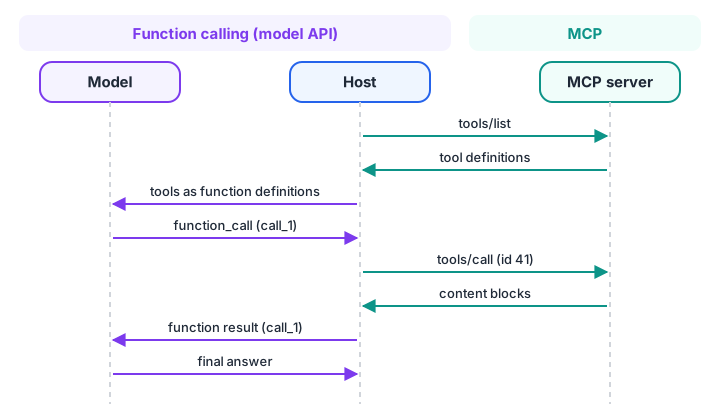
Function calling lives on the left of the host; MCP lives on the right. The host translates between them.
Function calling in one paragraph
You send the model a list of tool definitions: a name, a description and a JSON Schema for the parameters. When the model decides a tool would help, it returns a tool call (name plus JSON arguments, and an ID) instead of plain text.
Your code runs the function, sends the result back tagged with the same ID, and the model continues. The model never runs anything itself.
Every major model API supports this, but each uses its own field names. That small detail is exactly where MCP helps.
MCP vs function calling: side-by-side comparison
| Aspect | Function calling | MCP |
|---|---|---|
| Layer | Between your code and the model | Between your application and tool servers |
| Defined by | Each model provider's API | An open specification |
| Where tools live | In your application's code | In separate server processes or services |
| Discovery | You hard-code the list you send | tools/list at runtime |
| Who executes | Your code | The MCP server |
| Sharing tools | Copy the code into each app | Any MCP host connects to the same server |
| Beyond tools | Tools only | Also resources, prompts, elicitation |
| Model independence | Format differs per provider | Same server works with any model |
How MCP tools become function-calling definitions
An MCP tool already has what a function definition needs: a name, a description and a JSON Schema. Only the wrapper differs. MCP calls the schema inputSchema; the OpenAI Responses API calls it parameters inside a "type": "function" object; the Anthropic Messages API calls it input_schema.
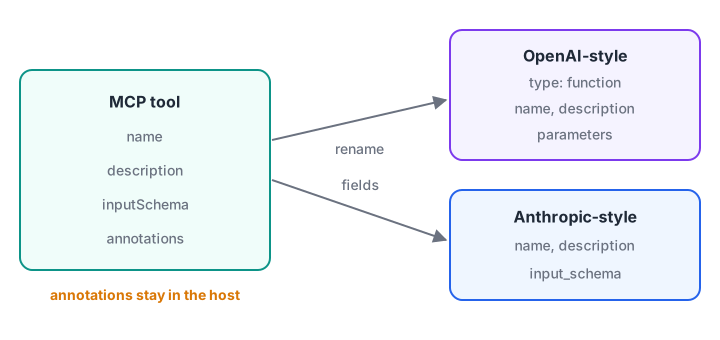
Same name, same description, same schema. The host only renames the wrapper fields.
import json

mcp_tools = [{   # as returned by tools/list on a timetable server
    "name": "get_timetable",
    "description": "Class timings for a batch on a given day.",
    "inputSchema": {"type": "object",
                    "properties": {"batch": {"type": "string"}, "day": {"type": "string"}},
                    "required": ["batch"]},
    "annotations": {"readOnlyHint": True},
}]

def to_openai_responses(tool):
    return {"type": "function", "name": tool["name"], "description": tool["description"],
            "parameters": tool["inputSchema"]}

def to_anthropic_messages(tool):
    return {"name": tool["name"], "description": tool["description"],
            "input_schema": tool["inputSchema"]}

for label, convert in [("OpenAI-style", to_openai_responses), ("Anthropic-style", to_anthropic_messages)]:
    converted = convert(mcp_tools[0])
    print(f"{label}: keys={list(converted)}")
    print("   schema unchanged:", json.dumps(converted.get("parameters") or converted["input_schema"]))
print("Annotations dropped from model view:", "annotations" not in to_openai_responses(mcp_tools[0]))
Notice that annotations are not sent to the model. They are for the host's approval logic, not for the model's reasoning. Some providers also offer a strict mode that needs additionalProperties: false on every object, so a host may need to adjust schemas before sending them.
Quick check
Which field holds a tool's argument schema in MCP?
MCP uses inputSchema. OpenAI-style APIs use parameters and Anthropic-style APIs use input_schema.
The full loop: model, host and MCP server
Here is what happens when a user asks "When is the GenAI evening class on Monday?" in an MCP host:
- The host's MCP client calls
tools/liston each connected server (or uses a cached list). - The host converts the tools into the model API's function format and sends them with the conversation.
- The model returns a function call:
get_timetablewith{"batch": "GenAI-Evening", "day": "Monday"}and a call ID. - The host finds which server owns
get_timetable, checks its approval policy, and sendstools/callto that server. - The server runs the tool and returns
contentblocks, maybe withstructuredContent. - The host turns the content into a function result tagged with the original call ID, and calls the model again.
- The model writes the final answer.
The simulation below runs that loop with a fake model so you can see every message.
import json

def fake_model(messages, tools):
    last = messages[-1]
    if last["role"] == "user":                       # first turn: ask for a tool
        return {"type": "function_call", "call_id": "call_1", "name": "get_timetable",
                "arguments": json.dumps({"batch": "GenAI-Evening", "day": "Monday"})}
    return {"type": "message", "text": f"Your class is on Monday, {last['output']}."}

def mcp_server(request):                             # a tools/call handler on the server
    args = request["params"]["arguments"]
    return {"jsonrpc": "2.0", "id": request["id"], "result": {"resultType": "complete",
            "content": [{"type": "text", "text": f"6 pm to 8 pm in Lab 2 ({args['batch']})"}], "isError": False}}

TOOL_OWNER = {"get_timetable": mcp_server}           # built from each server's tools/list
messages = [{"role": "user", "content": "When is the GenAI evening class on Monday?"}]

reply = fake_model(messages, tools=["get_timetable"])
print("1. model ->", reply["name"], reply["arguments"])
rpc = {"jsonrpc": "2.0", "id": 41, "method": "tools/call",
       "params": {"name": reply["name"], "arguments": json.loads(reply["arguments"])}}
print("2. host  -> MCP:", json.dumps(rpc)[:90], "...")
result = TOOL_OWNER[reply["name"]](rpc)["result"]
text = " ".join(block["text"] for block in result["content"] if block["type"] == "text")
messages.append({"role": "tool", "call_id": reply["call_id"], "output": text})
print("3. MCP   -> host:", text)
print("4. model ->", fake_model(messages, tools=["get_timetable"])["text"])
Two IDs are in play, and beginners often mix them up. The call ID (call_1) belongs to the model API and ties the function result to the model's request. The JSON-RPC ID (41) belongs to MCP and ties the server's response to the client's request. The host maps one to the other.
Quick check
In an MCP host, who executes a tool when the model asks for it?
The model only requests the call. The host routes it to the right MCP server, which runs it.
When is function calling alone enough?
You do not need MCP for every project. Plain function calling is simpler when:
- The tools are small functions inside one application, such as a calculator or a date parser.
- Only one app will ever use them.
- You control the code and deploy it together.
MCP earns its place when:
- Several apps, or several teams, need the same tools.
- Tools need their own credentials, lifecycle or language (a Go service, a Node package).
- You want users to plug in third-party tools without changing your code.
- You want to switch model providers without rewriting tool definitions.
A useful rule: function calling is always there, inside the host. The real question is whether your tools live in your code or behind MCP servers.
What MCP adds on top of function calling
Beyond sharing, MCP brings features that function calling does not define:
- Resources and prompts, so a server can offer data and templates, not only actions. See MCP tools, resources and prompts.
- Change notifications, through
subscriptions/listen, when a server's tool list changes. - Elicitation, so a tool can ask the user a question mid-call.
- Authorization rules for remote servers, built on OAuth 2.1.
- A standard place for approval hints, through tool annotations.
Common mistakes with MCP and function calling
- Thinking MCP replaces function calling. The model still emits function calls; MCP supplies and executes the tools.
- Sending annotations to the model. They are host-side hints and waste tokens in the prompt.
- Mixing up call IDs and JSON-RPC IDs. Keep a mapping in the host.
- Passing raw MCP errors to the model. Send
isErrortext as the function output so the model can recover; log protocol errors instead. - Exposing every tool from every server. Large tool lists confuse models. Avoiding tool overload shows how to filter.
Key takeaways
- Function calling is how a model asks for a tool; MCP is how an app finds and runs tools on servers.
- In an MCP host, MCP tools are converted into the model API's function format.
- The host maps the model's call ID to an MCP request ID and routes each call to the owning server.
- Plain function calling suits a few in-app tools; MCP suits shared, independently deployed tools.
- MCP adds resources, prompts, notifications, elicitation and authorization on top.
FAQ
Is MCP the same as function calling?
No. Function calling is a feature of model APIs that lets the model request a tool. MCP is an open protocol between applications and tool servers. They fit together: an MCP host lists tools from servers, gives them to the model through function calling, and runs the model's calls on the servers.
Does MCP work with any LLM?
Yes, as long as the model supports function calling or tool use. The MCP server does not know or care which model is behind the host. The host converts MCP tool definitions into whatever format its model API expects, so the same server works across providers.
Do I need MCP to build an AI agent?
No. Many agents work fine with a handful of tools defined directly in code. MCP becomes valuable when you want to reuse tools across agents or apps, connect third-party tools, or keep tools in separate services with their own credentials and release cycles.
Can a model call MCP servers directly?
In the standard design, no. The model only produces tool-call requests; the host's MCP client talks to the server. Some model APIs offer a hosted connector that calls remote MCP servers for you, but even then a client component, not the model itself, sends the MCP messages.
Where can I learn function calling and MCP in Indore?
Debugshala's hands-on Generative AI course at Old Palasia is taught in English and Hindi, and you can try a free demo class before enrolling. To revise the JSON and Python basics this loop relies on, drill JSON and Python MCQs on Debugshala Test.
From the team behind this site
Go further with the Generative AI Course at Debugshala
These tutorials are written by Debugshala, a training and placement institute at Old Palasia, Indore. The classroom course adds live mentoring, real projects and interview preparation.
- Offline classes at Old Palasia, Indore
- Free demo class before you pay
- Non-IT, fresher and year-gap friendly
- Placement assistance
700+ students placed · 200+ hiring partners · 4.9★ Google rating
