

Build an MCP Client in Python: Connect Servers to an LLM
Build an MCP client in Python with SDK 2.x: connect over stdio or HTTP, merge tools from many servers, gate risky calls, and drive an LLM tool loop.
Think of a travel agent in Palasia planning a family trip. She has a separate contact at the airline, the hotel chain and the cab company. She keeps one combined price list, but each line is labelled with the vendor's name, because two vendors both offer something called "deluxe".
Before she pays for anything, she phones the customer to confirm. And she has a rule: if planning takes more than six calls, she stops and checks back instead of looping forever.
That is an MCP client, and the host that runs several of them.
What is an MCP client?
Map the agent to MCP. Each vendor contact is an MCP client, one connection to one server. The combined, labelled price list is the host's merged tool list with prefixed names. The call to the customer before paying is the approval gate. The six-call rule is the step limit on the agent loop.
An MCP client is the component inside a host application that connects to a single MCP server, discovers its tools, resources and prompts, sends requests such as tools/call, and returns the results to the host and its language model.
This tutorial uses the official Python SDK mcp 2.3.0 with MCP specification 2026-07-28. It connects to the batch_server.py you built in build an MCP server in Python, so build that first if you have not.
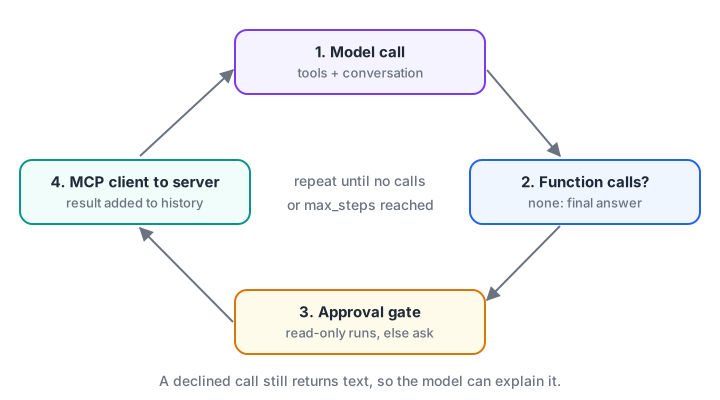
The loop runs until the model stops asking for tools or the step limit is reached.
How to connect an MCP client to servers
Step 1: connect to one server and call a tool
The Client class takes the server to connect to. A StdioServerParameters value launches a command as a subprocess. A URL string uses Streamable HTTP.
# client_basic.py - mcp 2.3.0
import asyncio, sys
from mcp import Client, StdioServerParameters

async def main():
    server = StdioServerParameters(command=sys.executable, args=["batch_server.py"])
    async with Client(server) as client:                 # or Client("http://127.0.0.1:8000/mcp")
        print("Protocol:", client.protocol_version)      # 2026-07-28 against a current server
        print("Server:", client.server_info.name, "-", client.instructions)

        for tool in (await client.list_tools()).tools:
            print("Tool:", tool.name, "| read-only:", bool(tool.annotations and tool.annotations.read_only_hint))

        result = await client.call_tool("find_batch", {"code": "GENAI-EVE"})
        if result.is_error:
            print("Tool failed:", result.content[0].text)
        else:
            print("Structured:", result.structured_content)

asyncio.run(main())
A few points that trip people up:
- The client negotiates for you. By default it probes with
server/discoverand falls back to the oldinitializehandshake for legacy servers, soprotocol_versionmay show2025-11-25on an older server. - Results use snake_case. Use
is_error,structured_contentandinput_schema, not the camelCase wire names. - A failing tool is not an exception. It comes back with
is_error=Trueand a message. Exceptions are for protocol problems such as an unreachable server.
Step 2: handle results the way a host should
Tool results can contain several content blocks: text, images, audio, resource links or embedded resources. The model API usually wants a string, so the host flattens text and describes the rest. The simulation below shows a robust converter, including the case where structured content is present.
import json

def result_to_model_text(result, max_chars=600):
    parts = []
    for block in result.get("content", []):
        if block["type"] == "text":
            parts.append(block["text"])
        elif block["type"] == "resource_link":
            parts.append(f"[link: {block['name']} -> {block['uri']}]")
        else:
            parts.append(f"[{block['type']} content, {block.get('mimeType', 'unknown type')}]")
    if not parts and "structuredContent" in result:          # very old or minimal servers
        parts.append(json.dumps(result["structuredContent"]))
    text = "\n".join(parts)
    prefix = "TOOL ERROR: " if result.get("isError") else ""
    return prefix + (text if len(text) <= max_chars else text[:max_chars] + " ...[truncated]")

samples = [
    {"content": [{"type": "text", "text": '{"code": "GENAI-EVE", "seats": 3}'}], "structuredContent": {"seats": 3}},
    {"content": [{"type": "text", "text": "Unknown batch 'ROBO'."}], "isError": True},
    {"content": [{"type": "image", "mimeType": "image/png", "data": "iVBORw0..."},
                 {"type": "resource_link", "name": "syllabus.md", "uri": "batches://DS-MOR/syllabus"}]},
    {"content": [{"type": "text", "text": "x" * 900}]},
]
for s in samples:
    out = result_to_model_text(s)
    print(repr(out) if len(out) < 100 else f"{len(out)} chars, ends with {out[-20:]!r}")
Truncation matters more than it looks. One tool returning a 50,000-character log can push the rest of the conversation out of the model's context window.
Step 3: connect several servers without name clashes
Real hosts connect to many servers. Two servers can both expose a tool called search, and the spec says hosts should disambiguate, for example by prefixing the server's name. Use a separator the model API accepts; some function-calling APIs reject dots, so a double underscore is a safe choice.
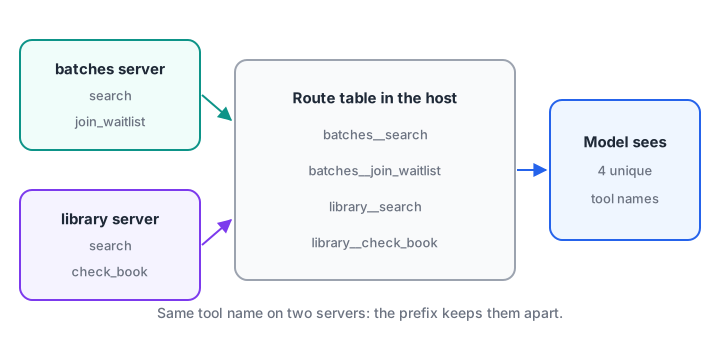
The model sees unique names. The route table turns each one back into a server and an original tool name.
servers = {
    "batches": [{"name": "search", "description": "Search batches by topic"},
                {"name": "join_waitlist", "description": "Waitlist a student"}],
    "library": [{"name": "search", "description": "Search books by title"},
                {"name": "check_book", "description": "Copies of a book on the shelf"}],
}

def merge(servers, sep="__"):
    routes, model_tools = {}, []
    for server, tools in servers.items():
        for tool in tools:
            public = f"{server}{sep}{tool['name']}"
            if public in routes:
                raise ValueError(f"Duplicate tool name after prefixing: {public}")
            routes[public] = (server, tool["name"])
            model_tools.append({"type": "function", "name": public, "description": tool["description"]})
    return routes, model_tools

routes, model_tools = merge(servers)
print("Model sees:", [t["name"] for t in model_tools])
print("Route for library__search:", routes["library__search"])
print("Route for batches__search:", routes["batches__search"])
With the real SDK, open each Client inside one AsyncExitStack so every connection closes cleanly when the host stops:
import sys
from contextlib import AsyncExitStack
from mcp import Client, StdioServerParameters

SERVERS = {
    "batches": StdioServerParameters(command=sys.executable, args=["batch_server.py"]),
    "library": StdioServerParameters(command=sys.executable, args=["library_server.py"]),
}

async def connect_all(stack: AsyncExitStack):
    clients, routes, tools, read_only = {}, {}, [], set()
    for server_name, params in SERVERS.items():
        client = clients[server_name] = await stack.enter_async_context(Client(params))
        for tool in (await client.list_tools()).tools:
            public = f"{server_name}__{tool.name}"
            routes[public] = (server_name, tool.name)
            tools.append({"type": "function", "name": public,
                          "description": tool.description or "", "parameters": tool.input_schema})
            if tool.annotations and tool.annotations.read_only_hint:
                read_only.add(public)            # trust hints only from servers you trust
    return clients, routes, tools, read_only
Quick check
How do you make the Python SDK's Client use Streamable HTTP?
A URL string selects Streamable HTTP; StdioServerParameters launches a local subprocess.
Quick check
Two servers both expose a tool named search. What should the host do?
The spec recommends disambiguation, such as prefixing with a server identifier.
How to build the agent loop on top
Step 4: drive an LLM with MCP tools
Now combine everything into a host loop. This version uses the OpenAI Responses API, the same style as tools and function calling for agents. Any model API with function calling works the same way. Replace your-model-name with a model you have access to.
# agent.py - an MCP host loop: mcp 2.3.0 + OpenAI Responses API (pip install openai)
import asyncio, json
from contextlib import AsyncExitStack
from openai import AsyncOpenAI
# connect_all() and SERVERS from the previous block go here

async def run_agent(question: str, max_steps: int = 6) -> str:
    llm = AsyncOpenAI()
    async with AsyncExitStack() as stack:
        clients, routes, tools, read_only = await connect_all(stack)
        items = [{"role": "user", "content": question}]
        for _ in range(max_steps):
            response = await llm.responses.create(model="your-model-name", tools=tools, input=items)
            items += response.output
            calls = [item for item in response.output if item.type == "function_call"]
            if not calls:
                return response.output_text
            for call in calls:
                server_name, tool_name = routes[call.name]
                prompt = f"Allow {call.name}({call.arguments})? [y/N] "
                if call.name not in read_only and (await asyncio.to_thread(input, prompt)).lower() != "y":
                    output = "The user declined this action."
                else:
                    result = await clients[server_name].call_tool(tool_name, json.loads(call.arguments))
                    output = "\n".join(b.text for b in result.content if b.type == "text")
                items.append({"type": "function_call_output", "call_id": call.call_id, "output": output})
        return "Stopped: too many tool steps."

if __name__ == "__main__":
    print(asyncio.run(run_agent("Is the Data Science morning batch full? If so, waitlist asha@example.com.")))
Read-only tools run straight away; anything else needs a "y" from the user. A declined call still returns an output, so the model knows what happened and can explain it.
You can rehearse the same loop without any API key. The fake model below asks for one read and one write, and the gate blocks the write.
import json

def fake_model(items):
    done = {i["call_id"] for i in items if i.get("type") == "function_call_output"}
    if "c1" not in done:
        return [{"type": "function_call", "call_id": "c1", "name": "batches__find_batch", "arguments": '{"code": "DS-MOR"}'}]
    if "c2" not in done:
        return [{"type": "function_call", "call_id": "c2", "name": "batches__join_waitlist",
                 "arguments": '{"code": "DS-MOR", "student_email": "asha@example.com"}'}]
    return [{"type": "message", "text": "DS-MOR is full. I did not add you to the waitlist, as you asked me not to."}]

def mcp_call(name, args):
    return {"batches__find_batch": '{"code": "DS-MOR", "seats": 0}'}.get(name, "added at position 1")

READ_ONLY, user_says = {"batches__find_batch"}, {"batches__join_waitlist": "n"}
items = [{"role": "user", "content": "Is DS-MOR full? Waitlist me if so."}]
for step in range(6):
    output = fake_model(items)
    items += output
    calls = [o for o in output if o["type"] == "function_call"]
    if not calls:
        print("Answer:", output[0]["text"]); break
    for c in calls:
        allowed = c["name"] in READ_ONLY or user_says.get(c["name"]) == "y"
        result = mcp_call(c["name"], json.loads(c["arguments"])) if allowed else "The user declined this action."
        print(f"step {step}: {c['name']} allowed={allowed} -> {result}")
        items.append({"type": "function_call_output", "call_id": c["call_id"], "output": result})
Step 5: answer when a server asks the user something
In 2026-07-28 a server that needs input returns an input_required result instead of finishing. The SDK's Client handles the retry for you; you only supply a callback that asks the user. If you do not declare the capability, servers that need elicitation will refuse the call with a missing-capability error.
from mcp import Client
from mcp.types import ElicitResult

async def ask_user(context, params):
    print("Server asks:", params.message)                 # show params.requested_schema as a form
    answer = input("Confirm? [y/N] ").lower() == "y"
    return ElicitResult(action="accept", content={"ok": answer})

# async with Client(server, elicitation_callback=ask_user) as client: ...
Step 6: cache tool lists, but listen for changes
List results carry ttlMs, a freshness hint, and the SDK caches them by default. If a server declares listChanged, a host can open client.listen(tools_list_changed=True) to be told when to fetch the list again, instead of polling.
Re-list tools after a change, and show the user new or altered tools before the model gets them, since a changed description could carry new instructions. MCP security best practices explains that risk.
Common mistakes when building an MCP client
- One shared client for several servers. Each server needs its own
Client. - Unprefixed tool names. Two
searchtools collide and the model calls the wrong one. - No step limit. A confused model can call tools forever; cap the loop.
- Raising on
is_error. Pass the error text to the model so it can recover. - Untruncated outputs. Cap tool results before adding them to the conversation.
- Trusting annotations from any server. Auto-run read-only tools only from servers you trust.
Key takeaways
Client(StdioServerParameters(...))launches a local server;Client(url)connects over Streamable HTTP.list_tools()andcall_tool()are the core; checkis_errorinstead of catching exceptions.- Hosts run one client per server, prefix tool names and keep a route table.
- The agent loop converts tools, routes function calls, gates risky ones and stops at a step limit.
- Supply an
elicitation_callbackso servers can ask the user questions mid-call.
FAQ
What is the difference between an MCP client and an MCP host?
An MCP client is one connection to one server. The host is the whole application, which runs many clients, holds the model and the conversation, shows approval prompts and decides which tools the model sees. In code, the host is your agent loop; each Client object is a client.
Can one MCP client connect to several servers?
No. By design each client holds exactly one server connection. A host that needs five servers creates five clients, often inside an AsyncExitStack, and merges their tools with prefixed names. This keeps failures, permissions and credentials separate per server.
Do I need an LLM to use an MCP client?
No. A client is just a program that sends MCP requests, so scripts, tests and scheduled jobs can call MCP tools directly. The LLM matters only when you want a model to choose which tools to call, as in an agent.
Which LLM works best with MCP clients?
Any model with reliable function calling works. MCP is model-neutral: the host converts tool definitions into each provider's format. Choose a model by testing it on your own tasks, tracking whether it picks the right tool and fills arguments correctly.
Is there a classroom course in Indore for building AI agents with MCP?
Debugshala's Generative AI training for graduates in Indore is taught at the Old Palasia campus in English and Hindi, and you can sit a free demo class first. For practice on loops and conditionals like the ones in this agent, work through loop-based coding quizzes on Debugshala Test.
From the team behind this site
Go further with the Generative AI Course at Debugshala
These tutorials are written by Debugshala, a training and placement institute at Old Palasia, Indore. The classroom course adds live mentoring, real projects and interview preparation.
- Offline classes at Old Palasia, Indore
- Free demo class before you pay
- Non-IT, fresher and year-gap friendly
- Placement assistance
700+ students placed · 200+ hiring partners · 4.9★ Google rating
