

Tools and Function Calling for AI Agents: A Practical Guide
How function calling works in AI agents: JSON Schema tool definitions, the call and result cycle, safe validation, and a real API loop, with Python examples.
Picture a busy restaurant on 56 Dukan street on a Sunday evening. The waiter takes your order but cannot cook. He writes a slip in a fixed format: dish from the menu, quantity, spice level.
The kitchen cooks exactly what the slip says and sends the plate out, and the waiter brings it to you with a word about the dish.
If a slip says "spice level: 11" on a scale of 1 to 5, the kitchen sends it back instead of guessing. If it names a dish that isn't on the menu, same thing.
That small system works because the menu is clear, the slip format is strict, and the kitchen checks every slip.
What is function calling in AI agents?
The waiter is the LLM: it understands the customer but cannot act. The menu is the list of tool definitions. The order slip is a tool call: a tool name plus arguments in a fixed format.
The kitchen is your code, which validates and executes the call. The plate going back is the tool result, which the model uses to write its reply.
Function calling is an LLM feature where the model, given descriptions of available functions, responds with a structured request naming a function and its JSON arguments, which the application executes before returning the result to the model.
This is how agents reach the outside world. The ReAct agent from scratch did the same job by parsing free text. Native function calling makes the model return structured data directly, so parsing becomes reliable. The examples here use Python 3.10+.
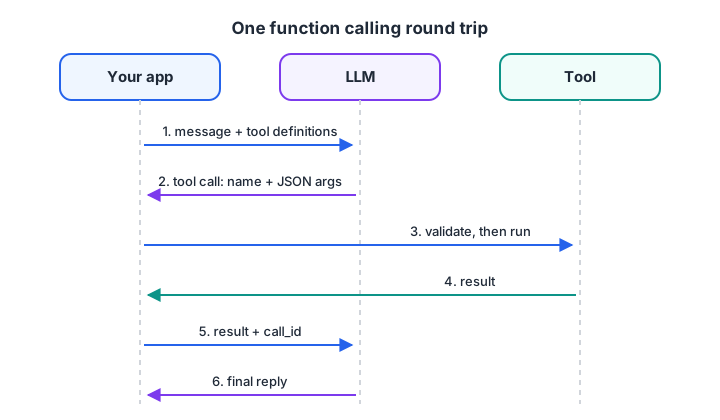
The model only proposes calls. Your app decides whether to run them and always returns the result.
Quick check
In function calling, what does the model actually return when it wants to use a tool?
The model proposes a call; your application validates and runs it, then sends the result back.
Anatomy of a tool definition
Every tool definition has three parts: a name, a description and parameters written as JSON Schema. Here is a definition for a tool that checks bus seats:
{
  "type": "function",
  "name": "check_bus_seats",
  "description": "Check available seats on an intercity bus. Use when the user asks about seats or availability. Returns the number of free seats and the fare in rupees.",
  "parameters": {
    "type": "object",
    "properties": {
      "route": {"type": "string", "enum": ["Indore-Bhopal", "Indore-Ujjain", "Indore-Mumbai"]},
      "date": {"type": "string", "description": "Travel date in YYYY-MM-DD format"},
      "seat_type": {"type": "string", "enum": ["seater", "sleeper"]}
    },
    "required": ["route", "date", "seat_type"],
    "additionalProperties": false
  },
  "strict": true
}
Each field does a job. The name should be a clear verb phrase. The description says what the tool does, when to use it and what it returns, because the model sees nothing else.
An enum turns free text into a fixed choice, which removes a whole class of errors. required and additionalProperties: false stop the model from skipping or inventing fields.
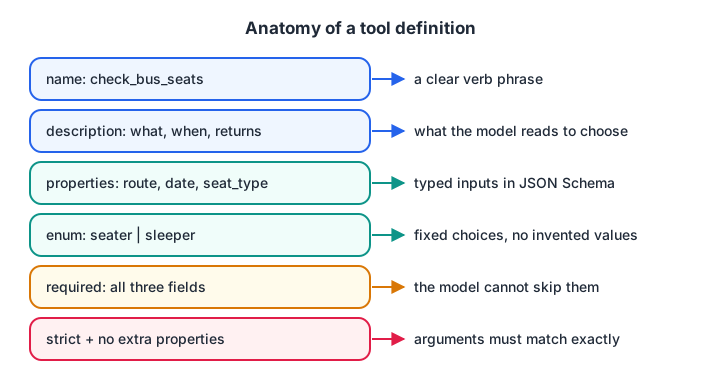
Every field in a tool definition is an instruction to the model. Vague fields produce vague calls.
The exact wrapper differs slightly between providers, but name, description and JSON Schema parameters are common to all major APIs and to the Model Context Protocol.
Quick check
Why use an enum for a parameter like seat_type?
An enum turns free text into a fixed list, removing a common source of bad calls.
Generate tool schemas from Python functions
Writing schemas by hand gets tedious and drifts out of sync with the code. Python's inspect module can build them from type hints and docstrings, which is roughly what agent frameworks do for you.
import inspect, json
from typing import Literal, get_args, get_origin

def check_bus_seats(route: Literal["Indore-Bhopal", "Indore-Ujjain"], date: str, passengers: int = 1):
    """Check free seats on an intercity bus and return seats left and fare in rupees."""

TYPE_MAP = {str: "string", int: "integer", float: "number", bool: "boolean"}

def to_schema(fn):
    props, required = {}, []
    for name, p in inspect.signature(fn).parameters.items():
        ann = p.annotation
        if get_origin(ann) is Literal:
            props[name] = {"type": "string", "enum": list(get_args(ann))}
        else:
            props[name] = {"type": TYPE_MAP[ann]}
        if p.default is inspect.Parameter.empty:
            required.append(name)
    return {"type": "function", "name": fn.__name__, "description": inspect.getdoc(fn),
            "parameters": {"type": "object", "properties": props, "required": required}}

print(json.dumps(to_schema(check_bus_seats), indent=2))
passengers has a default, so it is optional in the schema. Change a type hint and the schema follows automatically.
Validate and execute tool calls safely
The model sends arguments as a JSON string. Before running anything, your code must parse that JSON, check it against the schema and handle failures without crashing. Errors are returned to the model as results, so it can fix the call and try again.
A model may also return several tool calls in one response, for example checking two routes at once. Handle each call, and match every result to its call ID.
import json
SEATS = {("Indore-Bhopal", "seater"): (12, 350), ("Indore-Ujjain", "seater"): (0, 150)}

def check_bus_seats(route, date, seat_type):
    free, fare = SEATS.get((route, seat_type), (0, 0))
    return {"route": route, "date": date, "free_seats": free, "fare": fare}

SCHEMA = {"route": ["Indore-Bhopal", "Indore-Ujjain"], "seat_type": ["seater", "sleeper"]}
TOOLS = {"check_bus_seats": check_bus_seats}

def execute(call):
    try:
        args = json.loads(call["arguments"])
    except json.JSONDecodeError:
        return {"error": "arguments were not valid JSON"}
    if call["name"] not in TOOLS:
        return {"error": f"unknown tool {call['name']}"}
    for field, allowed in SCHEMA.items():
        if args.get(field) not in allowed:
            return {"error": f"{field} must be one of {allowed}"}
    return TOOLS[call["name"]](**args)

calls = [  # what a model might return in a single response
    {"id": "c1", "name": "check_bus_seats", "arguments": '{"route": "Indore-Bhopal", "date": "2026-11-20", "seat_type": "seater"}'},
    {"id": "c2", "name": "check_bus_seats", "arguments": '{"route": "Indore-Ujjain", "date": "2026-11-20", "seat_type": "seater"}'},
    {"id": "c3", "name": "check_bus_seats", "arguments": '{"route": "Indore-Goa", "date": "2026-11-20", "seat_type": "seater"}'},
]
for c in calls:
    print(c["id"], "->", json.dumps(execute(c)))
The third call names a route the tool does not serve. Instead of an exception, the model receives a clear error listing valid options, and its next call can correct the route or tell the user. In production, use a full JSON Schema validator rather than this hand-written check.
Function calling with a real API
Here is the same cycle with the OpenAI Python SDK's Responses API. The model returns function_call items; you run each one and send back a function_call_output with the matching call_id. Other providers follow the same shape with different field names.
import json
from openai import OpenAI

client = OpenAI()
tools = [{
    "type": "function",
    "name": "check_bus_seats",
    "description": "Check free seats and fare on an intercity bus from Indore.",
    "parameters": {
        "type": "object",
        "properties": {
            "route": {"type": "string", "enum": ["Indore-Bhopal", "Indore-Ujjain"]},
            "date": {"type": "string", "description": "YYYY-MM-DD"},
        },
        "required": ["route", "date"],
        "additionalProperties": False,
    },
    "strict": True,
}]

def check_bus_seats(route, date):
    return {"route": route, "date": date, "free_seats": 12, "fare": 350}

messages = [{"role": "user", "content": "Any seats to Bhopal on 2026-11-20?"}]
response = client.responses.create(model="your-model-name", tools=tools, input=messages)
messages += response.output                      # keep the model's tool calls in the history

for item in response.output:
    if item.type == "function_call" and item.name == "check_bus_seats":
        result = check_bus_seats(**json.loads(item.arguments))
        messages.append({"type": "function_call_output", "call_id": item.call_id,
                         "output": json.dumps(result)})

final = client.responses.create(model="your-model-name", tools=tools, input=messages)
print(final.output_text)
In an agent, this becomes a loop: keep calling the model and executing tools until a response contains no more function calls, with a step limit on top. If your tools live on external servers, MCP vs function calling explains how the two fit together.
How to design tools that agents use well
The model chooses tools by reading their definitions, so tool design is prompt design. These guidelines come up again and again in practice.
- Keep the set small. Three to six tools per agent is a good start. Merge near-duplicates such as
get_userandfetch_user. - Write descriptions for a new colleague. State what the tool does, when to use it, when not to, and what it returns.
- Constrain inputs. Use enums, formats like
YYYY-MM-DDand required fields. Every free-text field is a chance for the model to improvise. - Return compact results. Send back the five fields the model needs, not a 300-line API response. Large results waste tokens and bury the useful part.
- Separate reading from writing. Keep
search_ordersandcancel_orderas separate tools, so read-only tools can run freely while write tools need checks or approval. - Make errors helpful. "date must be YYYY-MM-DD, got 20/11" lets the model fix itself. "Error 400" does not.
- Make write tools safe to retry. If the model calls
book_seattwice by mistake, the second call should not create a second booking.
Common mistakes with tool calling
- Assuming the model ran the tool. It only asked. If your code never executes the call and returns a result, nothing happened.
- Skipping validation. Even with strict schemas, check business rules such as dates in the past or amounts above a limit.
- Losing call IDs. With several calls in one response, results must be matched to the right ID or the model gets confused.
- Dumping raw output. Huge JSON responses push important context out of the window.
- Letting tool output give orders. A result containing "ignore previous instructions" is data, not a command. This attack is covered in prompt injection defence.
Key takeaways
- Function calling returns structured tool requests instead of text.
- Each tool is a name, a description and a JSON Schema; all three guide the model.
- Your code validates, executes and returns results, including errors, for every call ID.
- Small, strict, well-described tools with compact outputs work best.
- Next, see how several tool-using agents cooperate in multi-agent system patterns.
FAQ
What is the difference between function calling and tool calling?
They mean the same thing. "Function calling" was the earlier name used by several APIs; "tool calling" is the broader term, since tools can include built-in capabilities like web search as well as your own functions. In both cases the model returns a structured request and your code acts on it.
Does the LLM execute the function itself?
No. The model only outputs the function name and arguments. Your application decides whether to run it, executes it, and sends the result back in the next request. That separation is what lets you validate arguments, require approval and log every action.
How many tools can an AI agent handle?
APIs accept many tools, but accuracy drops as the list grows, because the model must choose among similar options on every step. Start with three to six. For larger catalogues, group tools under specialised agents or load only the tools relevant to the current request.
Is function calling the same as MCP?
No. Function calling is how a model requests a tool within one API call. MCP is an open protocol for publishing and discovering tools on external servers. An agent typically discovers tools through MCP and then exposes them to the model through ordinary function calling.
Can I learn function calling and agent tools in Indore?
Yes. Writing tool schemas, validating calls and building agent loops are practised in Debugshala's project-based Generative AI training at the Old Palasia campus, in English and Hindi. Start with the free demo class. Meanwhile, practise Python and logic MCQs on Debugshala Test.
From the team behind this site
Go further with the Generative AI Course at Debugshala
These tutorials are written by Debugshala, a training and placement institute at Old Palasia, Indore. The classroom course adds live mentoring, real projects and interview preparation.
- Offline classes at Old Palasia, Indore
- Free demo class before you pay
- Non-IT, fresher and year-gap friendly
- Placement assistance
700+ students placed · 200+ hiring partners · 4.9★ Google rating
