

Multi-Agent System Patterns: 7 Ways AI Agents Work Together
Multi-agent system patterns explained: sequential, parallel, loop, router, aggregator, hierarchical and network, with handoffs, trade-offs and Python demos.
Every year the engineering colleges around Indore run technical fests, and no single student organises one alone. There is a coordinator, a sponsorship team, a design team, a registrations desk and a hospitality group.
Some work is a chain: the design team can't print posters until sponsors confirm their logos. Some runs in parallel: registrations and hospitality work at the same time. Some is review: the faculty advisor sends the brochure back until it's right. And some questions go straight to whichever team owns them.
The fest works not because each team is brilliant, but because everyone knows who does what and how work moves between them.
What is a multi-agent system?
Each fest team is an agent with a specific role. The coordinator who assigns and checks work is a supervisor agent. The rules about who passes what to whom are the orchestration pattern. And "send sponsor questions to the sponsorship team" is a handoff.
A multi-agent system is an AI application in which several LLM-driven agents, each with a defined role, prompt and set of tools, cooperate on a task through an orchestration pattern that decides which agent works when and what information each receives.
Multi-agent is the fifth of the agentic AI design patterns and level 4 of the levels of agentic AI. It helps when a single agent's prompt has grown too long, when it needs too many tools to choose well, or when parts of the job need different permissions.
It is not automatically better. Every extra agent means extra model calls, more latency and another place where information can be lost.
The 7 multi-agent system patterns
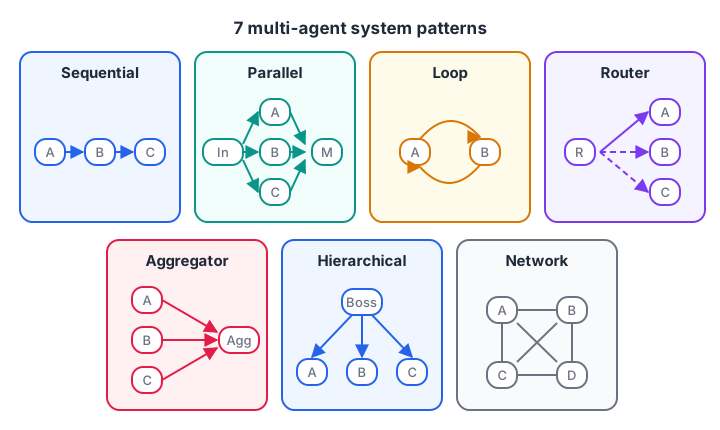
The same agents can be wired in very different ways. The wiring decides speed, cost and failure modes.
1. Sequential
Agents run in a fixed chain, each taking the previous one's output: extract, then analyse, then write. It is the easiest pattern to debug, because you can inspect the handover at each link. The weakness is that one bad link spoils everything after it.
2. Parallel
Several agents work on independent subtasks at the same time, and their outputs are merged. A report agent might send one agent to read sales data and another to read support tickets. Total time is set by the slowest agent, not the sum of all of them.
3. Loop
Two agents iterate: one produces, the other critiques, until the work passes or a round limit is hit. This is the reflection pattern split across two roles, useful for code review or brochure copy.
4. Router
A routing agent reads the request and sends it to exactly one specialist: admissions questions to one agent, placement questions to another. Only one specialist runs, which keeps cost low.
5. Aggregator
Several agents tackle the same question independently, and a final step combines their answers, for example by voting or averaging scores. This reduces the effect of any single agent's mistake.
6. Hierarchical
A supervisor agent breaks the goal into subtasks, assigns them to worker agents, checks their results and decides what happens next. It mirrors a manager and a team, and it scales well to large tasks. The supervisor is also a single point of failure: if it plans badly, every worker does the wrong job well.
7. Network
Agents talk to each other freely, with no fixed order or leader. This suits simulations and open-ended brainstorming, but it is the hardest pattern to predict, test and pay for. Production systems rarely use it on its own.
Quick check
Three agents analyse independent data sources, taking 4, 6 and 3 seconds. Roughly how long does the parallel pattern take before merging?
In parallel, total time is set by the slowest agent, here 6 seconds, plus any merge step.
Simulate multi-agent patterns in Python
The agents below are plain functions with made-up response times, so you can see how patterns differ without calling a model. First, sequential versus parallel for three independent research subtasks:
agents = {                                  # agent -> (simulated seconds, output)
    "sales_agent":    (4.0, "Sales up 12% in Q3"),
    "support_agent":  (6.0, "Top complaint: late delivery"),
    "social_agent":   (3.0, "Mentions doubled after Diwali sale"),
}
merge_time = 1.5

sequential = sum(t for t, _ in agents.values()) + merge_time
parallel = max(t for t, _ in agents.values()) + merge_time

report = " | ".join(out for _, out in agents.values())
print("Merged report:", report)
print(f"Sequential: {sequential:.1f}s   Parallel: {parallel:.1f}s")
print(f"Parallel is {sequential / parallel:.1f}x faster for independent subtasks")
Parallel wins here only because the subtasks don't depend on each other. If the support agent needed the sales numbers first, you would be back to a chain.
Next, a hierarchical supervisor. It assigns subtasks by skill, checks each result and reassigns work when a worker fails.
workers = {
    "researcher": lambda task: f"3 sources found for '{task}'",
    "writer":     lambda task: "" if "budget" in task else f"Draft written: '{task}'",
    "analyst":    lambda task: f"Table prepared for '{task}'",
}
plan = [("researcher", "AI jobs in Indore"), ("writer", "fest budget summary"),
        ("analyst", "registration numbers by college")]

def supervisor(plan):
    results = {}
    for worker, task in plan:
        out = workers[worker](task)
        if not out:                                  # supervisor checks every result
            print(f"  {worker} returned nothing for '{task}', reassigning to analyst")
            out = workers["analyst"](task)
        results[task] = out
    return results

for task, out in supervisor(plan).items():
    print(f"{task:35} -> {out}")
Finally, an aggregator. Three reviewer agents score the same resume, and the aggregator averages them and flags strong disagreement for a human.
from statistics import mean, pstdev

reviews = {"skills_reviewer": 8, "projects_reviewer": 7, "format_reviewer": 3}
avg, spread = mean(reviews.values()), pstdev(reviews.values())
print(f"Scores: {reviews}")
print(f"Average {avg:.1f}/10, spread {spread:.1f}")
if spread > 2:
    low = min(reviews, key=reviews.get)
    print(f"Reviewers disagree; send to a human. Lowest score from {low}.")
else:
    print("Reviewers agree; accept the average.")
Handoffs vs agents as tools
There are two ways for one agent to involve another, and the difference matters.
With a handoff, control moves. The triage agent passes the conversation to a specialist, and the specialist talks to the user from then on. With an agent as a tool, control stays. The manager calls a specialist like any other tool, receives its result and keeps talking to the user itself.
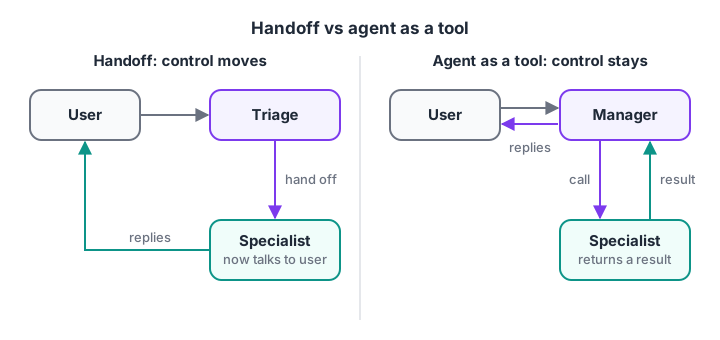
Handoffs suit routing to a specialist; agents as tools suit a manager that combines several specialists' work.
Many frameworks support both. Here is a sketch with the OpenAI Agents SDK (pip install openai-agents), based on its current documentation. Check the docs for your installed version, since agent SDKs change quickly.
import asyncio
from agents import Agent, Runner

timetable_agent = Agent(
    name="Timetable agent",
    handoff_description="Questions about batch timings and class schedules",
    instructions="Answer questions about batch timings clearly and briefly.",
)
placement_agent = Agent(
    name="Placement agent",
    handoff_description="Questions about interview preparation and resumes",
    instructions="Give practical interview and resume advice.",
)

# Handoff: triage passes control to whichever specialist fits
triage_agent = Agent(
    name="Triage agent",
    instructions="Route each student question to the right specialist.",
    handoffs=[timetable_agent, placement_agent],
)

# Agent as a tool: the manager stays in control and calls a specialist
summariser = Agent(name="Summariser", instructions="Summarise the text in 3 bullet points.")
manager = Agent(
    name="Manager",
    instructions="Help the student. Use the summarise tool for long text.",
    tools=[summariser.as_tool(tool_name="summarise", tool_description="Summarise a long text")],
)

async def main():
    result = await Runner.run(triage_agent, "When does the Saturday batch start?")
    print(result.final_output, "| answered by:", result.last_agent.name)

asyncio.run(main())
Underneath, both mechanisms are function calls: a handoff is exposed to the model as a special tool that transfers control.
Quick check
What is the key difference between a handoff and calling an agent as a tool?
The question is who talks to the user next: the specialist after a handoff, or the original agent after a tool call.
How to choose a multi-agent pattern
| Pattern | Use it when | Latency | Cost | Main risk |
|---|---|---|---|---|
| Sequential | Steps depend on each other | Sum of all steps | Medium | One bad step spoils the rest |
| Parallel | Subtasks are independent | Slowest agent | Medium to high | Conflicting partial results |
| Loop | Quality needs review and revision | Grows with rounds | Medium | Endless rounds without a cap |
| Router | Requests fall into clear categories | Low | Low | Misrouting |
| Aggregator | You want several independent opinions | Slowest agent | High | Averaging hides a correct outlier |
| Hierarchical | Large tasks with mixed skills | High | High | Supervisor plans badly |
| Network | Open-ended simulation or brainstorming | Unpredictable | Unpredictable | Hard to test or control |
Follow these steps to decide:
- Try one agent first. Give it good tools and a focused prompt, and measure where it fails.
- Name the failure. Too many tools? Use a router. Independent slow steps? Go parallel. Inconsistent quality? Add a loop.
- Pick the simplest pattern that fixes it, and give every agent a narrow role and only the tools it needs.
- Log every handoff and tool call, so you can trace which agent caused a bad result.
Common mistakes in multi-agent systems
- Starting multi-agent. Several agents debugging each other is harder than one agent with good tools. Earn the complexity.
- Losing context at handoffs. Decide exactly what each agent receives; passing the whole history wastes tokens, while passing too little drops key facts.
- Overlapping roles. If two agents could both answer, the router will flip between them. Make responsibilities exclusive.
- No global limits. Cap total steps and spend across all agents, not just per agent, as covered in guardrails for AI agents.
- Testing only the final answer. Evaluate each agent separately too, or you won't know which one to fix.
Key takeaways
- Multi-agent systems give separate roles, prompts and tools to cooperating agents.
- Seven patterns: sequential, parallel, loop, router, aggregator, hierarchical and network.
- Handoffs move control; agents as tools keep the caller in charge.
- Choose by the failure you observe, and prefer the simplest pattern that fixes it.
- The next step in this series applies agents to retrieval in agentic RAG.
FAQ
What is an example of a multi-agent system?
A customer support system where a triage agent routes each message to a billing, technical or delivery specialist is a common example. Another is a research assistant where one agent searches, one writes and one checks citations. Each agent has its own instructions and tools.
When should I use multiple agents instead of one?
Use several agents when one agent's prompt holds too many responsibilities, when it needs so many tools that it picks the wrong ones, or when parts of the work need different permissions. If one well-equipped agent handles your test cases reliably, adding more agents only adds cost.
What is a hierarchical multi-agent system?
It is a structure where a supervisor agent breaks a goal into subtasks, delegates them to worker agents, reviews their results and decides the next step. It works like a manager and a team, scales to large tasks, and depends heavily on the quality of the supervisor's planning.
Which frameworks support multi-agent systems?
Several open-source agent frameworks, including the OpenAI Agents SDK, LangGraph and CrewAI, support handoffs, supervisors or agent graphs. They differ in how they represent state and control flow. Learning the patterns first makes it easy to map them onto whichever framework your team uses.
Can I build multi-agent projects at Debugshala in Indore?
Multi-agent projects are part of the agent modules in Debugshala's Generative AI curriculum for Indore learners, taught offline at Old Palasia in English and Hindi, with a free demo class first. To keep your logic sharp, take timed reasoning tests on Debugshala Test.
From the team behind this site
Go further with the Generative AI Course at Debugshala
These tutorials are written by Debugshala, a training and placement institute at Old Palasia, Indore. The classroom course adds live mentoring, real projects and interview preparation.
- Offline classes at Old Palasia, Indore
- Free demo class before you pay
- Non-IT, fresher and year-gap friendly
- Placement assistance
700+ students placed · 200+ hiring partners · 4.9★ Google rating
