

A2A and AG-UI Explained: Agent Protocols with Python Examples
A2A and AG-UI agent protocols explained: agent cards, tasks and states, streamed UI events, how they differ from MCP, and Python code for both protocols.
Think about how a large hospital in Indore runs. Inside each department, staff use labelled equipment from a cupboard: a BP monitor, a glucometer.
Between departments, they use a standard referral slip: the cardiology desk sends a patient to radiology with a form that says what is needed, and radiology updates the status until the report is ready. And in the waiting area, a screen shows each patient's status live: "registered", "with doctor", "report ready".
Three different kinds of communication, each with its own agreed format.
What are agent protocols?
The labelled equipment is MCP, the protocol that connects an agent to tools and data. The referral slip is A2A, which lets one agent hand work to another agent and track it. The waiting-room screen is AG-UI, which streams what an agent is doing to a user interface.
Agent protocols are open, standard message formats that let AI agents talk to tools (MCP), to other agents (A2A) and to user interfaces (AG-UI) without custom integration code for every pair.
You met these names briefly in the agentic AI glossary. MCP has its own full series starting with what MCP is. This lesson covers the other two in depth.
It targets the A2A specification version 1.0 and the AG-UI protocol with its 1.0 Python SDK, as of November 2026. Both evolve quickly, so check the A2A specification and the AG-UI documentation for changes.
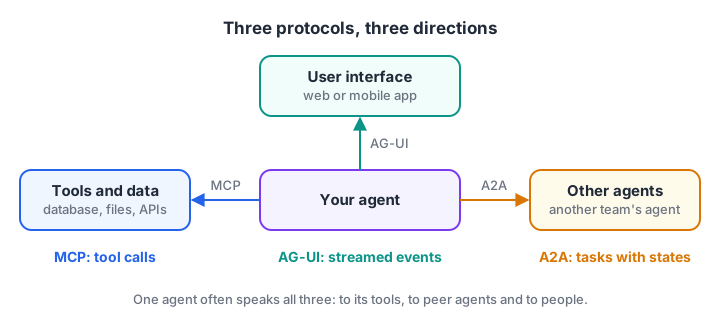
Three directions of communication, three protocols. Most real systems use more than one.
A2A vs MCP vs AG-UI: which does what?
The three protocols are complementary, not competing. The table shows where each sits.
| MCP | A2A | AG-UI | |
|---|---|---|---|
| Connects | Agent to tools and data | Agent to another agent | Agent to a user interface |
| Other side is | A tool server (passive) | An agent (reasons on its own) | A web or mobile front end |
| Unit of work | Tool call | Task with a lifecycle | Run, made of streamed events |
| Discovery | Server lists its tools | Agent card at a well-known URL | Front end knows the endpoint |
| Typical transport | stdio or streamable HTTP | JSON-RPC, gRPC or HTTP+JSON | HTTP with server-sent events |
The key difference between MCP and A2A is autonomy. An MCP tool does exactly what it is told. An A2A agent receives a goal, decides how to reach it, may ask questions back and may take minutes to finish. That is why A2A is built around tasks with states rather than single calls.
How does the A2A protocol work?
A2A has three core ideas: agent cards for discovery, messages for communication, and tasks for tracking work.
Agent cards: how agents find each other
Every A2A agent publishes a JSON document called an agent card at /.well-known/agent-card.json on its server. The card says who the agent is, what skills it has, where to send requests and which authentication it needs. Here is a trimmed example for a hotel-search agent.
{
  "name": "Hotel Finder",
  "description": "Finds and compares hotels for a city, dates and budget.",
  "version": "1.2.0",
  "supportedInterfaces": [
    {"url": "https://hotels.example.com/a2a", "protocolBinding": "JSONRPC", "protocolVersion": "1.0"}
  ],
  "capabilities": {"streaming": true, "pushNotifications": false},
  "defaultInputModes": ["text/plain"],
  "defaultOutputModes": ["text/plain", "application/json"],
  "skills": [
    {"id": "hotel-search", "name": "Hotel search",
     "description": "Search hotels by city, dates, guests and max price per night.",
     "tags": ["travel", "hotels"], "examples": ["3-star hotels in Goa, 20-23 Dec, under Rs 4000"]}
  ]
}
A client agent reads cards, picks an agent whose skills match the job, and sends it a message. The next block simulates that discovery step and builds a JSON-RPC request in the A2A 1.0 shape.
import json, uuid

CARDS = [
    {"name": "Hotel Finder", "url": "https://hotels.example.com/a2a",
     "skills": [{"id": "hotel-search", "tags": ["travel", "hotels"]}]},
    {"name": "Invoice Reader", "url": "https://docs.example.com/a2a",
     "skills": [{"id": "read-invoice", "tags": ["finance", "ocr"]}]},
]

def find_agent(tag):
    for card in CARDS:
        if any(tag in skill["tags"] for skill in card["skills"]):
            return card
    return None

card = find_agent("hotels")
request = {
    "jsonrpc": "2.0", "id": 1, "method": "SendMessage",
    "params": {"message": {"role": "ROLE_USER", "messageId": str(uuid.uuid4())[:8],
                           "parts": [{"text": "Hotels in Goa for 4 people, 20-23 Dec, under Rs 4000"}]}},
}
print("Chosen agent:", card["name"], "at", card["url"])
print(json.dumps(request, indent=2))
Older A2A versions (0.3 and earlier) used the method name message/send. Version 1.0 renamed the methods to SendMessage, GetTask, CancelTask and so on, so check which version a remote agent's card declares.
Tasks and their states
When the remote agent accepts work, it returns a task with an id and a state. The client can poll it, subscribe to a stream of updates, or receive push notifications. Results come back as artifacts, made of parts such as text or JSON.
The states that matter most are submitted, working, input-required, completed, failed, canceled and rejected. Input-required is what makes A2A feel like working with a colleague: the remote agent can stop and ask a question.
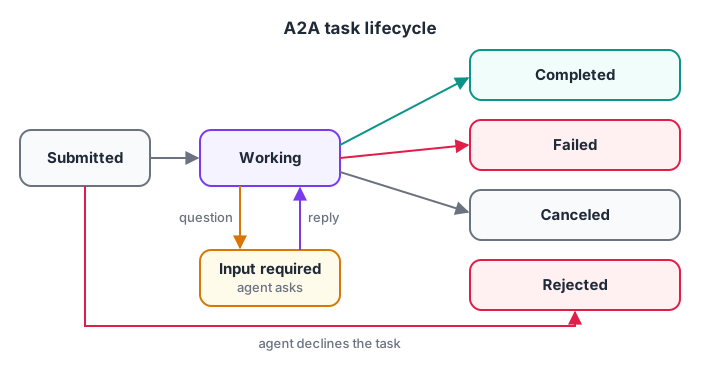
Input-required pauses the task until the client agent sends the missing details in a new message.
def hotel_agent(task, text):                       # the remote A2A agent
    task["history"].append(text)
    if "dec" not in " ".join(task["history"]).lower():
        task["state"] = "TASK_STATE_INPUT_REQUIRED"
        return "Which dates should I search?"
    task["state"] = "TASK_STATE_WORKING"
    task["artifacts"] = [{"parts": [{"data": {"hotel": "Palm Grove Inn", "per_night": 3600}}]}]
    task["state"] = "TASK_STATE_COMPLETED"
    return "Found 1 hotel within budget."

task = {"id": "task-501", "state": "TASK_STATE_SUBMITTED", "history": [], "artifacts": []}
for client_message in ["Hotels in Goa for 4 people under Rs 4000", "20 to 23 Dec"]:
    reply = hotel_agent(task, client_message)
    print(f"client: {client_message!r}\n  agent: {reply}  [{task['state']}]")
print("Artifact:", task["artifacts"][0]["parts"][0]["data"])
In a real deployment, the "client" here is itself an agent, for example the coordinator in the multi-agent travel finder project. It would answer the question from its own context instead of asking the user.
Quick check
Your support agent needs to hand a complex billing dispute to a separate billing agent run by another team. Which protocol fits?
A2A is designed for delegating tasks between independent agents, with task states such as input-required and completed.
How does the AG-UI protocol work?
AG-UI solves a different problem. A user watching an agent work wants to see text appear as it is generated, which tool is running, and how shared state such as a draft itinerary changes. AG-UI standardises this as a stream of typed events, usually sent over HTTP as server-sent events.
The event types fall into a few groups:
- Lifecycle:
RUN_STARTED,RUN_FINISHED,RUN_ERROR,STEP_STARTED,STEP_FINISHED. - Text messages:
TEXT_MESSAGE_START,TEXT_MESSAGE_CONTENT(one chunk of text),TEXT_MESSAGE_END. - Tool calls:
TOOL_CALL_START,TOOL_CALL_ARGS,TOOL_CALL_END,TOOL_CALL_RESULT. - State:
STATE_SNAPSHOT(the full state) andSTATE_DELTA(a JSON Patch change). - Special:
RAWandCUSTOMfor anything else.
The front end does not need to know which framework built the agent. It only reads events and updates the screen. The simulation below plays both sides: an agent that emits events, and a UI reducer that rebuilds the screen from them.
import json

events = [
    {"type": "RUN_STARTED", "threadId": "t1", "runId": "r1"},
    {"type": "TOOL_CALL_START", "toolCallId": "c1", "toolCallName": "search_hotels"},
    {"type": "TOOL_CALL_END", "toolCallId": "c1"},
    {"type": "STATE_DELTA", "delta": [{"op": "add", "path": "/hotel", "value": "Palm Grove Inn"}]},
    {"type": "TEXT_MESSAGE_START", "messageId": "m1", "role": "assistant"},
    {"type": "TEXT_MESSAGE_CONTENT", "messageId": "m1", "delta": "Palm Grove Inn "},
    {"type": "TEXT_MESSAGE_CONTENT", "messageId": "m1", "delta": "fits your budget."},
    {"type": "TEXT_MESSAGE_END", "messageId": "m1"},
    {"type": "RUN_FINISHED", "threadId": "t1", "runId": "r1"},
]

screen = {"status": "idle", "tools": [], "state": {}, "text": ""}
for e in events:
    wire = f"data: {json.dumps(e)}\n\n"              # what travels over SSE
    t = json.loads(wire[6:])["type"]
    if t == "RUN_STARTED": screen["status"] = "running"
    elif t == "TOOL_CALL_START": screen["tools"].append(e["toolCallName"] + " (running)")
    elif t == "TOOL_CALL_END": screen["tools"][-1] = screen["tools"][-1].replace("running", "done")
    elif t == "STATE_DELTA":
        for op in e["delta"]: screen["state"][op["path"].strip("/")] = op["value"]
    elif t == "TEXT_MESSAGE_CONTENT": screen["text"] += e["delta"]
    elif t == "RUN_FINISHED": screen["status"] = "finished"
print(screen)
Quick check
Which AG-UI event carries one chunk of the assistant's streamed reply?
TEXT_MESSAGE_CONTENT carries a delta of text between TEXT_MESSAGE_START and TEXT_MESSAGE_END.
A2A and AG-UI in production code
For A2A, any HTTP client can call a remote agent with the JSON-RPC binding. The official a2a-sdk Python package (1.3 at the time of writing) also provides client and server helpers. The raw call looks like this:
import uuid, httpx

body = {"jsonrpc": "2.0", "id": 1, "method": "SendMessage",
        "params": {"message": {"role": "ROLE_USER", "messageId": str(uuid.uuid4()),
                               "parts": [{"text": "Hotels in Goa, 20-23 Dec, under Rs 4000"}]}}}
card = httpx.get("https://hotels.example.com/.well-known/agent-card.json").json()
url = card["supportedInterfaces"][0]["url"]
reply = httpx.post(url, json=body, headers={"A2A-Version": "1.0", "Authorization": "Bearer YOUR_TOKEN"})
print(reply.json()["result"])        # a task (with id and status) or a direct message
For AG-UI, the ag-ui-protocol package (1.0) provides typed events and an encoder. This FastAPI endpoint streams a run to any AG-UI front end:
import uuid
from fastapi import FastAPI
from fastapi.responses import StreamingResponse
from ag_ui.core import (RunAgentInput, RunStartedEvent, RunFinishedEvent,
                        TextMessageStartEvent, TextMessageContentEvent, TextMessageEndEvent)
from ag_ui.encoder import EventEncoder

app = FastAPI()

@app.post("/agent")
async def run_agent(run: RunAgentInput):
    encoder = EventEncoder()

    async def events():
        yield encoder.encode(RunStartedEvent(thread_id=run.thread_id, run_id=run.run_id))
        msg_id = str(uuid.uuid4())
        yield encoder.encode(TextMessageStartEvent(message_id=msg_id, role="assistant"))
        async for chunk in my_agent_stream(run.messages):     # your agent's token stream
            yield encoder.encode(TextMessageContentEvent(message_id=msg_id, delta=chunk))
        yield encoder.encode(TextMessageEndEvent(message_id=msg_id))
        yield encoder.encode(RunFinishedEvent(thread_id=run.thread_id, run_id=run.run_id))

    return StreamingResponse(events(), media_type=encoder.get_content_type())
Serving either endpoint reliably, with authentication, queues and tracing, follows the patterns in deploying AI agents.
Which agent protocol do you need?
Use this decision list for your next project.
- Your agent needs tools or data (a database, files, an API): use MCP or plain function calling.
- Your agent must delegate to an agent owned by another team or company: use A2A, so neither side needs to know the other's framework.
- Your agent has a live user interface that should show progress, tool activity and shared state: use AG-UI.
- Everything is one codebase and one team: you may need none of them yet. Direct function calls between agents are simpler until you cross a team or vendor boundary.
Common mistakes with agent protocols
- Using A2A for tools. If the other side never reasons or asks questions, MCP or a plain API is simpler.
- Ignoring input-required. Clients that treat every response as final break when a remote agent asks a question.
- Skipping authentication. Agent cards declare security schemes for a reason; never expose an A2A endpoint publicly without them.
- Trusting remote agent output. Treat artifacts from another agent like any untrusted input and pass them through your guardrails.
- Mixing protocol versions. Check the version a card declares before sending requests.
Key takeaways
- MCP connects agents to tools, A2A connects agents to agents, AG-UI connects agents to users.
- A2A agents publish agent cards at a well-known URL and exchange tasks with explicit states.
- Input-required lets a remote agent ask questions mid-task.
- AG-UI streams typed events so any front end can show text, tool calls and state live.
- Adopt a protocol when you cross a team, vendor or UI boundary, not before.
FAQ
What is the A2A protocol?
A2A, short for Agent2Agent, is an open protocol that lets AI agents built by different teams or vendors work together. Agents describe themselves in agent cards, accept messages, and track work as tasks with states such as working, input-required and completed. It is now developed as an open project under the Linux Foundation.
What is the difference between A2A and MCP?
MCP connects an agent to tools and data sources that do exactly what they are asked. A2A connects an agent to another agent that can plan, ask questions and work for minutes on a task. Many systems use both: MCP inside each agent, A2A between agents.
What is AG-UI used for?
AG-UI standardises how an agent streams its work to a user interface. The agent sends typed events for run start and finish, text chunks, tool calls and state changes, and the front end updates the screen from them. Any AG-UI front end can then work with any AG-UI-compatible agent backend.
Do I need A2A for a multi-agent system?
Not always. If all agents live in one codebase, direct function calls or a framework's handoffs are simpler and faster. A2A pays off when agents are owned by different teams, written in different frameworks or run by different companies, because it gives them a shared, documented contract.
Can I learn agent protocols like MCP and A2A in Indore?
Yes. The Generative AI curriculum at Debugshala covers building agents with tools and protocols, taught at the Old Palasia campus in English and Hindi, with a free demo class before you pay. To warm up your reasoning skills, solve the logic and coding MCQs on Debugshala Test.
From the team behind this site
Go further with the Generative AI Course at Debugshala
These tutorials are written by Debugshala, a training and placement institute at Old Palasia, Indore. The classroom course adds live mentoring, real projects and interview preparation.
- Offline classes at Old Palasia, Indore
- Free demo class before you pay
- Non-IT, fresher and year-gap friendly
- Placement assistance
700+ students placed · 200+ hiring partners · 4.9★ Google rating
