

Building Blocks of AI Agents: Role, Tools, Memory, Guardrails
The six building blocks of AI agents: role, task, tools, memory, guardrails and cooperation, how each shapes behaviour, and a Python agent spec you can lint.
Suppose a small clinic in Vijay Nagar hires its first front-desk executive. On day one, the doctor does not just say "help patients". She explains the job.
"You are the front desk. Your job is booking and rescheduling appointments. You can use the booking software and the patient register. Write down anything a patient tells you about allergies. Never give medical advice. If someone asks about a bill, send them to the accounts person."
That short briefing has six parts: a title, a duty, the equipment, a notebook, rules, and who to hand over to. Leave out any one and the new hire will make predictable mistakes.
What are the building blocks of an AI agent?
An AI agent needs the same briefing. The title is its role. The duty is its task. The software and register are its tools. The notebook is its memory. "Never give medical advice" is a guardrail. "Send billing questions to accounts" is cooperation.
The building blocks of an AI agent are its role, task, tools, memory, guardrails and cooperation rules: six design decisions that together decide what the agent knows, what it can do and when it must stop or hand over.
The introduction to AI agents looked at the engine: an LLM in a loop with tools and memory. This article looks at the design sheet you fill in before switching that engine on. Each block maps to something concrete in code.
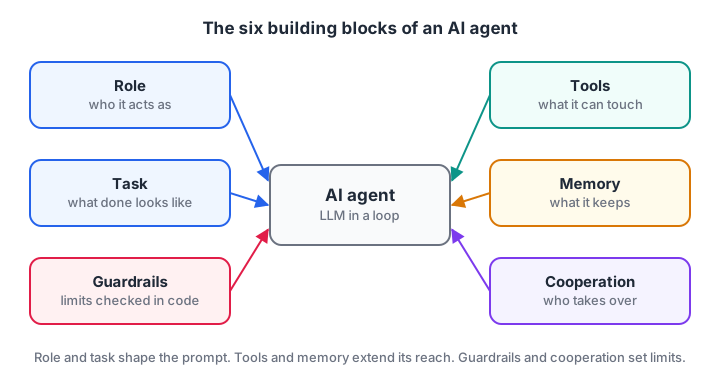
Role and task shape the prompt; tools and memory extend what the agent can reach; guardrails and cooperation decide its limits.
Quick check
Which building block decides that billing questions go to a different agent?
Cooperation rules define where this agent's job ends and who takes over.
Role and task: who the agent is and what it must finish
Role
The role tells the model which expertise and tone to use. "You are a front-desk assistant for a clinic" produces different behaviour from "You are a helpful assistant", even with the same question.
A good role names the domain and audience, and what the agent is not. That one sentence rules out many off-topic answers.
Task
The task is the concrete outcome the agent must produce, with a clear finish line. "Help with appointments" has no finish line. "Book, move or cancel an appointment and confirm the date and time back to the patient" does.
Focus matters. One agent asked to do bookings, billing, reports and marketing will do all four badly, because every extra duty adds instructions and tools that compete for attention. Narrow agents are easier to test.
Both blocks end up in the system prompt. Here is a small builder that turns a spec into one:
spec = {
    "role": "front-desk assistant for a family clinic in Vijay Nagar, Indore",
    "task": "book, move or cancel appointments and confirm date and time to the patient",
    "rules": ["Never give medical advice.", "Ask before cancelling anything."],
    "done_when": "the patient has a confirmed slot or has declined",
}

def build_system_prompt(s):
    lines = [f"You are the {s['role']}.",
             f"Your task: {s['task']}.",
             "Rules:"]
    lines += [f"- {r}" for r in s["rules"]]
    lines.append(f"You are finished when {s['done_when']}.")
    return "\n".join(lines)

print(build_system_prompt(spec))
print("\nPrompt length:", len(build_system_prompt(spec).split()), "words")
Keeping the spec as data rather than a hand-typed paragraph means you can version it, review it and test changes one field at a time. The wider practice of deciding what goes into the model's view is called context engineering.
Tools: what the agent is allowed to touch
Tools are the functions the agent can request: check free slots, create a booking, look up a patient. Without tools an agent can only talk. With them it can read live data and change things.
To the model, a tool is just a name, a description and a list of parameters. It never sees your code. So the description must say what the tool returns and when to use it, and the parameters should be as strict as possible, such as a date in YYYY-MM-DD format instead of free text.
Tools can be written as your own Python functions or discovered from external servers through the Model Context Protocol. The mechanics of schemas and calls are covered in tools and function calling for agents.
Keep the list short: three to six clear tools beat twenty overlapping ones.
Memory and cooperation: what it remembers and who it works with
Memory
Memory decides what the agent carries forward. Within one conversation, that is the running history: "the patient said Tuesday mornings are best". Across conversations, it might be a stored fact: "this patient is allergic to penicillin".
The design question is not "should it remember?" but "what exactly should it keep, for how long, and who can see it?". Medical or financial details need stricter rules than a preferred time slot. The different kinds of memory get their own article, memory in AI agents.
Cooperation
No agent should do everything. Cooperation defines where its job ends and someone else's begins: another agent, a human or a fixed workflow.
The clinic agent hands billing questions to an accounts agent and hands anything medical to a human nurse. This keeps each agent focused and gives risky decisions to the right owner. When several agents are designed to work together, you are building a multi-agent system.
Guardrails: the rules around every action
Guardrails are limits enforced outside the model. "Never give medical advice" in the prompt is a request. A check in your code that blocks the cancel_appointment tool until the patient confirms is a guarantee.
You need both. Prompt rules shape what the model tries to do. Code checks stop it when it tries anyway.
Typical guardrails are a maximum number of steps, an allowlist of tools, validation of every argument, human approval for irreversible actions, and filters on what the agent is allowed to say. These are covered in depth in guardrails for AI agents.
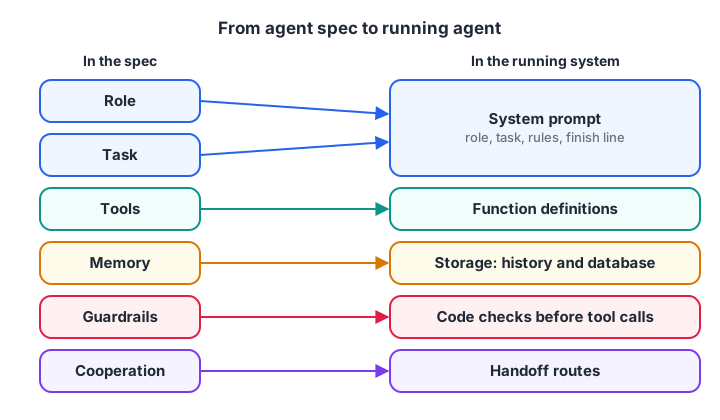
Every block in the spec turns into a specific piece of the running agent. If a block has no home in your code, it is only a wish.
Quick check
Where should a rule like "never cancel without confirmation" be enforced most reliably?
Prompt rules guide the model, but a check in your code is the only place that can actually block the action.
Write an agent spec and lint it in Python
Here is the whole design as a Python dataclass, plus a small linter that flags the common weak spots before you run anything. The first spec is deliberately sloppy.
from dataclasses import dataclass, field

@dataclass
class AgentSpec:
    role: str
    task: str
    tools: dict                       # name -> description
    memory: list = field(default_factory=list)
    guardrails: list = field(default_factory=list)
    handoffs: dict = field(default_factory=dict)

def lint(spec):
    issues = []
    if len(spec.role.split()) < 4: issues.append("role is too vague")
    if " and " in spec.task and spec.task.count(",") >= 2: issues.append("task does too many things")
    if len(spec.tools) > 6: issues.append(f"{len(spec.tools)} tools is a lot; trim the list")
    issues += [f"tool '{n}' needs a real description" for n, d in spec.tools.items() if len(d.split()) < 5]
    if not any("step" in g for g in spec.guardrails): issues.append("no step limit")
    if not spec.handoffs: issues.append("no handoff route for out-of-scope requests")
    return issues or ["looks good"]

sloppy = AgentSpec("assistant", "handle bookings, billing, reports and marketing",
                   {"get": "gets data", "do": "does it"})
clinic = AgentSpec("front-desk assistant for a clinic",
                   "book, move or cancel appointments",
                   {"find_slots": "Return free slots for a date as HH:MM strings",
                    "book": "Book a slot for a patient id and return a booking id"},
                   ["patient's preferred times"], ["max 6 steps", "confirm before cancel"],
                   {"billing": "accounts_agent", "medical": "human_nurse"})
for name, s in [("sloppy", sloppy), ("clinic", clinic)]:
    print(name, "->", lint(s))
The linter is crude, but the habit pays off: reviewing a spec takes minutes, debugging an agent with no finish line takes days.
Watch the cooperation block at work
This simulation routes three patient messages. Simple keyword rules stand in for the LLM's judgement, but the shape is real: the agent either handles the request with its own tools or hands it over, and it writes useful facts to memory.
HANDOFFS = {"bill": "accounts_agent", "fee": "accounts_agent",
            "pain": "human_nurse", "medicine": "human_nurse"}
memory = {}

def front_desk(patient, message):
    text = message.lower()
    for word, target in HANDOFFS.items():
        if word in text:
            return f"Handing over to {target}"
    if "tuesday" in text:
        memory[patient] = "prefers Tuesday"
    pref = memory.get(patient, "no preference yet")
    return f"Booking a slot for {patient} ({pref})"

messages = [("Asha", "Can I come on Tuesday morning?"),
            ("Ravi", "Why is my bill 1,200 rupees?"),
            ("Asha", "Which medicine should I take for pain?"),
            ("Asha", "Please book my follow-up")]
for patient, msg in messages:
    print(f"{patient}: {msg}\n  -> {front_desk(patient, msg)}")
print("Memory:", memory)
Asha's last message gets a booking that uses her remembered preference, while her medical question goes to a human. That is three blocks (tools, memory and cooperation) working together.
Common mistakes when designing agent building blocks
- A generic role. "You are a helpful AI" gives the model nothing to anchor on. Name the domain and the audience.
- No finish line. Without a "done when" condition, agents keep asking follow-up questions or call tools they don't need.
- Guardrails only in the prompt. The model can ignore a sentence. It cannot ignore a code check that blocks the call.
- Remembering everything. Storing every message makes retrieval noisy and creates privacy risk. Decide what is worth keeping.
- No exit route. An agent with no handoff will attempt questions it should refuse, often confidently.
- Changing several blocks at once. Edit one block at a time so you know which change fixed or broke things.
Key takeaways
- Six blocks: role, task, tools, memory, guardrails, cooperation.
- Role and task become the system prompt, so make them specific and give the task a finish line.
- Tools are judged by their names and descriptions alone. Keep them few and clear.
- Guardrails belong in code as well as in the prompt.
- Write the spec down and review it before building, then see how blocks combine in agentic AI design patterns.
FAQ
What are the main components of an AI agent?
The main components are a role, a focused task, tools, memory, guardrails and cooperation rules, all driven by an LLM inside a loop. The LLM makes decisions, while the six blocks define what it knows, what it can reach and where its responsibilities end.
What is a role in an AI agent?
The role is a short statement in the system prompt that tells the model who it is acting as, such as "front-desk assistant for a clinic". It sets expertise, tone and scope, which makes answers more relevant and helps the model decline requests that fall outside that job.
How many tools should an AI agent have?
Start with three to six. Each additional tool is another option the model must weigh on every step, and overlapping tools cause wrong choices. If an agent needs many more, split the work across several focused agents or load tools on demand.
Are guardrails part of the AI agent itself?
Yes. Some live in the prompt as instructions, but the important ones live in the code around the model: step limits, tool allowlists, argument validation and human approval. Treat them as a core building block, not an add-on after launch.
Can I learn to design AI agents in Indore?
Yes. Agent design, from writing the spec to wiring tools and guardrails, is part of the Generative AI programme taught at Debugshala's Indore campus, in English and Hindi. Book the free demo class first. For quick revision, attempt coding MCQs on Debugshala Test.
From the team behind this site
Go further with the Generative AI Course at Debugshala
These tutorials are written by Debugshala, a training and placement institute at Old Palasia, Indore. The classroom course adds live mentoring, real projects and interview preparation.
- Offline classes at Old Palasia, Indore
- Free demo class before you pay
- Non-IT, fresher and year-gap friendly
- Placement assistance
700+ students placed · 200+ hiring partners · 4.9★ Google rating
