

Build a ReAct Agent from Scratch in Python (No Framework)
Build a ReAct agent from scratch in Python: write the prompt, parse Thought and Action text, run tools safely, stop loops, then plug in a real LLM.
Imagine you are helping a friend over a phone call. Your friend is brilliant at reasoning but has no laptop. You have the laptop but no idea how to solve the problem.
So you agree on a routine. Your friend thinks aloud, then says exactly one instruction: "Search for the poha price." You do it and read out the result. Your friend thinks again and gives the next instruction. When your friend says "Final answer", the call ends.
The friend never touches the laptop. You never make decisions. And if your friend starts imagining results ("…and it probably says 60 rupees"), you interrupt and read out the real one.
What is a ReAct agent?
Your friend is the LLM: it reasons and chooses, but can only speak. You are the agent program: you parse each instruction, run the tool, and report back. The agreed routine is the ReAct format: Thought, Action, Action Input, then Observation. Interrupting imagined results is output parsing.
A ReAct agent is an LLM-driven loop in which the model writes its reasoning and a chosen action as text, and the surrounding program parses that text, executes the action and feeds the real result back, repeating until the model gives a final answer.
ReAct comes from the 2022 research paper "ReAct: Synergizing Reasoning and Acting in Language Models". The overview of AI agents showed the idea with a dictionary-based toy. Here you build the real thing: a text protocol, a parser and a loop that survive messy model output. The code targets Python 3.10+ and uses only the standard library.
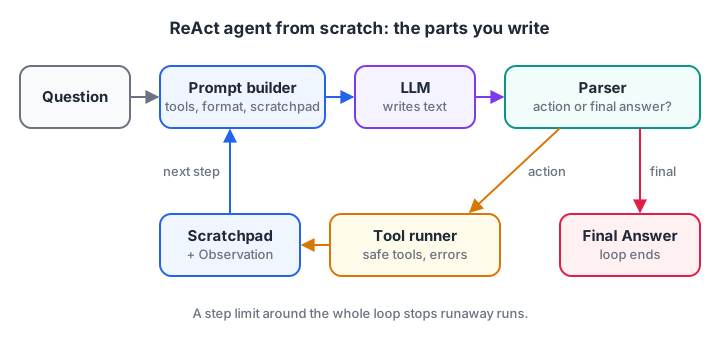
Four parts you write yourself (prompt builder, parser, tool runner, loop) around one part you call (the LLM).
Step 1: Write the ReAct prompt template
The prompt tells the model three things: which tools exist, the exact output format, and the question. Tool descriptions are generated from a dictionary, so adding a tool never means editing the prompt by hand.
TOOLS = {
    "price_lookup": "Price per kg in rupees of a grocery item. Input: item name, e.g. poha",
    "calculator":   "Evaluate an arithmetic expression. Input: e.g. (3*60 + 2*180) * 1.05",
}

TEMPLATE = """Answer the question using the tools below.

Tools:
{tools}

Use exactly this format:
Thought: what you should do next
Action: one tool name from [{names}]
Action Input: the input for the tool
(you will then receive an Observation; repeat as needed)
Thought: I now know the answer
Final Answer: the answer for the user

Question: {question}
"""

def build_prompt(question, scratchpad=""):
    tools = "\n".join(f"- {name}: {desc}" for name, desc in TOOLS.items())
    return TEMPLATE.format(tools=tools, names=", ".join(TOOLS), question=question) + scratchpad

print(build_prompt("What do 3 kg poha and 2 kg sev cost with 5% GST?"))
The scratchpad is everything written so far: previous thoughts, actions and observations. It grows each step and is the agent's short-term memory.
Step 2: Parse the model's output
The model's reply is plain text, so your code must pull out the action and its input, or the final answer. Models are inconsistent: extra spaces, missing lines, or a made-up "Observation:" line of their own. A good parser handles all of these.
import re

def parse(text):
    text = text.split("\nObservation:")[0]        # drop any observation the model invented
    if "Final Answer:" in text:
        return {"type": "final", "answer": text.split("Final Answer:", 1)[1].strip()}
    m = re.search(r"Action:\s*(\w+)\s*\n\s*Action Input:\s*(.+)", text)
    if m:
        return {"type": "action", "tool": m.group(1), "input": m.group(2).strip()}
    return {"type": "error", "message": "Use the Action / Action Input format or give a Final Answer."}

samples = [
    "Thought: I need the poha price.\nAction: price_lookup\nAction Input: poha",
    "Thought: Done.\nFinal Answer: Rs 567",
    "Thought: I will just guess the price.",
    "Thought: Check sev.\nAction: price_lookup\nAction Input: sev\nObservation: 999",
]
for s in samples:
    print(parse(s))
The last sample matters most. The model tried to write its own observation, "999". The parser cut it off, so only the real tool result will ever enter the scratchpad.
Quick check
Why does the parser cut the model's output at "Observation:"?
Models sometimes predict their own observation text; cutting it ensures the next step is grounded in the actual tool output.
Step 3: Run the ReAct loop
Now connect everything. Below, fake_llm stands in for a real model. It reads the observations in the scratchpad and writes the next step as text, just as an LLM would. The calculator only accepts digits and operators, because running model-written code with an unrestricted eval would let the model execute anything.
import re
PRICES = {"poha": 60, "sev": 180}

def calculator(expr):
    if not re.fullmatch(r"[\d\s+\-*/().]+", expr):
        return "Error: only arithmetic is allowed"
    return str(round(eval(expr, {"__builtins__": {}}), 2))

TOOLS = {"price_lookup": lambda item: str(PRICES.get(item.lower(), "not found")), "calculator": calculator}

def fake_llm(prompt):                          # reacts to real observations, like an LLM would
    obs = re.findall(r"^Observation: (.*)$", prompt, re.M)
    if len(obs) == 0: return "Thought: I need the poha price.\nAction: price_lookup\nAction Input: poha"
    if len(obs) == 1: return "Thought: Now sev.\nAction: price_lookup\nAction Input: sev"
    if len(obs) == 2: return f"Thought: Add GST.\nAction: calculator\nAction Input: (3*{obs[0]} + 2*{obs[1]}) * 1.05"
    return f"Thought: I now know the answer.\nFinal Answer: The total is Rs {obs[2]}."

def run(question, max_steps=6):
    scratchpad = ""
    for step in range(1, max_steps + 1):
        out = fake_llm(f"Question: {question}\n{scratchpad}").split("\nObservation:")[0]
        if "Final Answer:" in out:
            return out.split("Final Answer:")[1].strip()
        m = re.search(r"Action:\s*(\w+)\s*\n\s*Action Input:\s*(.+)", out)
        if not m: obs = "Error: use the Action / Action Input format."
        elif m[1] not in TOOLS: obs = f"Error: unknown tool. Choose from {list(TOOLS)}."
        else: obs = TOOLS[m[1]](m[2].strip())
        print(f"Step {step}: {m[1] if m else '?'}({m[2] if m else ''}) -> {obs}")
        scratchpad += f"{out}\nObservation: {obs}\n"
    return "Stopped: step limit reached."

print(run("What do 3 kg poha and 2 kg sev cost with 5% GST?"))
Change PRICES["sev"] to 200 and run again. The final answer changes because the fake model builds the calculator input from real observations, not from memory.
Notice three design choices. Errors become observations, so the model can correct itself instead of the program crashing. Unknown tools get a helpful message listing valid names. And the for loop has a hard step limit; if the Python for loop syntax is unfamiliar, review it first.
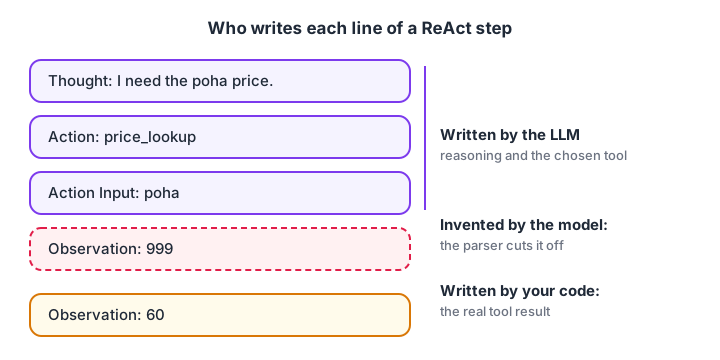
The model writes the top half of every step. Your code always writes the Observation.
Quick check
What should the loop do when the model names a tool that does not exist?
An informative observation lets the model correct itself on the next step.
Step 4: Swap in a real LLM
To use a real model, replace fake_llm with a function that sends the prompt and returns text. Here is one way with the OpenAI Python SDK's Responses API; any provider with a text-in, text-out API works the same way.
from openai import OpenAI

client = OpenAI()  # reads the OPENAI_API_KEY environment variable

def real_llm(prompt: str) -> str:
    response = client.responses.create(
        model="your-model-name",      # pick a current model from the provider's docs
        input=prompt,
    )
    return response.output_text
Then pass the full prompt from build_prompt(question, scratchpad) instead of the short one used in the simulation. Two practical notes. First, keep your parser strict, because even strong models occasionally drift from the format.
Second, many modern APIs offer native tool and function calling, which returns structured calls instead of text. The text version you just built is still worth knowing, because it shows exactly what native tool calling automates.
Handling ReAct failures: loops, bad formats and tool errors
The agent repeats itself
A common failure is calling the same tool with the same input again and again. Track previous actions and reply with a nudge instead of running the tool twice.
seen = set()

def guarded_call(tool, arg, tools):
    key = (tool, arg.lower())
    if key in seen:
        return "You already ran this exact action. Use the earlier observation or try something different."
    seen.add(key)
    return tools[tool](arg)

tools = {"search": lambda q: f"0 results for '{q}'"}
for tool, arg in [("search", "indore metro timings"), ("search", "Indore Metro timings"),
                  ("search", "indore metro schedule")]:
    print(f"{tool}({arg!r}) -> {guarded_call(tool, arg, tools)}")
Bad format and tool errors
If parsing fails, send back an observation that restates the expected format; one reminder usually fixes it. If a tool raises an exception, catch it and return a short error message as the observation. Never let a tool exception kill the loop, and never return a full stack trace, which wastes tokens and can leak details.
Cost and step limits
Each step re-sends the growing prompt. Cap steps (5 to 10 is typical), cap the total tokens per run, and log every step so you can see where runs go wrong. Systematic testing of agents is the subject of evaluating AI agents.
Common mistakes when building a ReAct agent
- Trusting model-written observations. Always cut the output at "Observation:" and add the real result yourself.
- Using
evalon model output. Restrict inputs to a safe grammar, or use a proper expression parser. - Crashing on errors. Turn parse errors and tool exceptions into observations the model can react to.
- No step limit. A confused model will loop forever if allowed.
- Vague tool descriptions. The description and example input are all the model knows about a tool.
- Testing on one question. Run 20 or more varied questions and count how many finish correctly within the limit.
Key takeaways
- ReAct is a text protocol: Thought, Action, Action Input from the model, Observation from your code.
- The four parts are prompt template, parser, tool runner and loop.
- Strict parsing, safe tools and error observations make the loop robust.
- Step limits and repeat detection stop runaway loops.
- Swapping the fake model for a real one is a single function change.
FAQ
What is the ReAct pattern in AI agents?
ReAct stands for reasoning and acting. The model alternates between writing a thought about what to do, choosing an action such as a tool call, and reading the observation that results. Repeating this lets it solve multi-step problems while grounding each step in real data rather than guesses.
Can I build an AI agent without LangChain or other frameworks?
Yes. As this tutorial shows, a working ReAct agent needs a prompt template, a regex parser, a dictionary of tools and a loop, all in plain Python. Frameworks add tracing, retries and integrations, but building it yourself first makes their behaviour far easier to understand.
Is ReAct still used now that LLMs have native tool calling?
The idea is everywhere; the text format less so. Native tool calling returns structured calls instead of parsed text, but the loop of think, act and observe is the same. Many agent frameworks still describe their default loop as ReAct-style.
How many steps should a ReAct agent be allowed?
For most tasks, 5 to 10. Measure how many steps successful runs take on your test questions and set the limit a little above that. A higher limit rarely helps, because runs that need far more steps are usually stuck rather than close to an answer.
Where can I learn to build AI agents hands-on in Indore?
Debugshala's Generative AI batches at Old Palasia, Indore include building agents like this one, taught in English and Hindi, with a free demo class before you enrol. To sharpen the Python you need, work through coding challenges on Debugshala Test.
From the team behind this site
Go further with the Generative AI Course at Debugshala
These tutorials are written by Debugshala, a training and placement institute at Old Palasia, Indore. The classroom course adds live mentoring, real projects and interview preparation.
- Offline classes at Old Palasia, Indore
- Free demo class before you pay
- Non-IT, fresher and year-gap friendly
- Placement assistance
700+ students placed · 200+ hiring partners · 4.9★ Google rating
