

AI Agents Explained: LLM, Tools, Memory and the Agent Loop
AI agents explained: how an LLM, tools, memory and a loop work together, the ReAct pattern, planning and guardrails, with a toy agent you can run in Python.
You message your cousin on Friday: "Plan a Sunday trip to Mandu for four of us, under 2,000 rupees, and tell me if it will rain." You do not tell him how.
He opens a weather app: clear skies. He checks bus fares from Indore: 180 rupees each way. He works out 4 people × 2 trips × 180 = 1,440 rupees.
Still under budget, so he adds an entry ticket estimate, notes everything on his phone, and replies with a plan. If the weather had shown heavy rain, he would have changed course and suggested Patalpani instead.
Nobody gave him a script. He looked, acted, checked the result, and decided what to do next, over and over, until the job was done. That is an AI agent.
What is an AI agent?
Mapping the cousin to the parts: his reasoning is the LLM, the weather and bus apps are tools, the notes on his phone are memory, and the look-act-check cycle is the agent loop. Your instruction "don't book anything without asking me" is a guardrail.
An AI agent is a system in which an LLM repeatedly decides which action to take, calls tools to carry it out, observes the results and updates its memory, looping until it reaches a goal or a stopping rule.
A short way to remember it: agent = LLM + tools + memory + loop.
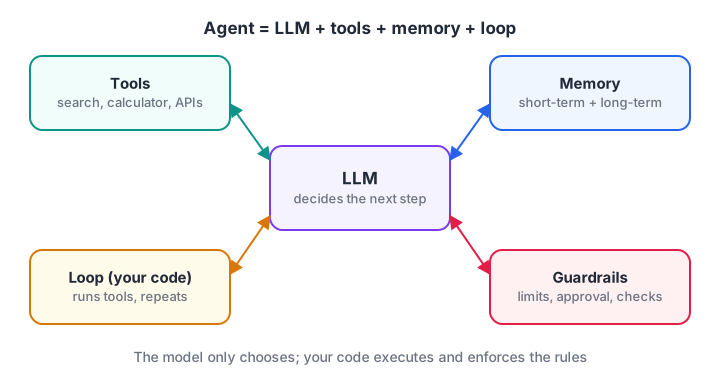
The LLM decides; tools act; memory holds state; the loop and guardrails decide when to continue or stop.
Compare this with a plain chatbot. A chatbot answers once from what it knows. A RAG system retrieves documents and answers once. An agent can take many steps, choose different tools along the way and react to what it finds.
The four building blocks of an agent
1. The LLM: the decision maker
At each step the LLM sees the goal, the list of available tools and everything that happened so far, and outputs either a tool call (name plus arguments) or a final answer. Modern LLM APIs support this directly through "tool calling" or "function calling", where you pass tool descriptions as JSON Schema and the model replies with structured calls.
2. Tools: the hands
Tools are functions the agent can run: search, a calculator, a database query, sending an email, running code. Good tools have clear names, precise descriptions and strict input schemas, because the description is all the model knows about them. Protocols such as MCP let an agent discover tools from external servers instead of hard-coding them.
3. Memory: what the agent knows so far
Short-term memory is the running transcript of thoughts, tool calls and observations, kept in the context window. Long-term memory stores facts across sessions, such as user preferences, often in a database or a vector store searched with embeddings. Long tasks need summarisation, because the transcript eventually outgrows the context window.
4. The loop: what makes it an agent
The loop is ordinary code that calls the model, runs the chosen tool, appends the result to memory and repeats. The LLM never runs tools itself; your program does. That is important, because it means your code can check every action before it happens.
Quick check
In an agent loop, who actually runs the tool?
The model only outputs a tool call; the surrounding code executes it, which is where guardrails can intervene.
The ReAct loop: reason, act, observe
The most widely used agent pattern is ReAct (short for reasoning and acting), introduced in a 2022 research paper. The model alternates between a thought, an action and an observation.
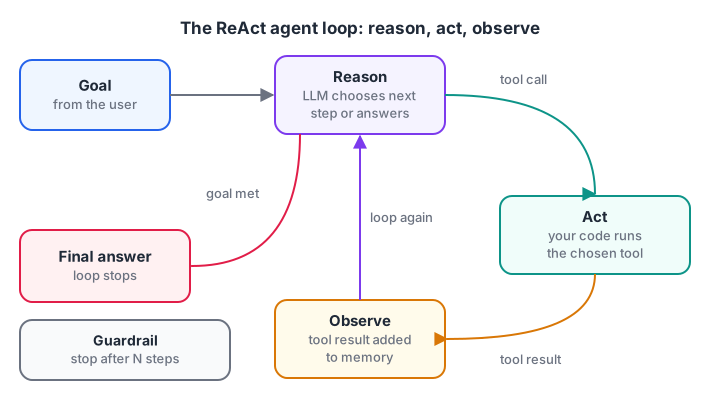
Each pass through the loop adds one thought, one action and one observation to the agent's memory.
A trace for the Mandu trip might read:
Thought: I need the weather in Mandu on Sunday.
Action: get_weather("Mandu")
Observation: Clear, 29 C
Thought: Weather is fine. Now I need the bus fare.
Action: bus_fare("Indore-Mandu")
Observation: 180
Thought: 4 people x 2 trips x 180. I should calculate.
Action: multiply(180, 8)
Observation: 1440
Thought: 1440 is under the 2000 budget. I can answer.
Final answer: Clear weather, bus total 1440 rupees, within budget.
Grounding each step in a real observation is what stops the agent from guessing the fare or doing mental arithmetic wrong.
Quick check
What does the "Observation" step in ReAct contain?
Observations feed real tool results back to the model so the next thought is grounded in facts.
Build a toy AI agent loop in Python
A real agent calls an LLM at each step. To keep this runnable offline, fake_model uses simple rules to choose the next tool by looking at memory. The loop around it is exactly the shape of a real agent.
TOOLS = {
    "get_weather": lambda city: {"Mandu": "Clear, 29 C", "Ujjain": "Rain, 24 C"}.get(city, "unknown"),
    "bus_fare":    lambda route: {"Indore-Mandu": 180, "Indore-Ujjain": 120}.get(route, 0),
    "multiply":    lambda a, b: a * b,
}

def fake_model(goal, memory):
    seen = {step["action"]: step["observation"] for step in memory}
    if "get_weather" not in seen:
        return {"thought": "Check the weather first", "action": "get_weather", "args": ["Mandu"]}
    if "Rain" in seen["get_weather"]:
        return {"final": "Rain expected. Suggest postponing the trip."}
    if "bus_fare" not in seen:
        return {"thought": "Need the bus fare", "action": "bus_fare", "args": ["Indore-Mandu"]}
    if "multiply" not in seen:
        return {"thought": "4 people x 2 trips", "action": "multiply", "args": [seen["bus_fare"], 8]}
    total = seen["multiply"]
    verdict = "within" if total <= 2000 else "over"
    return {"final": f"Weather is clear. Bus total is {total} rupees, {verdict} the 2000 budget."}

goal, memory = "Plan a Mandu trip for 4 under 2000 rupees", []
for step in range(1, 6):                       # hard step limit
    decision = fake_model(goal, memory)
    if "final" in decision:
        print("Final answer:", decision["final"])
        break
    result = TOOLS[decision["action"]](*decision["args"])
    memory.append({"action": decision["action"], "observation": result})
    call = f"{decision['action']}({', '.join(map(repr, decision['args']))})"
    print(f"Step {step}: {decision['thought']} -> {call} = {result}")
Change "Mandu" to "Ujjain" in the first rule and the agent takes a different path and stops early. That branching on observations is what separates an agent from a fixed script. If the syntax looks dense, review Python for loops and if-else statements first.
Planning: thinking before acting
ReAct decides one step at a time, which is flexible but can wander on long tasks. A common alternative is plan-and-execute: the LLM first writes a numbered plan, the loop executes each step, and the agent re-plans when a step fails.
plan = ["fetch attendance sheet", "compute percentages", "email low-attendance list"]
available = {"fetch attendance sheet", "compute percentages", "draft email for review"}

def replan(failed_step):
    # a real agent would ask the LLM for a safer alternative
    return "draft email for review" if "email" in failed_step else None

done = []
for step in plan:
    if step not in available:
        alternative = replan(step)
        print(f"Cannot do '{step}'. Re-planned to: '{alternative}'")
        step = alternative
    if step:
        done.append(step)
        print("Done:", step)
print("Completed", len(done), "of", len(plan), "steps")
Plans also make agents easier to supervise: a human can read the plan and approve it before anything runs.
Guardrails: keeping agents safe and affordable
An agent that can act can also act wrongly, and every loop costs tokens. Production agents layer several guardrails:
- Step and cost limits: stop after a fixed number of iterations or a token budget, so a confused agent cannot loop forever.
- Tool allowlists: give each agent only the tools its job needs.
- Argument validation: check types, ranges and formats before running a tool.
- Human approval: require confirmation for actions that pay, send, delete or publish.
- Treat observations as data: a fetched web page may contain instructions aimed at the agent. They must never override the system prompt.
- Logging: record every thought, call and result so you can debug and audit.
Here is a guardrail check that runs before every tool call:
ALLOWED = {"search_courses", "get_batch_timings", "send_email"}
NEEDS_APPROVAL = {"send_email"}
MAX_STEPS = 4

def check(step, action, args, approved=False):
    if step > MAX_STEPS:
        return "BLOCK: step limit reached"
    if action not in ALLOWED:
        return f"BLOCK: '{action}' is not on the allowlist"
    if action == "send_email" and not args.get("to", "").endswith("@debugshala.com"):
        return "BLOCK: external email address"
    if action in NEEDS_APPROVAL and not approved:
        return "ASK HUMAN: approval required"
    return "ALLOW"

proposals = [
    (1, "get_batch_timings", {"batch": "GenAI"}, False),
    (2, "delete_records", {}, False),
    (3, "send_email", {"to": "someone@gmail.com"}, False),
    (4, "send_email", {"to": "info@debugshala.com"}, False),
    (5, "search_courses", {"q": "RAG"}, False),
]
for p in proposals:
    print(p[:2], "->", check(*p))
Common mistakes when building AI agents
- Using an agent when a script would do. If the steps are always the same, a fixed pipeline is cheaper, faster and more reliable.
- Too many tools. Thirty similar tools confuse the model. Start with three to five, clearly named.
- Vague tool descriptions. "Gets data" tells the model nothing. Say what it returns and when to use it.
- No stopping rule. Always cap steps and cost.
- Trusting tool output blindly. Validate results and treat external text as untrusted.
- No evaluation. Test agents on a fixed set of tasks and measure success rate, steps taken and cost, not just one happy demo.
Key takeaways
- Agent = LLM + tools + memory + loop.
- ReAct alternates reasoning, acting and observing until a final answer.
- Plan-and-execute adds structure and supervision for longer tasks.
- Your code, not the model, runs tools, so it is where guardrails live.
- Cap steps, allowlist tools, validate inputs and ask humans before risky actions.
FAQ
What is the difference between an AI agent and a chatbot?
A chatbot usually answers each message in one step from its own knowledge or retrieved text. An agent can take several steps, call tools, read results and change its approach before answering. Many modern chat apps include some agent behaviour, so the line is about how much the system acts on its own.
Do AI agents need a special framework?
No. As the toy above shows, an agent is a loop around model calls and functions. Frameworks help with tool schemas, memory, retries and tracing, but learning the raw loop first makes any framework easier to understand and debug.
Are AI agents reliable enough for real work?
For narrow, well-defined tasks with good tools and guardrails, yes, and they are used in support, coding and data workflows. For open-ended tasks they can still loop, misuse tools or misread results. Keep a human in the loop for consequential actions and measure performance on real tasks.
Can I learn to build AI agents at Debugshala in Indore?
Debugshala runs a GenAI programme in Indore, taught offline at Old Palasia in English and Hindi. Attend the free demo class and ask how agent projects fit into the syllabus before you commit. You can sharpen your logic meanwhile with timed quizzes on Debugshala Test.
From the team behind this site
Go further with the Generative AI Course at Debugshala
These tutorials are written by Debugshala, a training and placement institute at Old Palasia, Indore. The classroom course adds live mentoring, real projects and interview preparation.
- Offline classes at Old Palasia, Indore
- Free demo class before you pay
- Non-IT, fresher and year-gap friendly
- Placement assistance
700+ students placed · 200+ hiring partners · 4.9★ Google rating
