

Build a Financial Analyst AI Agent in Python with MCP Tools
Build a financial analyst AI agent in Python: parse stock questions, compute return, volatility and drawdown in code, serve them over MCP, check every report.
Imagine your uncle runs a small cloth business on MT Cloth Market and holds a few shares on the side. Every month he asks his CA's junior the same kind of question: "How did my two stocks do this year? Which one swung more?"
The junior pulls the price history, works out the numbers on a spreadsheet, and writes three lines in plain Hindi and English. The CA glances at it before it goes out, mainly to check that the numbers match the sheet and that nothing sounds like a promise.
The junior is quick with words. The spreadsheet is what makes the numbers right.
What is a financial analyst AI agent?
The junior is the language model: it understands the question and writes the summary. The spreadsheet is the analysis tool, deterministic code that computes the metrics. The price history comes from a market data tool. The CA's glance is the report guard, which checks numbers and wording before the answer leaves.
A financial analyst AI agent is an AI system that interprets questions about stocks or portfolios, calls data and analysis tools to compute metrics such as return, volatility and drawdown, and writes a plain-language report whose figures are verified against the tool results.
This is the fourth and final project in the course. It exposes the tools through the Model Context Protocol, so the same tools work in any MCP-compatible app, and it reuses the citation-checking idea from the research assistant project. The simulation uses Python 3.10+, numpy and pandas, with synthetic prices for two made-up companies.
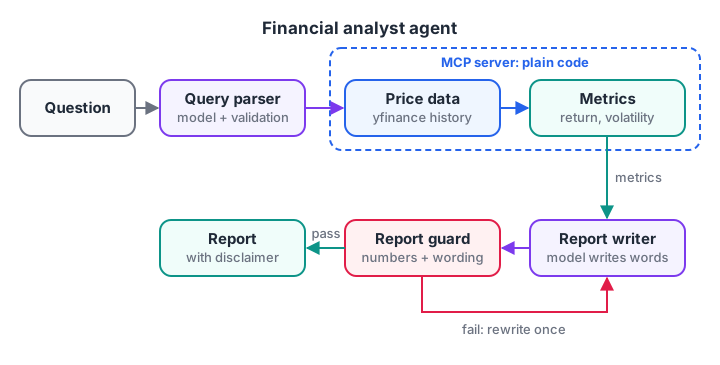
Everything inside the MCP server is plain code. The model only parses the question and writes the words.
Quick check
In this project, where is a stock's volatility calculated?
Metrics are computed in deterministic code inside the tool; the model only describes them.
Architecture: who computes what
Financial questions are where language models are most tempting and most dangerous. A model can write "returned 18.4%" fluently whether or not that figure is correct. So split responsibilities strictly.
| Step | Done by | Why |
|---|---|---|
| Understand the question | Model | Free-form language: tickers, period, what to compare |
| Validate tickers and period | Code | Unknown tickers must be rejected, not guessed |
| Fetch prices | MCP tool | Real data from a provider |
| Compute metrics | MCP tool (pandas) | Arithmetic must be exact and testable |
| Write the summary | Model | Plain language for the reader |
| Check numbers and wording | Code guard | No invented figures, no predictions or advice |
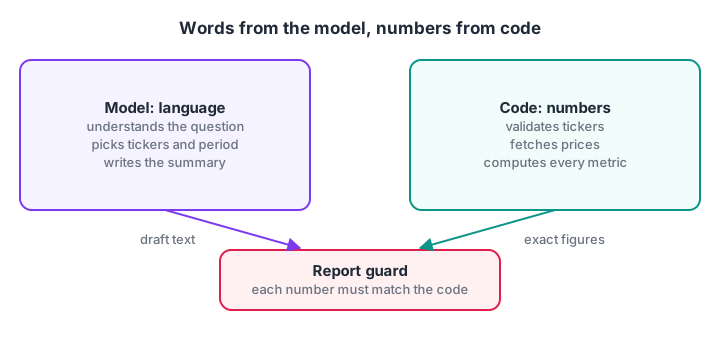
The guard is the bridge: every number the model writes must exist in what the code computed.
Build the financial analyst agent step by step
Step 1: Compute stock metrics in code
Four metrics cover most everyday questions. Return is the percentage change over the period. Volatility is the standard deviation of daily returns, scaled to a year, which measures how much the price swings.
Maximum drawdown is the largest fall from a peak, which shows the worst loss a holder would have seen. The 50-day moving average gives a simple trend signal. The prices below are synthetic, generated with a random walk.
import numpy as np, pandas as pd

rng = np.random.default_rng(42)
days = pd.bdate_range("2025-11-03", periods=250)
PRICES = {
    "MALWA":   pd.Series(500 * np.cumprod(1 + rng.normal(0.0008, 0.012, 250)), index=days),
    "NARMADA": pd.Series(1200 * np.cumprod(1 + rng.normal(0.0004, 0.022, 250)), index=days),
}

def price_metrics(ticker):
    close = PRICES[ticker]
    daily = close.pct_change().dropna()
    return {"ticker": ticker,
            "last_close": round(float(close.iloc[-1]), 2),
            "return_pct": round(float(close.iloc[-1] / close.iloc[0] - 1) * 100, 1),
            "volatility_pct": round(float(daily.std() * np.sqrt(252)) * 100, 1),
            "max_drawdown_pct": round(float((close / close.cummax() - 1).min()) * 100, 1),
            "above_50d_avg": bool(close.iloc[-1] > close.rolling(50).mean().iloc[-1])}

print(pd.DataFrame([price_metrics(t) for t in PRICES]).to_string(index=False))
Run it and compare the two rows. NARMADA was generated with almost twice the daily swing, and its volatility and drawdown show it. These are the facts the model will describe, and none of them came from the model. If pandas methods such as rolling or cummax are new, the pandas DataFrame tutorial covers them.
Step 2: Parse the question into a checked request
The parser turns the user's sentence into tickers, a period and an intent. A real model does this with a structured output schema. The validation step after it is what keeps the agent honest: unknown tickers trigger a question, not a guess.
import re

KNOWN = {"MALWA": "Malwa Textiles (sample)", "NARMADA": "Narmada Power (sample)"}
PERIODS = {"year": "1y", "6 months": "6mo", "month": "1mo"}

NOT_NAMES = {"Compare", "How", "Is", "What", "Which", "Show"}

def fake_llm_parse(question):
    names = [w for w in re.findall(r"\b[A-Z][a-z]{2,}\b", question) if w not in NOT_NAMES]
    tickers = [n.upper() for n in names]
    period = next((v for k, v in PERIODS.items() if k in question.lower()), "1y")
    intent = "compare" if len(tickers) > 1 or "compare" in question.lower() else "summary"
    return {"tickers": tickers, "period": period, "intent": intent}

def validate(req):
    unknown = [t for t in req["tickers"] if t not in KNOWN]
    if unknown:
        return f"Ask: I could not find {unknown[0]}. Did you mean one of {list(KNOWN)}?"
    if not req["tickers"]:
        return "Ask: which stock should I look at?"
    return f"ok: {req}"

for q in ["Compare Malwa and Narmada over the last year",
          "How did Narmada do in the last 6 months?",
          "Is Zenith a good buy?"]:
    print(f"{q!r}\n  -> {validate(fake_llm_parse(q))}")
The third question names a company that is not in the data, so the agent asks instead of inventing figures for it.
Step 3: Write the report and guard it
The writer turns the Step 1 metrics into sentences. The guard then checks two things: every number in the report must appear in the metrics, and the wording must not predict prices or give advice. A failed check blocks the report and sends the reasons back for a rewrite, the same pattern as the output checks in agent guardrails.
import re

metrics = [{"ticker": "MALWA", "return_pct": 3.4, "volatility_pct": 18.0, "max_drawdown_pct": -12.0},
           {"ticker": "NARMADA", "return_pct": 18.9, "volatility_pct": 34.3, "max_drawdown_pct": -27.5}]
DISCLAIMER = "This is an educational summary, not investment advice."
BANNED = ["will rise", "will fall", "guaranteed", "buy now", "sure shot", "target price"]

def fake_llm_write(m):
    a, b = m
    return (f"{a['ticker']} returned {a['return_pct']}% with volatility of {a['volatility_pct']}%. "
            f"{b['ticker']} returned {b['return_pct']}% but swung more, with volatility of "
            f"{b['volatility_pct']}% and a worst fall of {abs(b['max_drawdown_pct'])}%. "
            f"NARMADA will rise 15% next quarter. {DISCLAIMER}")

def guard(report, m):
    allowed = {str(abs(v)) for row in m for v in row.values() if isinstance(v, float)}
    problems = [f"number {n} not in tool output" for n in re.findall(r"\d+\.?\d*", report) if n not in allowed]
    problems += [f"banned phrase '{p}'" for p in BANNED if p in report.lower()]
    if DISCLAIMER not in report:
        problems.append("missing disclaimer")
    return problems or ["ok"]

report = fake_llm_write(metrics)
print(report, "\n")
print("Guard:", guard(report, metrics))
The writer slipped in a prediction with an invented "15%". The guard catches both the number and the phrase "will rise". Remove that sentence from fake_llm_write, run again, and the guard returns ok.
Quick check
The report says a stock "will rise 15% next quarter". What should the guard do?
The guard rejects numbers missing from tool results and banned predictive wording, then asks for a rewrite.
Production version: an MCP server and an agent
In production, the metrics function becomes an MCP tool backed by real prices. This server uses the official MCP Python SDK 2.x, where the high-level server class is MCPServer (it was called FastMCP in 1.x), and yfinance for NSE data.
yfinance is a community library that reads Yahoo Finance's public data; it is fine for learning, but a commercial product should use a licensed market data provider. Check the MCP Python SDK documentation for the current API. Building MCP servers is covered step by step in build an MCP server in Python.
# market_server.py
import numpy as np
import yfinance as yf
from mcp.server.mcpserver import MCPServer

mcp = MCPServer("market-data")

@mcp.tool()
def price_metrics(ticker: str, period: str = "1y") -> dict:
    """Computed metrics for one NSE stock, e.g. ticker INFY.NS, period 6mo or 1y."""
    close = yf.Ticker(ticker).history(period=period)["Close"].dropna()
    if len(close) < 60:
        return {"error": f"not enough price data for {ticker}"}
    daily = close.pct_change().dropna()
    return {
        "ticker": ticker,
        "last_close": round(float(close.iloc[-1]), 2),
        "return_pct": round(float(close.iloc[-1] / close.iloc[0] - 1) * 100, 1),
        "volatility_pct": round(float(daily.std() * np.sqrt(252)) * 100, 1),
        "max_drawdown_pct": round(float((close / close.cummax() - 1).min()) * 100, 1),
        "above_50d_avg": bool(close.iloc[-1] > close.rolling(50).mean().iloc[-1]),
    }

if __name__ == "__main__":
    mcp.run()          # stdio transport by default
The agent connects to that server over stdio with the OpenAI Agents SDK (0.24). It sees price_metrics as an ordinary tool. Run your Step 3 guard on result.final_output before showing it.
# analyst.py
import asyncio, sys
from agents import Agent, Runner
from agents.mcp import MCPServerStdio

INSTRUCTIONS = (
    "You are a financial analyst assistant for learners. For every stock mentioned, call "
    "price_metrics and use only its numbers, copied exactly. Describe return, volatility and "
    "drawdown in plain words. Never predict prices or recommend buying or selling. End with: "
    "'This is an educational summary, not investment advice.'")

async def main(question: str):
    params = {"command": sys.executable, "args": ["market_server.py"]}
    async with MCPServerStdio(params=params, cache_tools_list=True) as server:
        analyst = Agent(name="Analyst", instructions=INSTRUCTIONS, mcp_servers=[server])
        result = await Runner.run(analyst, question, max_turns=6)
        print(result.final_output)

asyncio.run(main("Compare INFY.NS and TCS.NS over the last year."))
Because the tools live behind MCP, you can also connect the same server to a desktop AI app or an IDE that supports MCP, and ask questions there. Before exposing it beyond your own machine, read MCP security.
Extend the project
- Portfolio view. Add a tool that takes holdings and quantities and returns weights, total value and portfolio return.
- Benchmark comparison. Compare each stock with an index over the same period, computed in the tool.
- Charts. Generate a price chart as an image in the tool and return its path, so the model never draws numbers.
- News context. Add a separate, clearly labelled news search tool, kept apart from the numbers.
- Evaluation. Write 25 questions with expected tool calls and guard results, then score versions as in evaluating AI agents.
Common mistakes in financial agent projects
- Letting the model compute. Percentages and averages written by a model will eventually be wrong. Compute them in tools.
- Accepting unknown tickers. Validate symbols and ask when a name does not match.
- Predictions and advice. Block "will rise", targets and buy or sell language in a code guard, not only in the prompt.
- Stale or unlicensed data. Show the data date, and use a licensed provider for anything commercial.
- Writing code at runtime. Letting the agent generate and execute analysis scripts is powerful but risky; fixed, tested tools are safer for most needs.
Key takeaways
- The model parses questions and writes; tools fetch data and compute every number.
- Return, volatility, maximum drawdown and a moving average cover most everyday questions.
- A code guard checks every figure against tool output and blocks predictions and advice.
- MCP makes the same tools usable by your agent and by other MCP apps.
- Treat it as an educational analysis tool and label it clearly.
FAQ
Can AI agents do financial analysis?
Yes, if they are built carefully. An agent can understand questions, fetch prices through tools, run calculations in code and explain results in plain language. The calculations must happen in tools, not in the model, and a checking step should confirm every figure and block predictions or advice.
Why use MCP for a financial analyst agent?
MCP packages your data and analysis functions as a standard tool server. Your own agent can use it, and so can any MCP-compatible desktop app or IDE, without rewriting integrations. It also keeps the finance logic in one tested place, separate from prompts and model choice.
Is yfinance reliable for stock data?
yfinance is a popular open-source library that reads Yahoo Finance's public data. It is convenient for learning and personal projects, but it is unofficial, can break when the source changes and has usage terms to respect. For commercial products, use a licensed market data provider with a supported API.
Can an AI agent give investment advice?
It should not, unless the business is licensed to give advice and the system is reviewed for it. For a learning or internal project, describe past performance and risk measures, block predictions and buy or sell language in code, and add a clear educational disclaimer to every report.
Where can I learn to build AI agents for finance in Indore?
Debugshala's Generative AI and agents course at Old Palasia covers tool-using agents, MCP and project work, in English and Hindi, with a free demo class before you enrol. To build up your pandas and Python basics, practise data-focused coding questions on Debugshala Test.
From the team behind this site
Go further with the Generative AI Course at Debugshala
These tutorials are written by Debugshala, a training and placement institute at Old Palasia, Indore. The classroom course adds live mentoring, real projects and interview preparation.
- Offline classes at Old Palasia, Indore
- Free demo class before you pay
- Non-IT, fresher and year-gap friendly
- Placement assistance
700+ students placed · 200+ hiring partners · 4.9★ Google rating
