

Build a Voice RAG Agent in Python: Speech In, Answers Out
Build a voice RAG agent in Python: voice activity detection, speech-to-text, retrieval, speech-friendly answers and text-to-speech, simulated, then for real.
Picture the phone at the reception of a small clinic in Vijay Nagar. Every few minutes someone calls with the same questions: what time is the OPD, which floor is the dentist, what should I bring.
The receptionist knows the answers because she has read the clinic's notice board and rules sheet. She waits for the caller to finish, answers in one or two plain sentences, and never reads out a table.
Now imagine an assistant that does the same job on the second line, so the receptionist can look after the patients standing in front of her.
What is a voice RAG agent?
Waiting for the caller to finish is voice activity detection (VAD). Hearing the words is speech-to-text (STT). Remembering the notice board is retrieval over your documents. Answering in short, plain sentences is speech-friendly generation, and speaking is text-to-speech (TTS).
A voice RAG agent is an AI assistant that takes spoken input, converts it to text, retrieves relevant passages from a knowledge base, generates an answer grounded in those passages, and converts the answer back to speech, all within a conversational delay.
It is ordinary retrieval-augmented generation with an audio layer on each side, plus the honest "I don't know" fallback from agentic RAG. This is the second project in the series. The simulation uses Python 3.10+ and numpy, with fake audio and a fake speech model, so it runs anywhere. The clinic and its details are made up.
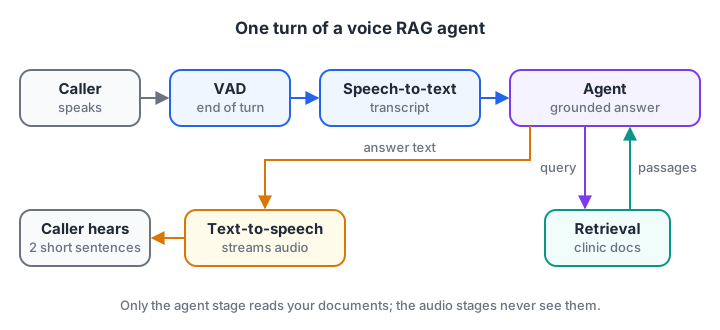
Five stages in one turn. Only the middle stage needs your documents.
Architecture: the five stages of one voice turn
Every voice turn passes through the same stages, each with a clear job and a typical time cost.
| Stage | Input | Output | Typical time |
|---|---|---|---|
| VAD | Audio frames | "Caller stopped speaking" signal | 200 to 500 ms of silence |
| Speech-to-text | Audio clip | Transcript | 200 to 600 ms |
| Retrieval | Transcript | 2 to 3 passages | 50 to 200 ms |
| Generation | Question plus passages | Short answer text | 300 to 1,500 ms |
| Text-to-speech | Answer text | Audio | 150 to 400 ms to first audio |
The numbers are rough planning figures, not benchmarks. Measure your own stack, because model choice and network distance change them a lot.
Build the voice RAG agent step by step
Step 1: Detect when the caller stops speaking
Audio arrives as a stream of samples. VAD splits it into short frames of about 20 milliseconds, measures the energy of each, and decides when speech starts and ends. A "hangover" of several quiet frames prevents a short pause between words from ending the turn too early.
import numpy as np
rng = np.random.default_rng(0)
RATE, FRAME = 16000, 320                         # 16 kHz audio, 20 ms frames

silence = rng.normal(0, 0.01, RATE // 2)         # 0.5 s of background noise
t = np.arange(int(RATE * 1.2)) / RATE
speech = 0.3 * np.sin(2 * np.pi * 220 * t) * (np.sin(2 * np.pi * 3 * t) > -0.6)   # words with short gaps
audio = np.concatenate([silence, speech, silence, silence])

frames = audio[: len(audio) // FRAME * FRAME].reshape(-1, FRAME)
energy = np.sqrt((frames ** 2).mean(axis=1))
is_speech = energy > 0.05

start, quiet, HANGOVER = None, 0, 15             # 15 quiet frames = 300 ms
for i, s in enumerate(is_speech):
    if s and start is None:
        start = i
    quiet = 0 if s else quiet + 1
    if start is not None and quiet == HANGOVER:
        end = i - HANGOVER + 1
        print(f"Speech from {start * 20} ms to {end * 20} ms; end of turn at {i * 20} ms")
        break
Lower the hangover to 5 frames and the short gaps inside the "words" will end the turn early, the same bug users notice when an assistant interrupts them. Production systems use trained VAD models, which handle noise far better than an energy threshold, but the turn-taking logic is the same.
Step 2: Transcribe, retrieve and answer for the ear
Now the middle of the pipeline. The fake STT returns a transcript, as a real model would. Retrieval uses word-count vectors and cosine similarity with numpy, a stand-in for the embeddings you would use in production. The key new piece is for_speech, which rewrites text so it sounds natural when spoken.
import re, numpy as np

DOCS = ["The OPD is open 9 am to 2 pm, Monday to Saturday.",
        "Bring your old prescription and an ID card.",
        "Dental OPD is on the second floor, room 204.",
        "Consultation fee is Rs 300, payable at reception."]
fake_stt = {"clip-1": "when is the opd open", "clip-2": "where is the dentist",
            "clip-3": "do you have parking"}

STOP = {"the", "is", "a", "to", "on", "and", "do", "does", "you", "what", "your"}
tokens = lambda s: [w for w in re.findall(r"[a-z]+", s.lower()) if w not in STOP]
vocab = sorted({w for d in DOCS for w in tokens(d)})
vec = lambda s: np.array([tokens(s).count(w) for w in vocab], float)
D = np.array([vec(d) for d in DOCS])

def retrieve(question):
    q = vec(question.replace("dentist", "dental"))      # a tiny synonym fix
    scores = D @ q / (np.linalg.norm(D, axis=1) * (np.linalg.norm(q) or 1))
    return DOCS[int(scores.argmax())], float(scores.max())

def for_speech(text):
    text = re.sub(r"Rs (\d+)", r"\1 rupees", text)
    text = re.sub(r"room (\d)(\d)(\d)", r"room \1 \2 \3", text)
    return text.replace("OPD", "O P D")

for clip, transcript in fake_stt.items():
    passage, score = retrieve(transcript)
    answer = passage if score > 0.3 else "I'm not sure. Let me connect you to the front desk."
    print(f"{transcript!r} (score {score:.2f})\n  says: {for_speech(answer)}")
The parking question matches nothing well, so the agent hands over to a person instead of guessing. On a phone line, a wrong answer spoken confidently is worse than a polite transfer.
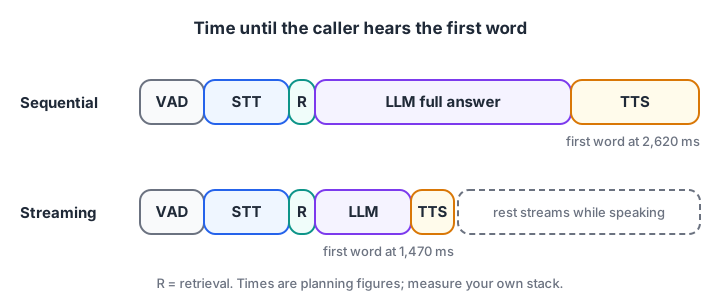
Streaming does not make any stage faster. It starts speaking before the last stage finishes.
Step 3: Fit the latency budget
People expect a reply to start within about a second. If every stage waits for the previous one to finish completely, the delays add up. Streaming helps: the model streams tokens, and TTS starts speaking the first sentence while the rest is still being written.
stages = {"vad_silence": 300, "stt": 400, "retrieval": 120, "llm_total": 1200, "tts_total": 600}
llm_first_sentence, tts_first_audio = 450, 200          # ms, when streaming

sequential = sum(stages.values())
streaming = (stages["vad_silence"] + stages["stt"] + stages["retrieval"]
             + llm_first_sentence + tts_first_audio)
print(f"Sequential: caller hears the first word after {sequential} ms")
print(f"Streaming:  caller hears the first word after {streaming} ms")
for name, ms in stages.items():
    print(f"  {name:12} {'#' * (ms // 50)} {ms} ms")
print("Biggest lever:", max(stages, key=stages.get))
Shortening the VAD silence window also helps, but too short and the agent interrupts slow speakers. Around 300 to 500 milliseconds is a common range.
Quick check
What does voice activity detection decide in a voice agent?
VAD detects speech in the audio stream so the agent knows when a turn has ended and it can respond.
Quick check
How does streaming reduce the delay before the caller hears a reply?
Overlapping generation and speech cuts time to first audio, even though each stage takes as long as before.
Production version with the OpenAI Agents SDK voice pipeline
The OpenAI Agents SDK (0.24, installed with pip install "openai-agents[voice]") includes a voice pipeline that chains speech-to-text, your agent and text-to-speech. Below, the agent gets a retrieval tool over the clinic documents using OpenAI embeddings.
The example reads a recorded WAV question and writes the spoken reply to a WAV file. Check the voice pipeline docs before you build on it.
import asyncio, wave
import numpy as np
from openai import OpenAI
from agents import Agent, function_tool
from agents.voice import AudioInput, SingleAgentVoiceWorkflow, VoicePipeline

client = OpenAI()
DOCS = ["OPD runs 9 am to 2 pm, Monday to Saturday.",
        "Bring your old prescription and an ID card.",
        "Dental OPD is on the second floor, room 204."]

def embed(texts):
    data = client.embeddings.create(model="text-embedding-3-small", input=texts).data
    return np.array([d.embedding for d in data])

DOC_VECTORS = embed(DOCS)

@function_tool
def search_clinic_docs(query: str) -> str:
    """Search the clinic's documents. Returns the 2 most relevant passages."""
    q = embed([query])[0]
    scores = DOC_VECTORS @ q / (np.linalg.norm(DOC_VECTORS, axis=1) * np.linalg.norm(q))
    return "\n".join(DOCS[i] for i in np.argsort(-scores)[:2])

agent = Agent(
    name="Clinic voice assistant",
    instructions=("Answer callers' questions about the clinic. Always call search_clinic_docs first "
                  "and answer only from its passages, in at most two short spoken sentences with no "
                  "lists or symbols. If the passages do not answer, offer to connect the front desk."),
    tools=[search_clinic_docs],
)

async def answer_call(in_path: str, out_path: str):
    with wave.open(in_path, "rb") as f:                    # 16-bit mono recording
        samples = np.frombuffer(f.readframes(f.getnframes()), dtype=np.int16)
        rate = f.getframerate()
    pipeline = VoicePipeline(workflow=SingleAgentVoiceWorkflow(agent))
    result = await pipeline.run(AudioInput(buffer=samples, frame_rate=rate))
    chunks = []
    async for event in result.stream():
        if event.type == "voice_stream_event_audio" and event.data is not None:
            chunks.append(event.data)
    with wave.open(out_path, "wb") as f:                   # TTS audio: 24 kHz, 16-bit mono
        f.setnchannels(1); f.setsampwidth(2); f.setframerate(24000)
        f.writeframes(np.concatenate(chunks).astype(np.int16).tobytes())

asyncio.run(answer_call("caller_question.wav", "assistant_reply.wav"))
For a live microphone, feed a StreamedAudioInput instead of a recording, and the pipeline handles turn detection for you. For phone lines and browser calls with many simultaneous users, a real-time media framework built on WebRTC, such as LiveKit Agents, is the usual next step. Hosting either one follows deploying AI agents.
Extend the project
- Hindi and Hinglish. Test STT on mixed-language questions; many callers in Indore switch languages mid-sentence.
- Barge-in. Stop speaking when the caller interrupts, then listen again.
- Appointment booking. Add a booking tool behind human approval, following agent guardrails.
- Call summaries. After each call, save a one-line summary and the passages used, for review.
- An evaluation set. Record 30 real-sounding questions, including noisy ones, and track answer accuracy and time to first audio.
Common mistakes in voice agent projects
- Answers written for screens. Bullet points, tables and URLs sound terrible when spoken. Instruct for two short sentences.
- Ignoring latency until the end. Measure each stage from day one; the total is what callers feel.
- No fallback. When retrieval finds nothing relevant, transfer to a person rather than guess.
- Testing only in a quiet room. Fans, traffic and speakerphones break VAD and STT. Test with real noise.
- Reading numbers badly. "Rs 300" and "room 204" need rewriting for natural speech.
Key takeaways
- A voice RAG agent is RAG with speech-to-text in front and text-to-speech behind.
- VAD with a hangover window decides when the caller has finished.
- Answers must be short, plain and rewritten for the ear.
- Streaming overlaps stages to get the first word out in about a second.
- When retrieval fails, hand over to a person instead of guessing.
FAQ
What is a voice RAG agent?
A voice RAG agent is a spoken assistant that answers from your own documents. It converts speech to text, retrieves relevant passages, generates a short grounded answer and speaks it back. It suits help lines, clinics, shops and internal support desks where people prefer talking to typing.
Which speech-to-text model should I use for a voice agent?
Choose based on your callers' languages, accents and background noise, then measure accuracy and delay on your own recordings. Hosted models from major providers and open models such as Whisper variants are common choices. For Indian callers, test Hindi, English and mixed speech explicitly before deciding.
How do I reduce latency in a voice AI agent?
Stream every stage you can: stream model tokens, start text-to-speech on the first sentence, and keep retrieval fast with a small, well-indexed knowledge base. Shorten the end-of-speech silence window carefully, keep answers short, and host services close to your users to reduce network delay.
Can a voice agent work in Hindi?
Yes, if each stage supports it. You need speech-to-text that handles Hindi and mixed Hindi-English, documents or translations the retriever can match, a model that answers in Hindi, and a Hindi text-to-speech voice. Test each stage separately with real callers before launch.
Where can I learn to build voice AI agents in Indore?
Debugshala's classroom Generative AI batches at Old Palasia teach the RAG and agent skills behind projects like this one, in English and Hindi, and you can attend a free demo class before you decide. For practice between classes, attempt the Python MCQs on Debugshala Test.
From the team behind this site
Go further with the Generative AI Course at Debugshala
These tutorials are written by Debugshala, a training and placement institute at Old Palasia, Indore. The classroom course adds live mentoring, real projects and interview preparation.
- Offline classes at Old Palasia, Indore
- Free demo class before you pay
- Non-IT, fresher and year-gap friendly
- Placement assistance
700+ students placed · 200+ hiring partners · 4.9★ Google rating
