

Build a Multi-Agent Travel Finder in Python with LangGraph
Build a multi-agent travel finder in Python: parse a trip request, search flights and hotels in parallel, fit a budget, write an itinerary, then use LangGraph.
You and three friends want a Goa trip after semester exams. One friend opens the flight app, another checks hotels, and the group chat fills with screenshots. Someone adds it all up: "₹52,000.
Over budget." So the hotel friend drops from 4-star to 3-star options, and the sum is redone. Finally someone posts a neat summary with times, the hotel name and each person's share.
That group chat already has the shape of a multi-agent system. Two people search in parallel, one person does the arithmetic and says "try again", and one writes the summary.
What is a multi-agent travel finder?
The friend who reads the original plan and confirms "4 people, 20 to 23 December, ₹40,000 total" is the request parser. The flight and hotel friends are search agents working in parallel.
The one adding it up is the budget checker, and the summary writer is the itinerary agent. The group chat itself is the shared state every agent reads and writes.
A multi-agent travel finder is an AI system in which separate agents parse a trip request into structured fields, search flights and hotels in parallel, check the combined cost against a budget with a limited number of retries, and write a final itinerary from the chosen options.
This is the third project in the series. It applies the parallel and loop patterns from multi-agent system patterns and the tool design rules from function calling for agents. The simulation runs in plain Python 3.10+ with made-up fares and hotels; the production version uses LangGraph.
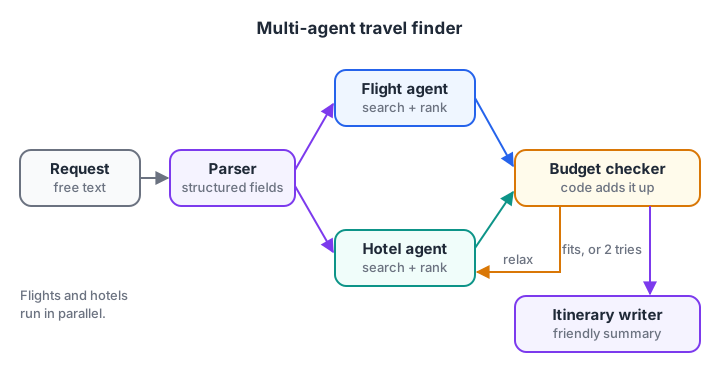
The only loop is budget checker to hotel agent, capped at two attempts.
Architecture: shared trip state
Instead of agents chatting freely, every agent reads from and writes to one shared state object. That keeps the system predictable and makes each run easy to inspect.
| State field | Written by | Read by |
|---|---|---|
request (origin, destination, dates, travellers, budget) |
Parser, budget checker when relaxing | Flight and hotel agents |
flights (list of options) |
Flight agent | Budget checker |
hotels (list of options) |
Hotel agent | Budget checker |
plan (chosen flight, hotel, total) |
Budget checker | Itinerary writer |
attempts |
Budget checker | Router after budget check |
Only two steps need a language model: turning the user's sentence into request, and turning plan into a friendly itinerary. Searching, ranking and adding up are code. A model that "adds up" ₹20,800 and ₹31,200 is a risk you do not need to take.
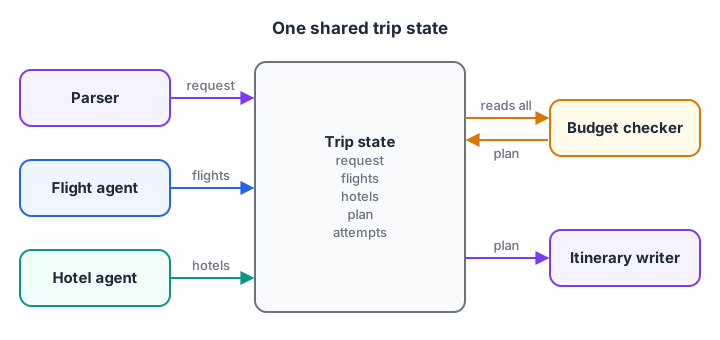
Each arrow is a field. Agents exchange data only through this state, never by messaging each other.
Build the travel finder step by step
Step 1: Parse the request and ask for what is missing
A real parser is a model call with a structured output schema, as covered in JSON structured output. The fake_llm_parse below uses regular expressions so it runs offline. What matters is the validation after it: if a required field is missing, the agent asks one clear question instead of guessing.
import re

CITY_CODES = {"indore": "IDR", "goa": "GOI", "mumbai": "BOM", "delhi": "DEL"}

def fake_llm_parse(text):
    t = text.lower()
    cities = [CITY_CODES[c] for c in re.findall(r"[a-z]+", t) if c in CITY_CODES]
    dates = re.search(r"(\d{1,2})\s*(?:-|to)\s*(\d{1,2})\s*dec", t)
    people = re.search(r"(\d+)\s*(?:friends|people|adults)", t)
    budget = re.search(r"rs\s*([\d,]+)", t)
    return {"origin": cities[0] if cities else None,
            "destination": cities[1] if len(cities) > 1 else None,
            "nights": int(dates[2]) - int(dates[1]) if dates else None,
            "travellers": int(people[1]) if people else None,
            "budget_rs": int(budget[1].replace(",", "")) if budget else None}

QUESTIONS = {"origin": "Which city are you leaving from?", "destination": "Where do you want to go?",
             "nights": "Which dates are you travelling?", "travellers": "How many people are going?",
             "budget_rs": "What is your total budget?"}

def validate(req):
    missing = [k for k, v in req.items() if v is None]
    return f"Ask the user: {QUESTIONS[missing[0]]}" if missing else "ok"

for text in ["4 friends, Indore to Goa, 20 to 23 Dec, under Rs 40,000 total",
             "Indore to Goa for 2 people under Rs 25,000"]:
    req = fake_llm_parse(text)
    print(req, "->", validate(req))
The second request has no dates, so the agent asks for them instead of inventing a weekend. In a chat interface, that question goes back to the user; the run resumes when they reply.
Step 2: Flight and hotel agents with ranking
Each search agent calls its tool, filters out options that break the rules, and ranks the rest. Here the tools return mock inventories. In production they call a travel provider's API.
FLIGHTS = [  # IDR -> GOI, fare per person (round trip), stops, departure
    {"id": "SL-101", "fare": 6400, "stops": 0, "departs": "06:10"},
    {"id": "SL-215", "fare": 5200, "stops": 1, "departs": "11:45"},
    {"id": "BX-330", "fare": 4800, "stops": 2, "departs": "23:55"},
]
HOTELS = [
    {"name": "Sea Breeze Resort", "stars": 4, "per_night": 5200, "rating": 4.4},
    {"name": "Palm Grove Inn", "stars": 3, "per_night": 3200, "rating": 4.1},
    {"name": "Calangute Stay", "stars": 3, "per_night": 2700, "rating": 3.6},
]

def flight_agent(max_stops=1):
    ok = [f for f in FLIGHTS if f["stops"] <= max_stops]
    return sorted(ok, key=lambda f: f["fare"] + 800 * f["stops"])   # a stop "costs" Rs 800

def hotel_agent(max_stars=4, min_rating=4.0):
    ok = [h for h in HOTELS if h["stars"] <= max_stars and h["rating"] >= min_rating]
    return sorted(ok, key=lambda h: (-h["stars"], h["per_night"]))

print("Flights:", [f"{f['id']} Rs {f['fare']}" for f in flight_agent()])
print("Hotels (4-star max):", [h["name"] for h in hotel_agent()])
print("Hotels (3-star max):", [h["name"] for h in hotel_agent(max_stars=3)])
The ranking rules are where your product decisions live. The 23:55 two-stop flight is cheapest, but the flight agent drops it because the group asked for at most one stop. Write such rules in code, where you can test them, rather than hoping the model weighs them sensibly.
Step 3: Check the budget, relax and write the itinerary
The budget checker adds up the best flight and hotel. If the total is over budget, it relaxes one constraint and asks the hotel agent to search again, at most twice. Then the itinerary writer, a model in production and a template here, writes the plan.
FLIGHTS = [{"id": "SL-215", "fare": 5200, "departs": "11:45"}]
HOTELS = [{"name": "Sea Breeze Resort", "stars": 4, "per_night": 5200},
          {"name": "Palm Grove Inn", "stars": 3, "per_night": 3200}]
req = {"origin": "IDR", "destination": "GOI", "nights": 3, "travellers": 4, "budget_rs": 40000}

def total_cost(flight, hotel, req):
    rooms = -(-req["travellers"] // 2)                     # 2 people per room, rounded up
    return flight["fare"] * req["travellers"] + hotel["per_night"] * req["nights"] * rooms

max_stars, attempts = 4, 0
while True:
    attempts += 1
    hotel = min((h for h in HOTELS if h["stars"] <= max_stars), key=lambda h: -h["stars"])
    flight, total = FLIGHTS[0], total_cost(FLIGHTS[0], hotel, req)
    print(f"Attempt {attempts}: {hotel['name']} -> Rs {total:,}")
    if total <= req["budget_rs"] or attempts == 2:
        break
    max_stars -= 1                                          # relax one constraint

status = "within budget" if total <= req["budget_rs"] else "over budget, shown with a warning"
print(f"\nItinerary ({status}):\n  Fly {flight['id']} {req['origin']} to {req['destination']}, departs {flight['departs']}"
      f"\n  Stay {req['nights']} nights at {hotel['name']}\n  Total Rs {total:,}, Rs {total // req['travellers']:,} each")
The first attempt costs ₹52,000, so the checker drops to 3-star hotels and the second attempt fits at exactly ₹40,000. If it still did not fit, the plan would be shown with a clear warning rather than looping again.
Quick check
In the travel finder, which steps actually need a language model?
Language understanding and writing need a model; searching, ranking and adding up are safer and cheaper in code.
Quick check
The plan is still over budget after two attempts. What should the system do?
A retry cap prevents endless loops, and the user decides what to do with an honest result.
Production version with LangGraph
LangGraph (1.2 at the time of writing) models this exactly: nodes are agents, edges are the flow, and a typed state dictionary is the shared trip state.
Two edges out of the parser make flights and hotels run in parallel, and a conditional edge implements the budget loop. search_flights_api and search_hotels_api stand for your travel provider's client. Check the LangGraph documentation for the current API.
from typing import TypedDict
from pydantic import BaseModel
from openai import OpenAI
from langgraph.graph import StateGraph, START, END

client = OpenAI()

class TripRequest(BaseModel):
    origin: str
    destination: str
    depart_date: str
    return_date: str
    travellers: int
    budget_rs: int
    max_hotel_stars: int = 4

class TripState(TypedDict, total=False):
    query: str
    request: dict
    flights: list
    hotels: list
    plan: dict
    attempts: int
    itinerary: str

def parse_request(state: TripState) -> dict:
    response = client.responses.parse(
        model="your-model-name",
        instructions="Extract the trip details. Use IATA airport codes and ISO dates.",
        input=state["query"], text_format=TripRequest)
    return {"request": response.output_parsed.model_dump(), "attempts": 0}

def find_flights(state: TripState) -> dict:
    return {"flights": search_flights_api(**state["request"])}     # your provider

def find_hotels(state: TripState) -> dict:
    return {"hotels": search_hotels_api(**state["request"])}       # your provider

def check_budget(state: TripState) -> dict:
    plan = cheapest_combination(state["flights"], state["hotels"], state["request"])  # plain code
    return {"plan": plan, "attempts": state["attempts"] + 1}

def route_after_budget(state: TripState) -> str:
    fits = state["plan"]["total"] <= state["request"]["budget_rs"]
    return "write" if fits or state["attempts"] >= 2 else "relax"

def relax(state: TripState) -> dict:
    req = dict(state["request"])
    req["max_hotel_stars"] = max(2, req["max_hotel_stars"] - 1)
    return {"request": req}

def write_itinerary(state: TripState) -> dict:
    response = client.responses.create(model="your-model-name",
        input=f"Write a short, friendly itinerary from this plan only: {state['plan']}")
    return {"itinerary": response.output_text}

graph = StateGraph(TripState)
for name, fn in [("parse", parse_request), ("flights", find_flights), ("hotels", find_hotels),
                 ("budget", check_budget), ("relax", relax), ("write", write_itinerary)]:
    graph.add_node(name, fn)
graph.add_edge(START, "parse")
graph.add_edge("parse", "flights"); graph.add_edge("parse", "hotels")      # run in parallel
graph.add_edge("flights", "budget"); graph.add_edge("hotels", "budget")
graph.add_conditional_edges("budget", route_after_budget, {"write": "write", "relax": "relax"})
graph.add_edge("relax", "hotels")
graph.add_edge("write", END)
app = graph.compile()

result = app.invoke({"query": "4 friends, Indore to Goa, 20 to 23 Dec 2026, under Rs 40,000 total"})
print(result["itinerary"])
Because flights and hotels are both triggered by the parser, LangGraph runs them in the same step and waits for both before the budget node. After a relax, only the hotel node runs again, so you do not pay for a second flight search.
Extend the project
- Human checkpoint. Pause before any booking and show the plan for approval, as in agent guardrails.
- Date flexibility. Let the relax step try one day earlier or later when hotels alone cannot fit the budget.
- Trains and buses. Add a third search agent for overnight options from Indore.
- Streaming UI. Stream each agent's progress to the front end with AG-UI.
- Price caching. Cache search results for a few minutes so retries and repeated questions stay cheap.
Common mistakes in travel agent projects
- Letting the model do arithmetic. Totals, per-person shares and budget checks belong in code.
- Guessing missing details. Ask for dates or traveller count instead of assuming them.
- Unbounded retries. Cap the relax loop and show the best option with a warning.
- Free-form agent chat. A shared typed state is easier to debug than agents messaging each other.
- Booking without approval. Searching is safe; paying is not. Always confirm before any booking tool runs.
Key takeaways
- Parser, parallel flight and hotel agents, budget checker and itinerary writer.
- One shared, typed trip state replaces free-form agent chat.
- Use the model for language and keep prices and totals in code.
- Cap the relax loop and never book without approval.
- LangGraph maps the design directly: nodes, parallel edges and a conditional loop.
FAQ
How do AI travel agents find flights and hotels?
They call flight and hotel search tools, usually a travel provider's API, with structured fields such as airport codes, dates and traveller count. The model extracts those fields from the user's request, then code filters and ranks the returned options before the model writes a summary.
Why use multiple agents instead of one for travel planning?
Separate agents keep each prompt small and let flight and hotel searches run at the same time, which cuts waiting time. They also make debugging easier: if a hotel choice looks wrong, you inspect only the hotel agent's inputs and outputs. A single agent works for simple trips but becomes hard to control.
Is LangGraph good for multi-agent projects?
Yes, for workflows with a clear shape. LangGraph lets you define agents as nodes, run some in parallel, add conditional loops and keep a typed shared state, with checkpointing for long runs. For very simple pipelines, plain Python functions like the simulation above are easier to read.
Can an AI travel agent book tickets automatically?
Technically yes, if it has a booking tool and payment access, but it should not book without a person confirming. Prices change, names must be exact, and bookings cost money to cancel. Let the agent search and prepare the booking, then require explicit approval before the booking call.
Is there a project-based course in Indore for building AI agents?
Yes. Debugshala runs a project-based Generative AI course in Indore at its Old Palasia campus, taught in English and Hindi, with a free demo class before you join. To keep your logic sharp, try the reasoning and aptitude quizzes on Debugshala Test.
From the team behind this site
Go further with the Generative AI Course at Debugshala
These tutorials are written by Debugshala, a training and placement institute at Old Palasia, Indore. The classroom course adds live mentoring, real projects and interview preparation.
- Offline classes at Old Palasia, Indore
- Free demo class before you pay
- Non-IT, fresher and year-gap friendly
- Placement assistance
700+ students placed · 200+ hiring partners · 4.9★ Google rating
