

Build a Multi-Agent Research Assistant in Python: Full Project
Build a multi-agent research assistant in Python: planner, parallel searchers, cited writer and fact-checker, simulated offline, then a real Agents SDK version.
Think about a group seminar project in your final year. The topic is "Is rooftop solar worth it for homes in Indore?" One person, the group leader, splits it into parts: cost, savings, subsidies, maintenance.
Each member researches one part and brings back notes with the page they found them on. One member writes the report. Before submission, someone checks that every number in the report matches a source, because the faculty will ask.
Nobody tries to do everything. And the final check catches the classic mistake: a number someone "remembered" but cannot point to.
What is a multi-agent research assistant?
The group leader is the planner agent. The members are searcher agents running in parallel. The report writer is the writer agent, and the person checking numbers is the fact-checker agent. The notes-with-page-numbers rule is the citation contract that ties them together.
A multi-agent research assistant is an AI system in which a planner agent breaks a research question into sub-questions, searcher agents gather sourced notes for each, a writer agent drafts a cited report from those notes only, and a checker agent verifies the claims before the report is returned.
This project applies the orchestrator and parallel patterns from multi-agent system patterns, and it is the first of four projects that close this course. All simulation code runs offline in plain Python 3.10+. The mock web pages use made-up figures, so treat them as sample data, not facts about solar power.
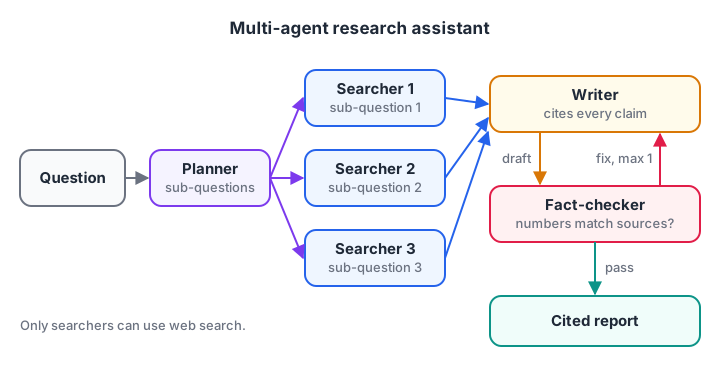
Searchers run in parallel. The fact-checker can send the draft back to the writer once.
Architecture: four agents and their contracts
Each agent has one job and a fixed input and output. Writing these contracts first is what keeps a multi-agent system debuggable.
| Agent | Input | Output | Tools |
|---|---|---|---|
| Planner | Research question | 3 to 5 sub-questions | None |
| Searcher | One sub-question | Notes, each with a source id | Web search |
| Writer | Question plus numbered notes | Report with [n] citations | None |
| Fact-checker | Report plus notes | Pass, or a list of problems | None |
Two choices matter here. Only searchers touch the web, so only they can bring in outside text, which keeps prompt injection risk in one place. And the writer has no tools at all, so it cannot fetch new facts that skip the notes.
Build the research assistant step by step
Step 1: A mock web, a search tool and the planner
The mock web is a dictionary of pages. The search tool scores pages by shared words, in the same style as the retriever in agentic RAG. The planner here uses a fixed template; a real model would write sub-questions to fit each question.
WEB = {
    "src-1": ("energy-portal.example/costs", "A 3 kW rooftop solar system costs about Rs 1,80,000 before subsidy."),
    "src-2": ("gov-scheme.example/subsidy", "The subsidy for a 3 kW home system is about Rs 78,000."),
    "src-3": ("power-blog.example/savings", "A 3 kW system produces about 360 units a month, saving about Rs 2,500."),
    "src-4": ("installer.example/maintenance", "Panels need cleaning twice a month; inverters last about 10 years."),
    "src-5": ("news.example/ev", "Electric scooter sales rose in central India last year."),
}

def search(query, k=2):
    q = {w.lower() for w in query.split() if len(w) > 3}
    scored = sorted(WEB.items(), key=lambda kv: -len(q & {w.lower().strip(".,") for w in kv[1][1].split()}))
    return [(sid, url, text) for sid, (url, text) in scored[:k]]

def fake_planner(question):
    topic = "rooftop solar system"
    return [f"How much does a {topic} cost?", f"What subsidy applies to a {topic}?",
            f"How much does a {topic} save each month?"]

plan = fake_planner("Is rooftop solar worth it for homes in Indore?")
print("Plan:", *plan, sep="\n  ")
print("Search results for the first sub-question:")
for sid, url, text in search(plan[0]):
    print(f"  {sid} {url}: {text}")
Step 2: Searchers and a writer that must cite
Each searcher keeps only its top result as a note with its source id. The writer then builds sentences from notes and attaches the note number to each. In production, the searchers run at the same time; here they run in a loop.
WEB = {
    "src-1": "A 3 kW rooftop solar system costs about Rs 1,80,000 before subsidy.",
    "src-2": "The subsidy for a 3 kW home system is about Rs 78,000.",
    "src-3": "A 3 kW system produces about 360 units a month, saving about Rs 2,500.",
}
KEYWORDS = {"cost": "src-1", "subsidy": "src-2", "save": "src-3"}

def searcher(sub_question):                       # one searcher agent per sub-question
    for word, sid in KEYWORDS.items():
        if word in sub_question.lower():
            return {"claim": WEB[sid], "source": sid}
    return None

def fake_writer(question, notes):                 # may only use the notes
    lines = [f"Report: {question}"]
    for i, n in enumerate(notes, 1):
        lines.append(f"- {n['claim']} [{i}]")
    net = 180000 - 78000
    lines.append(f"- After subsidy, the system costs about Rs {net}, paying back in about {net // 2500 // 12} years. [1][2][3]")
    lines.append("Sources: " + ", ".join(f"[{i}] {n['source']}" for i, n in enumerate(notes, 1)))
    return "\n".join(lines)

plan = ["What does it cost?", "What subsidy applies?", "How much does it save?"]
notes = [n for n in (searcher(q) for q in plan) if n]
print(fake_writer("Is rooftop solar worth it in Indore?", notes))
The payback line is derived from three notes, so it cites all three. A derived claim is fine as long as the reader can trace every input.
Step 3: A fact-checker that catches invented numbers
The checker reads each report line, collects the numbers in it, and confirms each one appears as a number in a cited source. Matching whole numbers matters: a naive text search would accept "2 years" because the digit 2 appears inside "2,500".
A real checker would use a model for meaning, but a number check alone catches the most damaging error: a confident figure with no source.
import re

SOURCES = {
    1: "A 3 kW rooftop solar system costs about Rs 1,80,000 before subsidy.",
    2: "The subsidy for a 3 kW home system is about Rs 78,000.",
    3: "A 3 kW system produces about 360 units a month, saving about Rs 2,500.",
}
report = [
    "A 3 kW system costs about Rs 1,80,000 before subsidy. [1]",
    "The subsidy is about Rs 78,000. [2]",
    "Most homes recover the cost in 2 years. [3]",                # invented
    "Panels last 25 years.",                                       # no citation
]

NUM = r"\d[\d,]*\d|\d"

def check(line):
    cites = [int(c) for c in re.findall(r"\[(\d+)\]", line)]
    if not cites:
        return "FAIL: no citation"
    numbers = re.findall(NUM, re.sub(r"\[\d+\]", "", line))
    allowed = {n for c in cites for n in re.findall(NUM, SOURCES[c])}
    missing = [n for n in numbers if n not in allowed]
    return "ok" if not missing else f"FAIL: {missing} not in sources {cites}"

for line in report:
    print(f"{check(line):38} | {line}")
When the checker fails a line, send the problems back to the writer with an instruction to fix or remove those claims. Allow one revision, then return the report with the remaining issues flagged. An endless writer-checker loop is a known failure mode.
Derived figures, like the Rs 102000 net cost from Step 2, would also fail this check because no source states them. Handle them separately: have the writer mark calculations, and recompute them in code from the cited inputs.
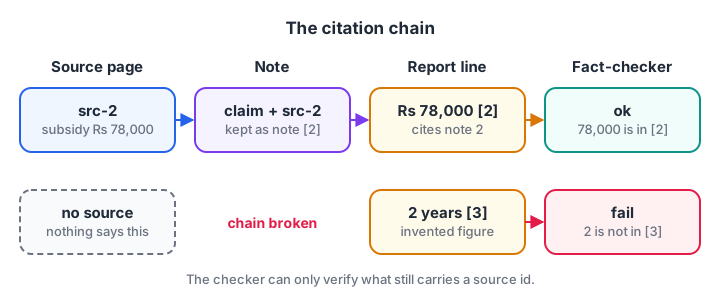
The source id travels with the claim from search to final report. Break that chain and the checker has nothing to verify against.
Quick check
The fact-checker finds a number in the report that appears in none of the cited sources. What should happen?
One targeted revision fixes most problems; a cap prevents endless loops.
Production version with the OpenAI Agents SDK
The real version keeps the same four roles. Structured outputs enforce the contracts, WebSearchTool gives searchers live search, and asyncio.gather runs them in parallel. This targets the OpenAI Agents SDK 0.24; check the Agents SDK documentation for current tool options.
import asyncio
from pydantic import BaseModel
from agents import Agent, Runner, WebSearchTool

class ResearchPlan(BaseModel):
    sub_questions: list[str]

class Note(BaseModel):
    claim: str
    source_url: str

class Notes(BaseModel):
    notes: list[Note]

planner = Agent(name="Planner", output_type=ResearchPlan,
                instructions="Split the research question into 3 to 5 focused sub-questions.")
searcher = Agent(name="Searcher", tools=[WebSearchTool()], output_type=Notes,
                 instructions=("Search the web for the sub-question. Return 2 to 4 short factual notes, "
                               "each with the exact URL it came from. Never write a note without a URL."))
writer = Agent(name="Writer",
               instructions=("Write a 300-word report from the notes only. Put [n] after every claim, "
                             "where n is the note number, and list the URLs at the end."))

async def research(question: str) -> str:
    plan = (await Runner.run(planner, question)).final_output
    results = await asyncio.gather(*(Runner.run(searcher, q) for q in plan.sub_questions))
    notes = [n for r in results for n in r.final_output.notes]
    numbered = "\n".join(f"[{i}] {n.claim} ({n.source_url})" for i, n in enumerate(notes, 1))
    report = await Runner.run(writer, f"Question: {question}\n\nNotes:\n{numbered}")
    return report.final_output          # then run your checker on report + notes

if __name__ == "__main__":
    print(asyncio.run(research("Is rooftop solar worth it for homes in Indore?")))
Add the fact-checker as a fourth agent with an output type such as passed: bool and problems: list[str], or reuse the number check from Step 3 as plain code before calling it. Running code first is cheaper and catches the worst errors.
A typical run makes one planner call, three to five searcher runs of two or three calls each, and one writer call: roughly 10 to 15 model calls. Log them as one trace so you can see which searcher was slow, using the ideas in deploying AI agents.
Extend the project
Once the core works, these extensions turn it into a portfolio piece.
- Source quality rules. Prefer official and primary sources; down-rank pages without dates.
- A follow-up round. Let the planner read the notes and add one more sub-question for gaps.
- Private documents. Give searchers a second tool over your own PDFs, so reports mix web and internal sources.
- A2A wrapping. Publish the assistant as an agent other agents can call, using A2A.
- An evaluation set. Write 20 research questions with must-mention facts and score each version, following evaluating AI agents.
Common mistakes in research agent projects
- Notes without sources. Once a claim loses its source, it cannot be checked. Make the URL a required field.
- Letting the writer search. The writer then adds uncited facts. Keep it tool-free.
- Too many sub-questions. Ten searchers cost more and produce overlapping notes. Three to five is usually enough.
- Unlimited revisions. Cap the writer-checker loop at one or two rounds.
- Trusting page text as instructions. Web pages can contain injected commands; searchers should only extract facts.
Quick check
Why does the writer agent in this project have no tools?
Keeping the writer tool-free means every claim must trace back to a note with a source.
Key takeaways
- Four roles: planner, parallel searchers, writer, fact-checker.
- Every note carries a source, and the writer may only use notes.
- Code-based number checks catch invented figures cheaply.
- Structured outputs enforce the contracts between agents in production.
- Cap revisions, keep web access in one role, and evaluate with a fixed question set.
FAQ
How do multi-agent research assistants work?
A planner splits the question into sub-questions, searcher agents look up each one and return notes with sources, a writer turns the notes into a cited report, and a checker verifies claims before the report is returned. Splitting the work keeps each agent's prompt short and makes errors easier to trace.
Is a multi-agent research assistant better than a single agent?
For broad questions, usually yes, because sub-questions are searched in parallel and each agent has a focused prompt. For narrow questions answerable with one or two searches, a single agent with a search tool is cheaper and faster. Start with one agent and split only when quality or speed suffers.
How do I stop a research agent from making up facts?
Require a source on every note, give the writer no tools so it can only use notes, instruct it to cite every claim, and check numbers and quotes against the cited sources in code before returning the report. Flag or remove anything that cannot be traced.
Which framework should I use for a research agent?
Any framework with structured outputs and parallel execution works, including the OpenAI Agents SDK, LangGraph and others. Build the simulation first so you understand the contracts, then pick the framework your team can debug and deploy. The architecture matters more than the library.
Can I build agent projects like this with guidance in Indore?
Yes. You can build projects like this in Debugshala's GenAI course at the Old Palasia campus, with classes in English and Hindi and a free demo class first. For extra Python practice before you start, sharpen your Python with practice questions on Debugshala Test.
From the team behind this site
Go further with the Generative AI Course at Debugshala
These tutorials are written by Debugshala, a training and placement institute at Old Palasia, Indore. The classroom course adds live mentoring, real projects and interview preparation.
- Offline classes at Old Palasia, Indore
- Free demo class before you pay
- Non-IT, fresher and year-gap friendly
- Placement assistance
700+ students placed · 200+ hiring partners · 4.9★ Google rating
