

Deploying AI Agents to Production: Architecture and Code
Deploying AI agents to production: API, queue and worker design, streaming, checkpoints, retries, idempotent tools, tracing and costs, with Python examples.
Think of a home tiffin service that grows into a cloud kitchen in Vijay Nagar. At home, you cook while the customer waits at the door. That works for five orders a day. At 500 orders a day, it collapses.
So the kitchen changes. Orders are taken at a counter and given a ticket number. Cooks pick tickets from a rack.
Each dish's progress is written on the ticket, so if a cook's shift ends mid-order, the next cook continues instead of starting over. Customers watch a status screen. And the owner checks gas and ingredient costs per order every evening.
What does deploying an AI agent involve?
The counter is your API. The ticket rack is a job queue, and the cooks are workers that run the agent loop. Notes on each ticket are checkpoints in a state store. The status screen is streaming. The evening cost review is observability.
Deploying an AI agent is the work of running an agent's reasoning loop as a reliable service, with an API for requests, workers that execute runs, durable state for sessions and checkpoints, safe retries for tools, streaming of progress to users, and tracing and cost controls on every step.
Deploying a single ML model, covered in ML model deployment, is mostly about one fast prediction call. An agent run is different: it can take 30 seconds, call ten tools, wait for human approval and cost a few rupees.
That changes the architecture. The examples use Python 3.10+, and the runnable ones simulate the agent as in the rest of this course.
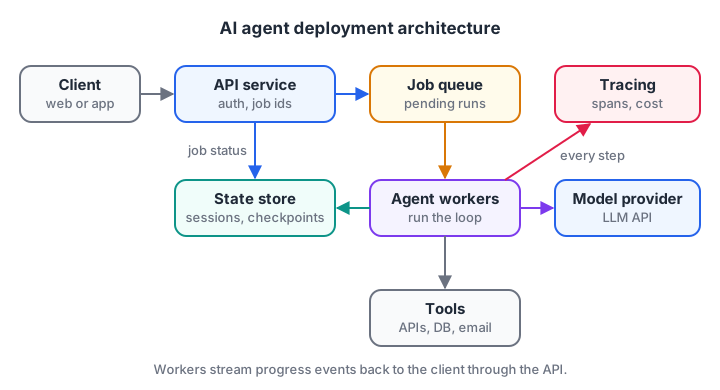
The API stays fast because workers do the slow agent loop. Everything writes to tracing.
Sync, streaming or background jobs?
The first design choice is how the client waits for the answer. Pick based on how long a typical run takes.
| Pattern | How it works | Best for | Watch out for |
|---|---|---|---|
| Synchronous | One HTTP request, wait for the final answer | Runs under about 10 s | Timeouts at load balancers |
| Streaming | One request, tokens and events sent as they happen | Chat agents, 5 to 60 s runs | Connection drops mid-run |
| Background job | Request returns a job id; client polls or gets a webhook | Research, reports, runs over a minute | Needs a queue and job states |
Most production agents combine the last two. The API creates a job, a worker runs it, and the worker streams events through a channel the client subscribes to. If the connection drops, the client reconnects with the job id and the work continues.
How do you make agent runs durable?
Save a checkpoint after every step
A worker can crash, be redeployed or hit a timeout halfway through a run. Without saved state, the run restarts from zero, repeating model calls you already paid for and, worse, tool actions that already happened. The fix is to save a checkpoint after every completed step and resume from it.
import json

STEPS = ["parse_request", "search_flights", "search_hotels", "write_summary"]
store = {}                                   # stands in for Redis or Postgres

def run_job(job_id, crash_at=None):
    state = json.loads(store.get(job_id, '{"done": [], "results": {}}'))
    for step in STEPS:
        if step in state["done"]:
            print(f"  skip {step} (from checkpoint)")
            continue
        if step == crash_at:
            raise RuntimeError(f"worker died during {step}")
        state["results"][step] = f"output of {step}"
        state["done"].append(step)
        store[job_id] = json.dumps(state)        # checkpoint after each step
        print(f"  ran  {step}")
    return state["results"]["write_summary"]

try:
    print("Attempt 1:"); run_job("job-42", crash_at="search_hotels")
except RuntimeError as e:
    print("  crash:", e)
print("Attempt 2:"); print("  result:", run_job("job-42"))
The second attempt skips the two finished steps. Frameworks offer this built in, for example LangGraph checkpointers or session stores in agent SDKs, but the idea is exactly this: state keyed by job id, written after each step.
Retries, timeouts and idempotent tools
Model APIs and tools fail in production: rate limits, network blips, slow third-party services. Wrap every external call in a timeout and a retry with exponential backoff. But retries create a new danger. If a "create booking" call succeeded but the response was lost, a retry books twice.
The answer is an idempotency key: a unique id per intended action. The tool remembers keys it has processed and returns the earlier result instead of acting again.
import random
random.seed(3)

processed = {}                                # the payment service's memory of keys

def charge_card(amount, idempotency_key):
    if idempotency_key in processed:
        return processed[idempotency_key] + " (duplicate ignored)"
    if random.random() < 0.5:
        raise TimeoutError("payment gateway timed out")
    processed[idempotency_key] = f"charged Rs {amount}"
    return processed[idempotency_key]

def with_retries(fn, *args, attempts=4, base_delay=0.5):
    for i in range(attempts):
        try:
            return fn(*args)
        except TimeoutError as e:
            wait = base_delay * 2 ** i
            print(f"  attempt {i + 1} failed ({e}); would wait {wait:.1f}s")
    return "gave up: tell the user and log for review"

print(with_retries(charge_card, 2400, "job-42-step-3"))
print(with_retries(charge_card, 2400, "job-42-step-3"))   # a retried job reuses the key
print("Charges recorded:", len(processed))
Build the key from the job id and the step, so the same step of the same job always produces the same key. Many payment and messaging APIs accept an idempotency key header for exactly this reason.
Quick check
Why should an agent save a checkpoint after each completed step?
Checkpoints keyed by job id let a new worker skip finished steps instead of redoing them.
Quick check
What problem does an idempotency key solve?
The tool remembers processed keys and returns the earlier result when it sees the same key again.
Serve the agent with FastAPI and streaming
Here is a compact production-style endpoint using FastAPI (0.162 at the time of writing) and the OpenAI Agents SDK (0.24). It keeps conversation memory per user in a session store and streams text deltas to the browser as server-sent events. Check the Agents SDK streaming guide for the current event types.
from fastapi import FastAPI
from fastapi.responses import StreamingResponse
from openai.types.responses import ResponseTextDeltaEvent
from agents import Agent, Runner, SQLiteSession

app = FastAPI()
agent = Agent(name="Support", instructions="Help customers with orders.")  # add your tools

@app.post("/chat/{user_id}")
async def chat(user_id: str, body: dict):
    session = SQLiteSession(user_id, "sessions.db")     # use a shared DB in production
    result = Runner.run_streamed(agent, body["message"], session=session, max_turns=8)

    async def events():
        async for event in result.stream_events():
            if event.type == "raw_response_event" and isinstance(event.data, ResponseTextDeltaEvent):
                yield f"data: {event.data.delta}\n\n"
        yield "data: [DONE]\n\n"

    return StreamingResponse(events(), media_type="text/event-stream")
Package it in a container so every environment runs the same code. The basics of images and containers are in Docker for ML.
FROM python:3.12-slim
WORKDIR /app
COPY requirements.txt .
RUN pip install --no-cache-dir -r requirements.txt
COPY . .
CMD ["uvicorn", "main:app", "--host", "0.0.0.0", "--port", "8000"]
Keep API keys in environment variables or a secrets manager, never in the image. If you host your own open model instead of calling a provider, the serving side is covered in vLLM LLM serving.
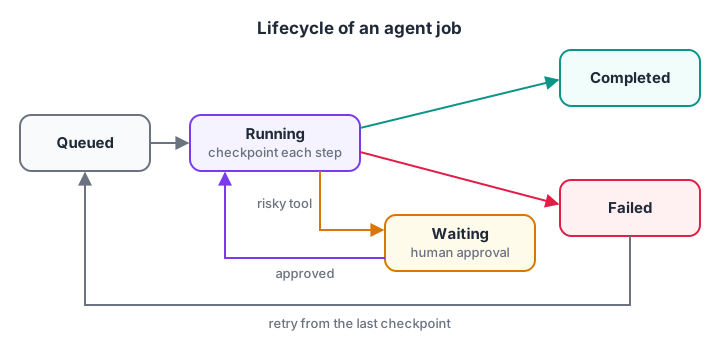
Give every job an explicit state, so the UI, the workers and support staff agree on what is happening.
Observability and cost control
You cannot fix what you cannot see. Record a trace for every run: one span per model call and tool call, with its duration, tokens, cost and outcome. Then you can answer the questions that matter in production: which step is slow, which tool fails most, and what one run costs.
spans = [  # (step, kind, milliseconds, input_tokens, output_tokens)
    ("plan",          "llm",  1800, 1200, 150),
    ("track_order",   "tool",  240,    0,   0),
    ("decide",        "llm",  1500, 1900, 120),
    ("issue_refund",  "tool", 3100,    0,   0),
    ("final_answer",  "llm",  1300, 2300, 200),
]
RS_PER_1K_IN, RS_PER_1K_OUT = 0.25, 1.0          # example prices, check your provider

total_ms = sum(s[2] for s in spans)
cost = sum(s[3] / 1000 * RS_PER_1K_IN + s[4] / 1000 * RS_PER_1K_OUT for s in spans)
slowest = max(spans, key=lambda s: s[2])
print(f"Run took {total_ms / 1000:.1f}s and cost Rs {cost:.2f}")
print(f"Slowest step: {slowest[0]} ({slowest[1]}, {slowest[2]} ms)")
for name, kind, ms, *_ in spans:
    print(f"{name:13} {kind:4} {'#' * (ms // 200)}")
Set alerts on cost per run, error rate per tool and the share of runs that hit the step limit. Store traces with a run id that also appears in your application logs. The tooling options are compared in LLM observability.
A deployment checklist for AI agents
Before the first real user, walk through these steps.
- Limits: step limit, timeout and budget per run, from your agent guardrails.
- Durability: checkpoints after each step; sessions in a shared database, not on one server's disk.
- Safe tools: timeouts, retries with backoff, idempotency keys on every action that changes something.
- Approval flow: risky actions pause the job in a "waiting" state with a review screen.
- Streaming: users see progress within a second or two, even when the full run takes longer.
- Tracing: one trace per run, cost and latency per step, alerts on spikes.
- Evaluation gate: the offline test set from evaluating AI agents runs before every release.
- Rollback: prompts, tool definitions and model names are versioned, so you can return to the last good set in minutes.
Common mistakes when deploying AI agents
- Running the agent inside the request handler for long tasks, so load balancer timeouts kill runs.
- Keeping sessions in memory, which vanish on every redeploy and break when you add a second server.
- Retrying non-idempotent tools, which causes double bookings and double charges.
- No per-run cost cap, so one looping run costs more than a day of normal traffic.
- Changing the model without re-running tests. A new model version can change tool-calling behaviour.
Key takeaways
- Separate a fast API from workers that run the slow agent loop.
- Choose sync, streaming or background jobs based on typical run time.
- Checkpoint after every step and keep sessions in shared storage.
- Retry with backoff, and protect actions with idempotency keys.
- Trace every step, cap cost per run, and gate releases on evaluation.
FAQ
How do you deploy an AI agent to production?
Wrap the agent in an API service, run long agent loops in background workers, store sessions and checkpoints in a shared database, stream progress to the user, and add tracing, cost limits and alerts. Package it in a container and run your evaluation test set before every release.
What is the best framework for deploying AI agents?
There is no single best option. FastAPI is a common choice for the API layer, with a queue such as Redis or a managed cloud queue for background runs. Agent SDKs and graph frameworks provide sessions, checkpoints and tracing hooks. Choose the agent framework first, then a hosting setup your team already runs well.
Should an AI agent run synchronously or as a background job?
Use synchronous calls only for runs that reliably finish within about ten seconds. For chat, stream tokens and events as they are produced. For research, reports or anything involving approvals, create a background job, return a job id immediately and let the client poll or subscribe for updates.
How much does it cost to run an AI agent in production?
It depends on steps per run, prompt size and model prices, so measure it. Multiply average tokens per run by your provider's prices, then add tool and hosting costs. Agents typically cost several times a single chat reply because every step re-sends a growing context. Trace cost per run from day one.
Where can I learn to deploy AI agents in Indore?
The hands-on GenAI training at Debugshala in Indore covers building and deploying AI applications at the Old Palasia campus, in English and Hindi, and starts with a free demo class. To test your Python and reasoning before you begin, attempt the practice quizzes on Debugshala Test.
From the team behind this site
Go further with the Generative AI Course at Debugshala
These tutorials are written by Debugshala, a training and placement institute at Old Palasia, Indore. The classroom course adds live mentoring, real projects and interview preparation.
- Offline classes at Old Palasia, Indore
- Free demo class before you pay
- Non-IT, fresher and year-gap friendly
- Placement assistance
700+ students placed · 200+ hiring partners · 4.9★ Google rating
